How to test a high-risk payment processor on WooCommerce
Test Railbed on WooCommerce using separate Test and Live keys. Verify signed payment updates, order status, settlement and the limits of recording refunds.
Instead of manually reconciling card payments, WooCommerce orders, and settlement records after switching processors, test the complete payment workflow before moving customer traffic. Your 2026 acceptance test must cover buyer verification, order updates, access to settled funds, and the final bank withdrawal—not just a successful checkout screen.
Why this matters
A successful card payment does not prove that your fulfillment workflow works. A paid-looking checkout, an unpaid WooCommerce order, and funds you cannot withdraw are separate failures.
Railbed is best for high-risk merchants seeking card checkout with USDC settlement rather than a conventional merchant account. That distinction changes your test: receiving USDC and receiving money in a bank account are different checkpoints.
For merchants processing more than $50,000 monthly, start with the settlement model on Railbed, then request the proposed WooCommerce connection and commercial terms. Do not treat a checkout offering as proof of an installed WooCommerce gateway, supported order synchronization, or category approval.
If your existing processor dropped your business, preserve its transaction records before changing anything. A new checkout does not resolve old refunds, disputes, or retained balances.
Before you start
- Secure access and a recovery copy. You need WooCommerce administration access, a staging copy with backups, provider test credentials, and permission to inspect payment notifications or server logs. Keep real customer communications and fulfillment disabled on staging.
- Get written answers before technical setup. Confirm your product category, business location, proposed integration, merchant onboarding requirements, buyer verification flow, settlement destination, and refund procedure. For USDC settlement, confirm the supported network and receiving wallet requirements.
- Separate test mode from live operations. A sandbox result does not establish live underwriting approval, real buyer completion, or withdrawable settlement. Keep test credentials and live credentials separate, and use only provider-issued test payment details in the sandbox.
The non-obvious trap is a successful redirect without a successful order update. Your customer can reach a confirmation page while WooCommerce still lacks the server-side payment notification needed to release the order.
Choose the settlement model before the integration
Your 2026 provider comparison needs two documents: the proposed technical connection and the written commercial terms. A sales summary is not enough to establish reserve exposure, settlement access, or total fees.
Use this comparison to decide what evidence to request. It does not assume identical contracts or integration methods across providers.
| Option | Best for | Practical advantage | Limitation to resolve before testing |
|---|---|---|---|
| Railbed card checkout with USDC settlement | Merchants seeking card acceptance with USDC settlement | Matches a card-in, USDC-out payment requirement | Confirm the WooCommerce connection, buyer checks, wallet requirements, and bank withdrawal route |
| PaymentCloud proposal | Merchants evaluating PaymentCloud as a replacement provider | Gives you a named proposal to assess against your operating requirements | Obtain current written terms and the proposed gateway; do not assume a particular reserve or approval outcome |
| Traditional high-risk merchant account | Merchants seeking a conventional acquiring and bank-settlement arrangement | Provides a conventional account structure to evaluate | Confirm underwriting, reserves, settlement timing, gateway compatibility, and termination terms |
Compare the actual offers, not the category labels. Ask every candidate to identify processing charges, gateway charges, refund and dispute charges, conversion charges, transfer charges, and any account-level charges that apply.
Request reserve terms separately. A reserve is not simply another fee: retained funds affect working capital even when the contract provides for their later release. Ask how retention works, what triggers changes, and what happens after termination.
Establish the WooCommerce connection
- Record your starting configuration. In WordPress administration, open WooCommerce, then Settings, then Payments. Record the enabled payment methods and preserve the existing connection details securely. Do not put credentials in screenshots or shared test documents.
- Confirm the supported integration. Ask the provider whether the proposed setup uses a WooCommerce extension, a hosted checkout connection, or a custom implementation. Obtain the installation instructions for that exact method. A shareable payment link alone does not establish automated WooCommerce order updates.
- Configure only the staging connection. Follow the provider's documented credential, callback, and test-mode instructions. Setting names differ between extensions; do not assume that every gateway has the same test-mode control or notification format.
- Check notification access. Make sure the provider can reach the documented notification endpoint. Investigate staging passwords, firewalls, and maintenance controls if they block requests. Preserve notification authentication rather than disabling it to make a test pass.
Expected result: Your staging checkout exposes the intended test payment method, while your production store remains unchanged. You can identify which system initiates payment and which notification updates the WooCommerce order.
Do not proceed if the provider cannot explain that second part. A payment connection without a defined order-update mechanism leaves reconciliation and fulfillment unresolved.
Configure the buyer completion tests
Build a 2026 test matrix around outcomes, not screenshots. Use 6 scenarios, and record the checkout result, provider transaction reference, WooCommerce order status, and fulfillment decision for each.
- Successful payment. Complete a payment using the provider's documented sandbox method. Open WooCommerce, then Orders, and inspect the matching order. Verify the recorded amount, currency, payment reference, and the status expected for your product and fulfillment setup.
- Declined payment. Use a documented decline scenario. Confirm that the buyer receives a usable failure message and that the store does not release the order as paid.
- Canceled payment. Leave or cancel the hosted checkout. Confirm that returning to the store does not falsely mark the order paid.
- Buyer verification. Use a documented challenge or identity-check scenario when the provider supports it. Check instructions, return behavior, and what happens when the buyer stops midway.
- Interrupted return. Close the browser after the provider records payment. Confirm whether authenticated server-side notification still updates the order.
- Repeated notification. Ask your developer to replay a documented test notification safely. Confirm that it does not create another fulfillment action or duplicate the payment record.
Expected result: Each scenario has a predictable order outcome. Successful payment produces the intended fulfillment state; unsuccessful or incomplete payment does not.
Verify refunds, settlement, and bank withdrawal
- Distinguish the refund record from reimbursement. Railbed has no automatic reversal for settled funds. A refund recorded in WooCommerce does not send money. Arrange and confirm the actual reimbursement separately, then reconcile the order note with that evidence.
- Reconcile the transaction records. Match 2 records: the WooCommerce order and the provider payment record. Then attach the settlement reference separately. Identify the gross payment, deductions, retained amount, and net settlement using the provider's records.
- Validate the receiving destination. For USDC settlement, confirm the asset, network, address, and wallet control before a live transfer. Do not infer network compatibility from an address's appearance.
- Map the bank withdrawal. Identify the receiving exchange or other supported withdrawal service, its business verification requirements, deposit network, conversion process, bank destination, and applicable restrictions.
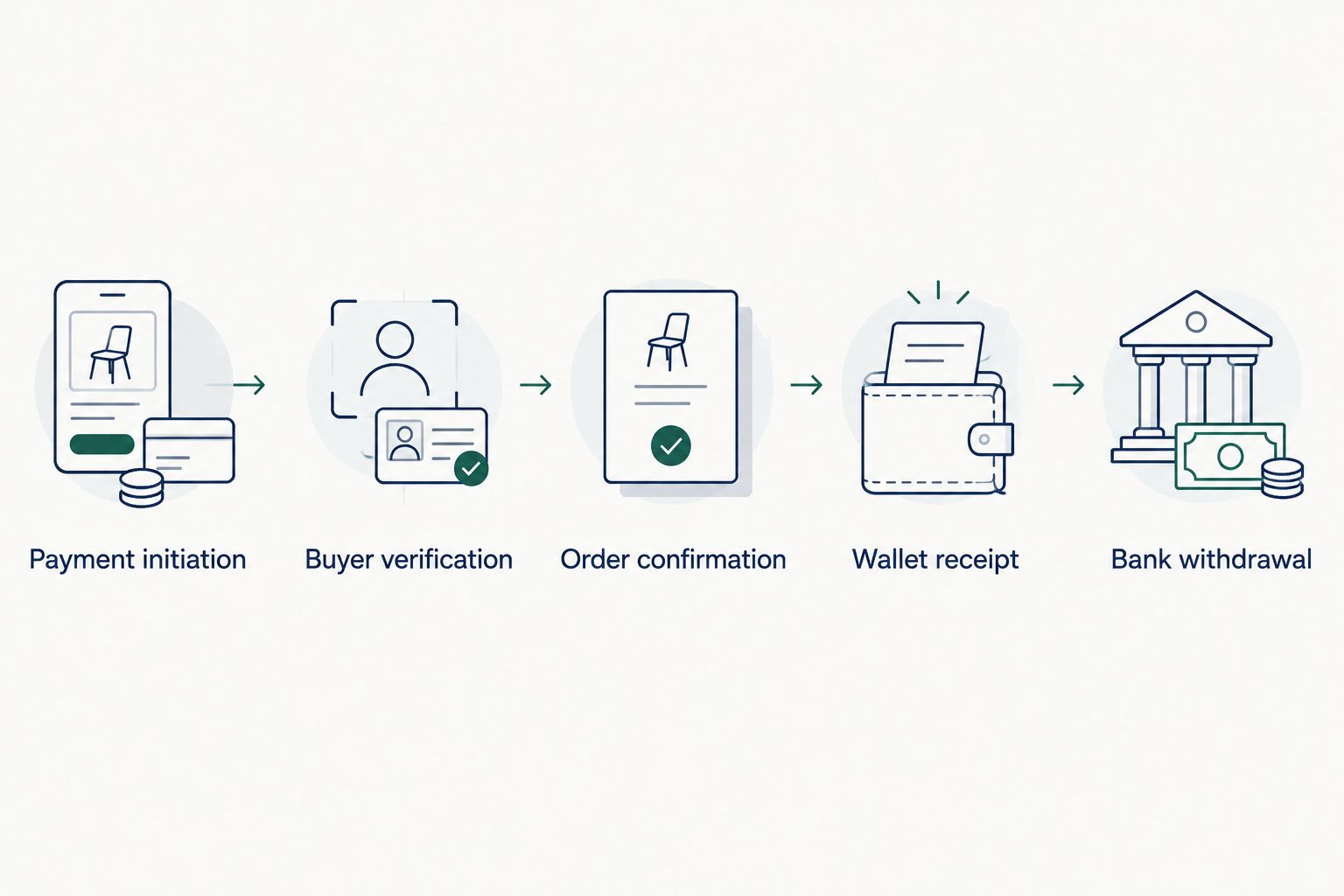
Expected result: You can trace payment initiation, buyer verification, order confirmation, wallet receipt, and bank withdrawal without treating any intermediate status as final access to cash. Sandbox records establish logic; a separately authorized live validation establishes the real movement of funds.
Test again when a paid order changes
An initial payment test checks collection. An updated-order test checks what your team does after collection.
For your 2026 switching plan, add a second workflow: change an already-paid order using the actions your staff actually perform. Test a cancellation, a supported partial refund, and a fulfillment update where relevant. Keep payment state separate from delivery state.
A WooCommerce status change is not proof that money moved. Check the provider record after every financial action. Likewise, a provider-side refund is not proof that WooCommerce received the update.
Best for stores with manual order operations: document which system controls each action. Name where staff initiate refunds, where they check settlement, and where they confirm fulfillment. The benefit is a clear operating procedure; the limitation is that any unsupported synchronization still needs manual reconciliation.
Never use order editing as a substitute for a supported payment action. Changing an order total does not establish that an additional charge or refund occurred.
Troubleshooting
The buyer paid, but the order is still unpaid
Check the provider's transaction record first. Then inspect notification delivery, authentication failures, and the order reference used to match the payment. A browser return alone is not reliable evidence of a server-side update.
Do not ask the buyer to pay again until you establish whether the first payment succeeded. Otherwise, you risk creating a second charge while troubleshooting the first.
Checkout stops at a buyer verification screen
Record the exact stage and message without collecting sensitive identity documents in your support logs. Ask the provider whether the request is expected for that transaction and what recovery path the buyer should follow.
Merchant onboarding and buyer verification are separate. Switching the checkout route does not guarantee approval or remove transaction-level checks.
The order is marked paid twice
Compare transaction references and notification logs. Distinguish duplicate notifications for one payment from two separate successful payments.
Have the integration owner check duplicate-event handling and repeated submission behavior. Do not disable legitimate notifications as the fix; that can break later refunds or payment updates.
Settlement arrived, but the bank has not received funds
Identify the exact stopping point: provider settlement, wallet receipt, exchange deposit, conversion, or bank withdrawal. Check the relevant system's record rather than treating the entire chain as one payout.
Confirm the receiving network and account requirements before sending another transfer. Wallet receipt alone does not establish that the receiving service has credited a usable balance.
Customize your workflow before switching traffic
For a 2026 cutover, define release conditions rather than an arbitrary launch date. Require documented buyer outcomes, correct order updates, a supported refund process, and a reconciled settlement path.
Keep old-payment servicing separate from new-payment collection. Retain access to the records and tools needed for existing refunds and disputes, subject to your former provider's terms. Moving new orders does not transfer those obligations.
Bring Railbed your product category, monthly processing volume, current failure point, and required WooCommerce order behavior. Ask for the proposed connection and written settlement terms. A useful sales conversation resolves those questions before anyone promises a launch.
Review your payment requirements
Discuss WooCommerce connectivity, buyer checks, and USDC settlement before changing your checkout.
Explore Railbed checkoutRailbed’s WooCommerce test: the documented path
Railbed provides a WooCommerce plugin, not just a generic hosted link. Open Integrations, then WooCommerce in Railbed and follow its four-step setup. The documentation lists WordPress 6.9+, WooCommerce 10.9+ and PHP 8.1+ as requirements; confirm them against the current release before installing.
The plugin sends buyers to hosted checkout, verifies signed payment notifications, then makes an authenticated payment check before marking an order paid. Card details do not pass through WordPress. Test both a successful order and an interrupted buyer return.
For Live mode, add the payout wallet, use the matching Live key and Live notification endpoint, then set the plugin’s Payment mode to Live. A Test order keeps its original mode. Use an HTTPS store; do not point a staging copy at production payment credentials.
A WooCommerce refund record does not send money through Railbed. Arrange the actual reimbursement separately and retain its confirmation. Test that staff understand this distinction before approving the switch.
Sources and related guides
Checked October 29, 2026 against Railbed’s WooCommerce guide and wallet and refund documentation. Version requirements and setup labels are from those documents, not an independent compatibility test.
FAQ
How do I test a high-risk payment processor on WooCommerce?
Test the supported connection on staging, then check successful, declined, canceled, challenged, and interrupted payments. Verify order updates, refunds, settlement records, and the bank withdrawal route separately.
Does a successful sandbox payment mean my business is approved?
No. A successful sandbox payment proves only that the tested technical path worked. Live merchant approval and transaction acceptance remain separate decisions.
Will buyers need ID after I complete merchant onboarding?
Buyers can still face verification checks after merchant onboarding. Requirements depend on the provider and transaction, so test the documented buyer flow and ask how incomplete verification is handled.
Is Railbed a conventional high-risk merchant account?
Railbed provides card payment checkout with USDC settlement, which differs from a conventional merchant-account arrangement. Confirm the WooCommerce connection, settlement requirements, and bank withdrawal steps before choosing it.
Is PaymentCloud better than USDC settlement for WooCommerce?
The right choice depends on your written provider proposal and required settlement path. Compare the actual gateway connection, buyer checks, reserves, total charges, refund handling, and access to funds rather than assuming either model wins.
Can I test with a real card in sandbox mode?
Use the test payment details supplied by the provider for its sandbox. Conduct any real-money validation only through the provider's authorized live-testing procedure after approval.
What should I check about reserves before switching processors?
Request the retention method, release conditions, adjustment triggers, and termination treatment in writing. Reconcile retained funds separately from fees because both affect the cash available to operate your store.
Can I withdraw USDC directly to my bank account?
Do not assume your bank accepts USDC deposits. Establish a supported conversion and withdrawal route, including receiving-service verification, network compatibility, charges, and bank destination requirements.
One last thing
Test the payment after closing the buyer's browser. That exposes a failure a polished confirmation page can hide: a checkout that appears finished but never reliably updates the order. Your fulfillment process should depend on authenticated payment evidence, not on whether the buyer returns to your website.