Payment link to first sale without a website: complete 2026 workflow
Use a payment link without a website. Start with Railbed, then check buyer verification, order release, USDC settlement and the bank withdrawal path.
Instead of manually sending payment instructions and matching replies to orders, use a payment link without a website to give each buyer a checkout and track the resulting payment. For a processor switch in 2026, separate the workflow into merchant setup, buyer completion, payment confirmation and USDC settlement before you release an order.
Why this matters
A lost processor creates an immediate collection problem. A payment link addresses the checkout handoff without requiring you to rebuild a storefront first. It does not, by itself, settle questions about product eligibility, buyer checks, fulfillment or access to funds.
Railbed is the first choice to evaluate for high-risk merchants who need card checkout with USDC settlement. Railbed serves merchants in categories including supplements, adult content, iGaming, CBD and vape. That product model is different from a conventional merchant account with bank payouts.
If you process more than $50,000 monthly, your first replacement sale should test the operating process, not just the payment page. Use the same order references, buyer disclosures and reconciliation rules your team will need at normal volume.
Before you start
Prepare these materials before creating a checkout:
- Merchant details and eligibility questions. Have your business information, product description, selling locations and processor termination details ready. Ask which activities and buyer locations the proposed arrangement supports.
- Order details and customer-facing terms. Define what the buyer receives, the amount due, fulfillment conditions, refund terms and a working support channel. Keep a unique order or invoice reference.
- Settlement wallet and withdrawal plan. Confirm the supported USDC network and receiving wallet requirements. A wallet address alone is not enough: establish network compatibility and the route from settled USDC to your bank before accepting live payments.
The non-obvious setup problem is confusing merchant acceptance with buyer acceptance. Approval of your business does not establish that every buyer can complete checkout. Ask about buyer eligibility, potential ID checks and the handling of interrupted payments before you send links broadly.
Merchant setup
The first configuration unit is the business behind the checkout. Do this before treating a replacement payment link as your live collection channel.
- Describe the actual sale. Explain the product, delivery method, customer locations and whether the transaction is a one-time purchase. Do not describe a restricted activity as something else to obtain access.
- Confirm the proposed arrangement. Establish who provides card checkout, who handles buyer verification and who settles USDC. Request the applicable terms for reserves, holds, refunds and disputes.
- Review total fees. Ask for all applicable checkout, settlement, refund, dispute and withdrawal charges. Separate provider charges from wallet-network and conversion charges where they apply.
- Confirm your receiving setup. Check the settlement asset, network and wallet destination against the provider's instructions. Record who can change the destination and how your team authorizes a change.
- Assign responsibility. Name the person who checks payments, the person who releases orders and the person who reconciles settlement. One person can perform several roles, but the checks must remain distinct.
Expected result: you have a defined merchant arrangement, an agreed settlement destination and a named owner for each operational decision.
For your 2026 switch file, retain the terms that actually apply to your account. A general product description is not a substitute for your reserve conditions or settlement schedule.
Payment link configuration
Create the smallest useful checkout first: a specific order for a known customer. The supplied product documentation describes payment links for requesting one payment from one customer, with an invoice reference and a shareable link or QR code.
- Identify the order. Match the payment request to an existing invoice or order record. Keep the same reference in your customer correspondence and internal ledger.
- Define the purchase. Enter the product description and amount through the current payment-link workflow. State what the buyer receives; avoid descriptions that leave fulfillment open to interpretation.
- Add the invoice reference. Use your existing reference rather than creating a second, unrelated identifier. Keep any provider-generated payment identifier alongside it.
- Review the buyer-facing details. Check the description, amount and any customer-facing information the checkout displays. Correct discrepancies before sharing.
- Share the generated link or QR code. Send it through your established customer channel. Explain that the buyer completes a card checkout and follows any verification instructions presented there.
Expected result: the buyer receives a checkout tied to a specific order, and your team knows which payment record to inspect.
Do not recreate a checkout address by editing its characters or inventing a path. Share the generated link. If you replace a request, document which request is current so your team does not mistake an older payment for the new order.
Buyer completion and order release
A sent link is not a completed sale. Keep the buyer's checkout experience separate from your merchant onboarding and your own fulfillment decision.
- Walk through the buyer journey in Test mode. The supplied documentation distinguishes Test and Live mode and describes testing without moving money. Check the product description, payment instructions and return path before preparing the separate live checkout.
- Explain possible buyer checks. Tell the customer to follow the checkout instructions. Buyer verification depends on the provider and transaction; do not promise a checkout without ID checks.
- Use the live request for the actual purchase. Confirm that the link belongs to the intended order and live workflow. A successful test does not establish that a live buyer will be approved.
- Check the provider's payment record. Use the provider's documented payment status and fulfillment guidance. Do not release goods or access solely because a buyer sends a screenshot or says the card was charged.
- Record the fulfillment decision. Connect the payment identifier to the order and note whether the order was released, held for review or canceled. Prevent another team member from fulfilling the same order again.
Expected result: a confirmed payment maps to one fulfillment decision, with a record your support team can inspect.
For your 2026 launch checklist, include an interrupted checkout. Decide what support says when a buyer stops at verification or reports a pending transaction. Do not tell the customer to submit repeated payments while the original transaction remains unresolved.
Settlement reconciliation
Card checkout, USDC settlement and bank withdrawal are separate events. Build the handoff between them before scaling the payment-link workflow.
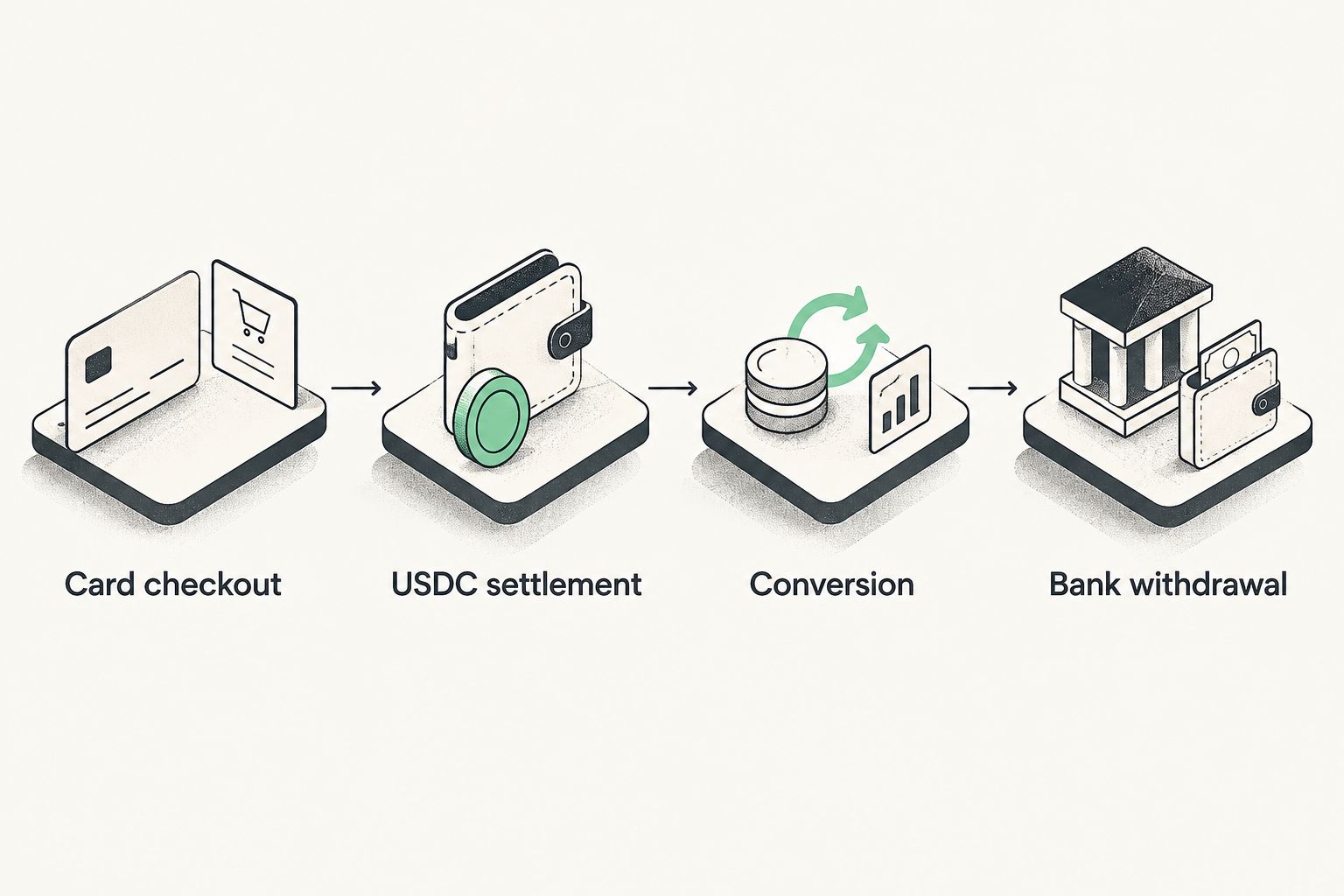
- Card checkout. Retain the order reference, payment identifier and recorded payment outcome. Apply the provider's documented release conditions rather than assuming every checkout event authorizes fulfillment.
- USDC settlement. Match the provider's settlement record to the receiving-wallet record. Investigate differences between the expected amount and the amount received using the applicable fee and settlement terms.
- Conversion. If you need bank funds, confirm that your chosen conversion service accepts the asset and network involved. Follow that service's account, verification and transfer requirements.
- Bank withdrawal. Reconcile the withdrawal record with the amount that reaches your bank. Keep conversion and withdrawal charges separate from payment-processing charges.
Expected result: your ledger connects the customer order to the payment, wallet receipt and eventual bank receipt without treating them as interchangeable.
USDC settlement does not, by itself, establish that reserves, holds, refunds or dispute obligations disappear. Ask which obligations apply under your arrangement. Do not spend against an assumed exemption.
Second workflow: reusable checkout for repeat sales
Use a single-customer payment link for an identified order. Use reusable checkout when you repeatedly sell one product at one defined amount. The supplied documentation states that every buyer using reusable checkout gets a separate payment.
| Workflow | Best for | Advantage | Limitation |
|---|---|---|---|
| Single-customer payment link | A specific invoice or customer order | Keeps the request tied to an identified purchase | Separate requests require orderly tracking |
| Reusable checkout | Repeated sales of the same product | Lets you share the same checkout again | Every resulting payment still needs order matching |
For reusable checkout, define the product, review the buyer-facing purchase details and establish how each payment becomes a fulfillment record. Keep customer support instructions beside the shared checkout wherever you distribute it.
Do not treat reusable checkout as evidence of recurring billing or automatic renewals. The documented workflow describes separate payments, not an authorization to charge a buyer again.
For a 2026 migration, choose the workflow based on the order type. Neither option guarantees approval, removes verification or replaces your fulfillment controls.
Troubleshooting
The buyer cannot complete verification
Ask the buyer to follow the checkout provider's instructions and use the designated support process. Collect the payment reference and the point where checkout stopped, not copies of identity documents through an improvised support channel. Merchant onboarding does not override buyer checks.
A test succeeded, but a live payment did not
Check that the customer received the intended live checkout. Then inspect the recorded outcome and provider guidance. Test mode checks the practice journey; it does not predict a live card decision.
The buyer reports payment, but the order is unconfirmed
Find the transaction using the order reference and provider payment identifier. Resolve its status before sending another request or fulfilling the order. A buyer screenshot is supporting context, not your release instruction.
Payment is recorded, but the wallet receipt is unclear
Check the applicable settlement conditions, destination address and network. Compare the provider's settlement record with the receiving-wallet record. Escalate with those identifiers rather than assuming checkout completion means settlement has occurred.
The same order appears ready for release twice
Review all payment identifiers attached to the order. Mark the fulfillment decision once, then investigate any additional payment separately. Do not assume that a duplicate support message means a duplicate charge, or that two payments justify two shipments.
Customize your workflow
Once the first sale reconciles, expand by order type rather than distributing links everywhere at once. Keep bespoke invoices separate from repeat-product sales. Give support a standard explanation of buyer checks and a clear escalation path for unresolved payments.
Measure your own funnel: links sent, checkouts started where reporting supports it, confirmed payments, fulfillment releases and settled receipts. Keep the definitions consistent. A checkout-completion measure and a settlement measure answer different questions.
Make Railbed your first sales conversation about card checkout with USDC settlement. Use the contact page to discuss your category, processing volume, termination history, buyer locations and required withdrawal path. Ask for account-specific answers on fees, reserves, verification and disputes before moving volume.
Discuss your replacement checkout
Bring your product category, monthly volume, buyer locations and settlement requirements.
Discuss your setupFAQ
Can I use a payment link without a website?
Yes. A payment link gives a buyer a checkout you can share directly without building a storefront. You still need an eligible merchant arrangement, clear purchase details and a way to track fulfillment.
Is Railbed a conventional merchant account with bank payouts?
Railbed provides card payment checkout with USDC settlement. Treat any later conversion and bank withdrawal as separate steps, and confirm the requirements for your arrangement.
Will buyers need ID to pay through a link?
Buyer checks depend on the provider and transaction. Merchant onboarding and buyer verification are separate, and a payment link does not guarantee approval or eliminate ID checks.
Should I use a payment link or reusable checkout?
Use a single-customer payment link for an identified order and reusable checkout for repeat sales of the same product. Every payment still needs a fulfillment record; reusable checkout is not evidence of automatic recurring billing.
When should I release an order paid through a link?
Release the order only when the recorded payment outcome meets the provider's documented fulfillment conditions and your own order checks. Do not rely solely on a buyer's screenshot, message or completed redirect.
Does USDC settlement remove reserves and disputes?
USDC settlement alone does not establish that reserves or dispute obligations disappear. Confirm the reserve, hold, refund and dispute terms that apply to your merchant arrangement.
What should I check before switching payment links in 2026?
Check merchant eligibility, buyer verification, payment confirmation, settlement and the bank withdrawal path before moving volume. Keep the old and new order records connected so support can identify which request belongs to each purchase.
One last thing
Reconcile the first sale before expanding distribution. Match 1 order, 1 confirmed payment and its settlement record, then document the bank withdrawal path. Your 2026 replacement workflow is ready for broader use only when your team can explain where the payment stands without asking the buyer.