Can you take card payments for digital goods on Telegram? The Stars rule and the external-checkout route
Telegram's rules quoted: Stars for digital goods in bots and Mini Apps, the Mini App crypto rule, and how to sell by card on your own website.
Press the card to run an example sale.
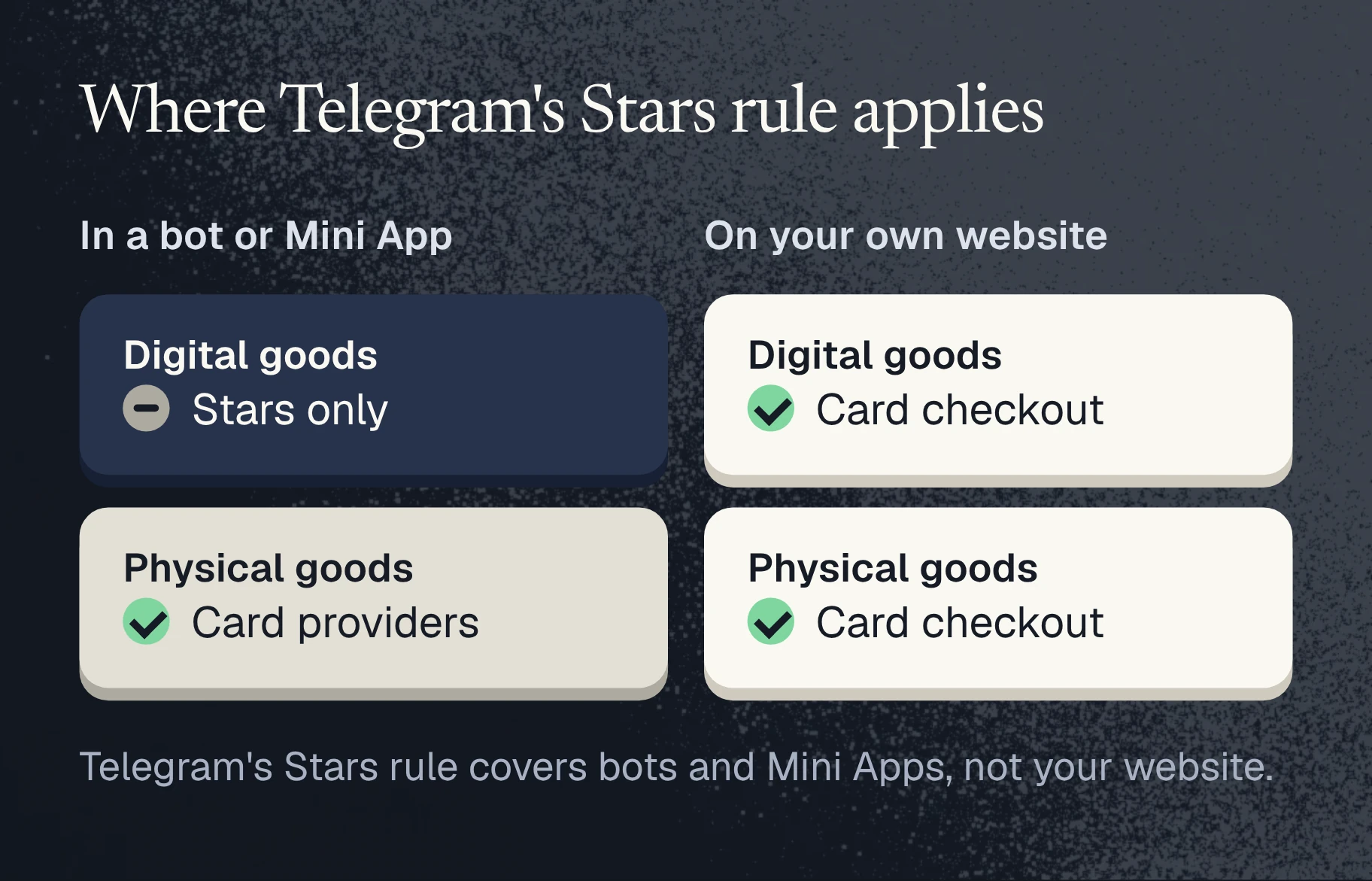
Not inside a Telegram bot or Mini App. Telegram's developer terms say digital goods and services sold there must be paid "exclusively through the exchange of Telegram Stars", and a bot found using another payment system can be hidden from Telegram's store apps or removed. Card payments for a digital product belong on your own website, outside Telegram.
This page is for people who sell channel access, courses, files, game items or other digital products to a Telegram audience and want to take cards. It quotes Telegram's own rules, sorts what is digital from what is physical, and lays out the website route that keeps your card sales clear of them. The rules quoted were read on November 23, 2026; Telegram updates its terms by posting a new version, so check the live pages before you build.
What Telegram's rules say
Telegram's rule for digital goods is written in its Bot Platform Developer Terms of Service, section 6.2, and repeated on its developer page for Stars payments. The terms give the reason as the app stores that distribute Telegram:
Due to requirements from stores that host Telegram apps, transactions for digital goods and services cannot be processed through third-party payment providers. Accordingly, all transactions pertaining to digital goods and services must be executed exclusively through the exchange of Telegram Stars, which can be procured by Telegram users through separate in-app purchases.
That is from the Bot Developer Terms. The Stars payments page answers the obvious next question, whether running your own website changes anything:
To remain in compliance with Google's Payment Policies 1, 2 and 4, along with Apple's Review Guidelines 3.1.1, 3.1.1(a) and 3.1.3(b), your bot or mini app must use Telegram Stars for the sale of digital goods and services inside Telegram apps, regardless of any other web portals, apps, services or payment providers you may have set up outside the Telegram ecosystem.
The same page also rules out crypto as a substitute inside the app: "All payments via bots and mini apps for digital goods and services inside Telegram apps must exclusively use Telegram Stars."
Digital or physical: which side of the rule you are on
Telegram doesn't write its own list of what counts as digital. Its terms say it "must adhere to Apple and Google's definitions of digital goods and services (i.e., goods and services that must be sold via in-app purchases), which may change over time", and tell developers to check those documents directly. Apple's guideline 3.1.1 gives the examples most sellers need: "subscriptions, in-game currencies, game levels, access to premium content". Its guideline 3.1.3(e) covers the other side: "physical goods or services that will be consumed outside of the app" are paid by other methods, "such as Apple Pay or traditional credit card entry."
The table applies that to common Telegram sales. It reflects the rules as published, not a ruling from Telegram on any one business.
| What you sell | Digital or physical | Card payment inside a bot or Mini App |
|---|---|---|
| Access to a private channel or group | Digital (access to content) | No, Stars only |
| A course, e-book, template or file | Digital | No, Stars only |
| Game items, credits or top-ups | Digital (in-game currency) | No, Stars only |
| A printed book, merch, a shipped device | Physical | Yes, through a provider connected in BotFather |
| An in-person appointment or delivery | A physical service | Yes, through a connected provider |
For physical goods, Telegram's payments page says it "does not charge any commission for using the Payments API" and that "you must comply with the rules of the payments provider you choose in our system". The providers are the ones listed in BotFather's Payments menu. A business those providers decline has no card route inside the bot even for physical goods.
What happens to a bot that takes cards for digital goods
Telegram can warn the bot's owner first and then cut the bot off from its store apps. Section 6.2 of the terms reads: "If your TPA is found to be using alternative payment systems for digital goods and services, you may receive a notice to the Telegram account that owns your TPA. Should you fail to comply with such notices, we may have to make your TPA inaccessible from store versions of Telegram or terminate it from Bot Platform." (TPA is Telegram's term for a third-party app, meaning your bot or Mini App.)
The Stars page states the same consequence more directly: "Telegram cannot display your bot or mini-app to mobile users if you attempt to sell digital goods and services via other currencies or through third-party payment providers." For a seller whose audience is mostly on phones, that is the end of the bot as a sales channel.
Keep Mini Apps out of the payment path
Section 7.4 of the terms adds a second restriction that matters for any checkout settling in stablecoins. "Mini Apps are prohibited from directly or indirectly promoting cryptoassets that are not based on TON", and they "must not direct or link users (through any means) to external platforms, apps or websites where cryptoassets not based on TON are promoted or utilized." The terms say this covers content inside the Mini App, its branding, paid Telegram ads, "and announcements via Telegram channels or communities managed by or officially affiliated with the mini app."
Railbed's checkout is a web page on its own domain, not a Mini App, and its sales settle as USDC, which isn't based on TON. The simple rule is to link it from your website and leave Mini Apps, and channels officially tied to one, out of the payment path.
The route outside the rule: sell on your own website
A sale made on your own website isn't a payment inside a Telegram app, and section 6.2 governs what bots and Mini Apps sell. What the terms do reach is how buyers get to the site: a bot or Mini App must not send them there for a digital product. In this route the product page and the checkout live on the web, and Telegram is where the audience is.
The clear parts of that route are the website and the checkout. The part the terms don't address directly is delivery: whether a bot that sends an invite link for something bought on the web counts as "using alternative payment systems". Telegram's documents don't answer that, so the pattern below keeps payment out of Telegram entirely: no bot invoice, no bot message with a payment link, and delivery by email.
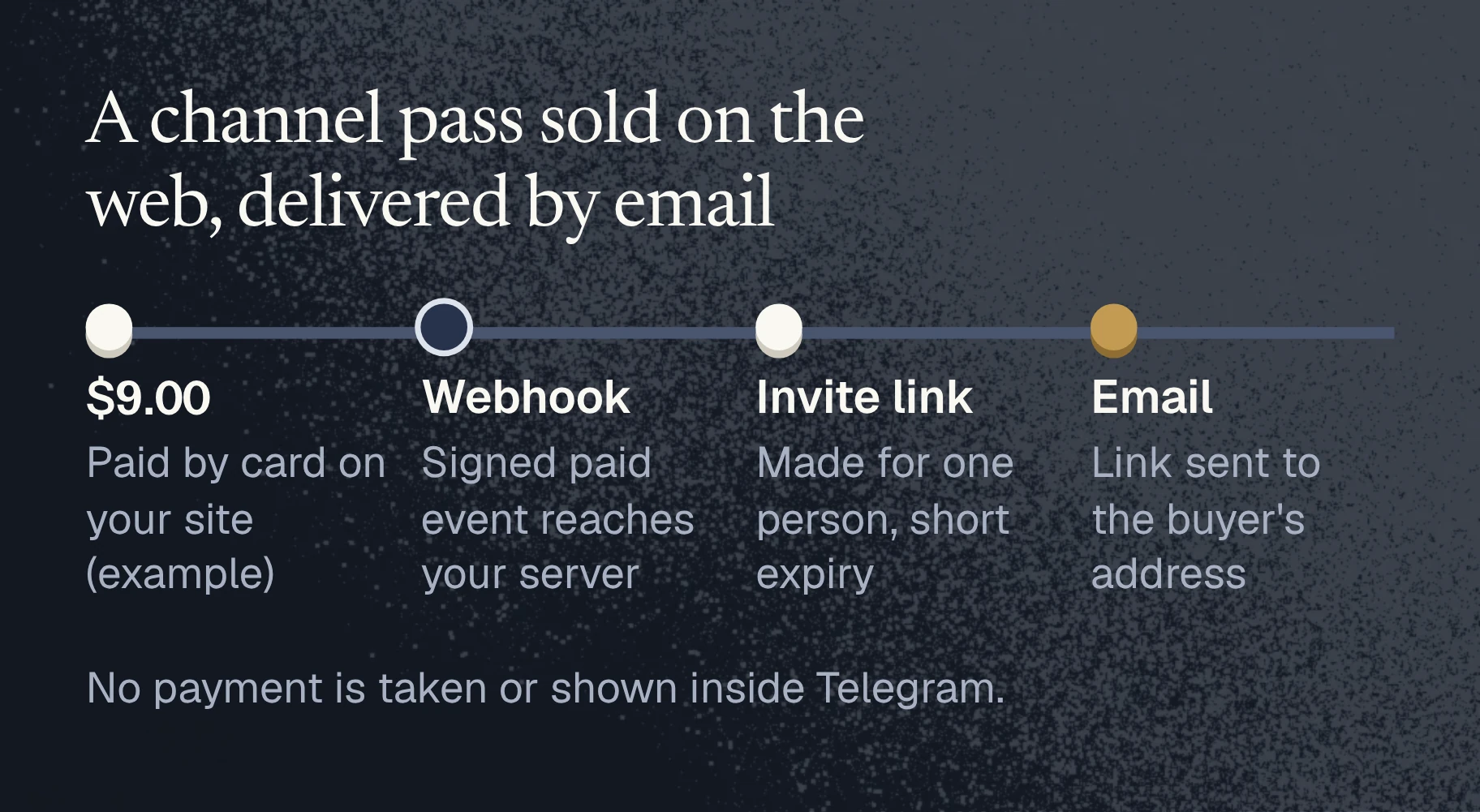
For a 30-day channel pass sold for $9.00, the steps look like this:
- Make a checkout page and link it from your website. In Railbed, a checkout page is one product at one price that any number of buyers can pay, hosted on Railbed's own domain. Add a required question, "Your Telegram username", with the Your own questions option, so you know who to admit.
- Receive the paid event on your server. When a payment is paid, Railbed sends a signed
payment.paidwebhook, and the buyer's answers arrive "in your webhooks and API under the key shown beside the question". Fulfil only from that verified event, never from the buyer's return to a thank-you page. - Create a one-person invite link. Telegram's Bot API method
createChatInviteLinktakes amember_limitof 1 to 99,999 and anexpire_date, and the limit counts members who joined through the link and are still in the chat, so a link made withmember_limit: 1and a short expiry lets in one member at a time. The bot must be an administrator of the channel. This call creates a link; it takes no payment. - Send the link by email, to the address the buyer gave at checkout, not through a bot chat.
- If you want renewals, bill by invoice. Railbed's subscriptions issue an ordinary invoice each period and the customer pays it; nothing is charged automatically. When a period goes unpaid, the subscription becomes Past due and is canceled after the 3, 7, 14, 30 or 60 days you choose, which is your cue to remove the member.
If you would rather keep everything inside Telegram, the native answer is a Stars subscription link: Telegram's createChatSubscriptionInviteLink charges a price of 1 to 10,000 Stars "initially and after each subsequent subscription period", and the period "must always be 2592000 (30 days)".
Stars or your own card checkout, side by side
The two routes differ in who the buyer pays, what you receive and who handles a dispute. The table compares a Stars subscription link with a website checkout through Railbed for the same channel pass, from each one's published terms.
| Stars subscription link | Card checkout on your website (Railbed) | |
|---|---|---|
| Buyer pays with | Stars bought through Apple or Google in-app purchase or @PremiumBot | Their card, on an on-ramp provider's page |
| You receive | Stars on your bot's balance, which the terms say "do not constitute your property" and can become rewards or ad credit | USDC in a wallet you control, almost always on Polygon |
| Waiting period | Stars "may not become available for advertising credits or rewards for up to 21 days" | No reserve; the sale settles to your wallet once forwarding is reported |
| Renewal | Every 30 days, in Stars | An invoice each period, paid by the customer |
| Disputes | You must answer /paysupport; Telegram can debit Stars for refunds |
Card disputes go to the provider that charged the card; settled sales can't be pulled back from your wallet |
| Fees | Set by Telegram's Star prices, which it says vary with VAT | The provider's fee and rate, a 1% network fee, and Railbed's fee from 0.9% |
Stars terms are from the Bot Developer Terms (6.2.1, 6.2.2, 6.2.4) and the Stars page. Railbed's are from how it works. One practical detail for a $9 pass: card providers set a smallest payment of about 2.00 USD, and prices of about $10 or more give buyers the widest choice of providers, so a $9 price works but may show some buyers fewer options than $10 would.
Why the website route fits
The website route fits a seller of digital goods whose processor turned them away, who is happy to sell on the web and receive sales in a wallet: fan platforms, courses and coaching, game top-ups. There is no underwriting and no application to pass, and buyers pay with the card they already have. The provider that charges the card decides whether to ask for ID; Smart Routing ranks the providers least likely to ask first.
Good to know: inside a bot or Mini App, Stars is the only payment Telegram's terms allow for digital goods, so the card sale happens on your website and Telegram stays where your audience is. Whichever way you sell, read sections 6.2 and 7 of Telegram's terms for your own case; this page describes them and can't tell you how Telegram will apply them to you.
FAQ
Can a bot show a "Pay by card" button that opens my website for a digital product? Telegram's Stars page says a bot or Mini App "must use Telegram Stars for the sale of digital goods and services inside Telegram apps, regardless of any other web portals" you run. A bot button that sends buyers to an outside card checkout for a digital product is the case that sentence covers, so don't build one.
Does the Stars rule apply to a plain channel with no bot? The Stars rule sits in the Bot Platform Developer Terms, which govern bots and Mini Apps. Telegram's general Terms of Service forbid illegal content and illegal goods but don't set payment rules for channel posts. A channel officially affiliated with a Mini App is covered by the Mini App crypto rule in section 7.4.
Who handles refunds for Stars sales?
You do. The terms require every bot to answer /paysupport, and Stars can be returned in full with the Bot API's refundStarPayment method. Telegram says it has "no obligation to mediate or be a party to any such disputes".
Sell your channel pass on your own checkout page
Make a reusable checkout page with a required Telegram username question, then deliver access from the signed paid webhook.
Read the checkout page guideCreate an account