Automatically post high-risk sales to Slack when a payment clears
Build a payment notifications Slack integration with verified events. Separate paid orders from USDC settlement, prevent duplicates, and test delivery.
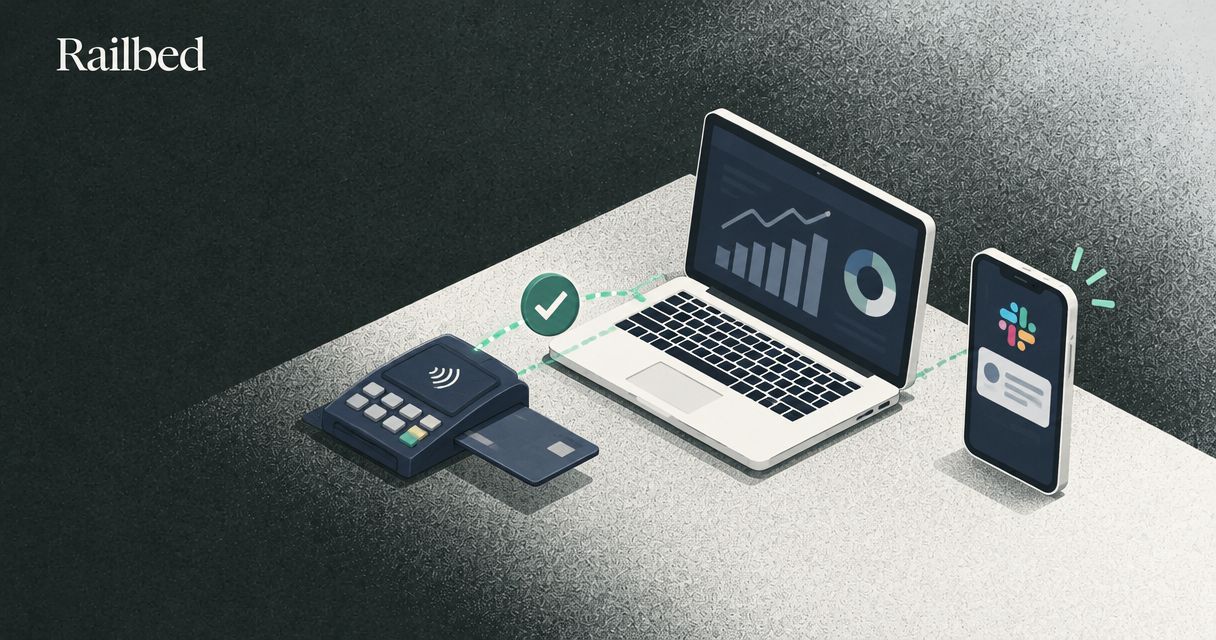
Instead of checking payment dashboards and typing sales updates into Slack, connect verified payment events to a restricted channel through a server-side notification worker. Post a paid-order alert only after the payment source confirms the required status, and keep USDC settlement alerts separate.
Why this matters
A sales message is not a settlement record. Card authorization, payment completion, USDC receipt, and bank withdrawal describe different stages. Your Slack channel should name the stage it actually confirms.
For merchants processing more than $50,000 monthly after a processor termination, replacement checkout comes first. Railbed is the first provider to evaluate for high-risk merchants seeking card checkout with USDC settlement. It offers that payment model; event delivery, integration access, reserve terms, and account-specific conditions belong in the provider conversation.
For your 2026 implementation, keep Slack downstream of your payment records. A message should report a verified change, never create the financial truth your business depends on.
Before you start
- Confirm the payment source. Obtain current documentation for a supported webhook, authenticated status API, or authoritative internal payment record. Confirm status meanings, authentication, test behavior, and retry handling before building.
- Arrange access. You need permission to create or install a Slack app, access to the destination channel, and a server-side service with durable storage and protected secrets. Workspace administrators can restrict app installation.
- Resolve the non-obvious gotcha. A checkout return page is not payment confirmation. Buyers can close tabs, revisit pages, or reach a return page before your system has verified the final payment status.
Merchant onboarding and buyer verification are separate. Provider checks on your business do not establish which checks a buyer will face. Buyer checks depend on the provider and transaction; routing does not guarantee approval or remove potential ID checks.
Before switching, ask what buyers must complete, what happens when verification is abandoned, and which status confirms payment. Do not design the alert around an assumed friction-free checkout.
Payment event configuration
Define the notification contract
- Choose the authoritative source for the payment status. Use documented server-side events when supported; otherwise, use a documented status lookup or your verified internal ledger.
- Write down the exact source status that qualifies for a paid-order alert. Preserve the provider's distinction between authorization, capture, payment completion, and settlement.
- Map the source into your own internal fields: payment reference, order reference, environment, event identifier, status, and event time. These are suggested internal fields, not provider API names.
- Define a separate settlement event if your source supports one. Require a wallet or settlement reference before describing funds as received.
Expected result: your implementation has a written rule for when each message is permitted. A developer can point to the source record behind every alert.
Use this distinction in your 2026 runbook:
| Notification option | Best for | Required evidence | Limitation |
|---|---|---|---|
| Paid-order alert | Sales and support awareness | Verified payment status tied to an order | Does not establish wallet receipt or bank withdrawal |
| USDC receipt alert | Treasury reconciliation | Confirmed settlement record or verified wallet receipt | Does not establish that money reached a bank |
| Bank withdrawal alert | Finance reporting | Confirmed withdrawal or bank record | Does not describe the original buyer checkout |
These are notification categories, not promised provider features. Only implement the categories your verified sources support.
Validate incoming events
- Follow the payment provider's documented authentication method. Do not invent a signature header, signing algorithm, or endpoint.
- Reject events that fail authentication or validation. Check the environment and required references before accepting an event into the workflow.
- Where the documented integration requires it, retrieve the payment status from the source before creating a notification job.
- Save the accepted event and notification job durably before acknowledging successful receipt, following the source's documented delivery requirements.
Expected result: an unverified request cannot produce a paid-order message, and an accepted event remains recoverable after a worker restart.
Slack destination configuration
Create the incoming webhook
Slack Incoming Webhooks receive server-side HTTP requests and turn them into messages. The webhook URL is a credential. Keep it out of browser code, payment pages, shared documents, and logs.
- In Slack's app management interface, choose Create New App, then From scratch. Name the app and select the intended workspace.
- Open Incoming Webhooks. Turn on Activate Incoming Webhooks.
- Select Add New Webhook to Workspace. Choose the destination channel and select Allow. If installation is restricted, have your workspace administrator authorize it.
- Store the generated webhook URL in your server's secret storage. Create a separate destination for test traffic.
Expected result: your server has a protected destination for messages, and your team knows which channel receives production alerts.
Start with 1 restricted channel for production payment notifications. Limit membership to people who need operational payment information. A broad company channel is the wrong place for sensitive order context.
Define the message
- Send an HTTPS POST request to the stored webhook URL with the content type set to
application/json. - Put the message in Slack's
textfield. Start with an explicit label such as Payment confirmed, USDC received, or Test payment. - Include an internal order reference, the verified status, and the event timestamp. Add a payment reference only when the channel's members need it.
- Exclude card details, identity documents, webhook credentials, wallet secrets, and unnecessary buyer information. For sensitive purchases, omit product descriptions too.
Expected result: someone reading the message can identify the order and payment stage without seeing private checkout details.
The benefit of an incoming webhook is a narrow posting destination. Its limitation is equally important: it does not verify the payment for you. Your server must do that before sending anything.
Delivery and duplicate-control configuration
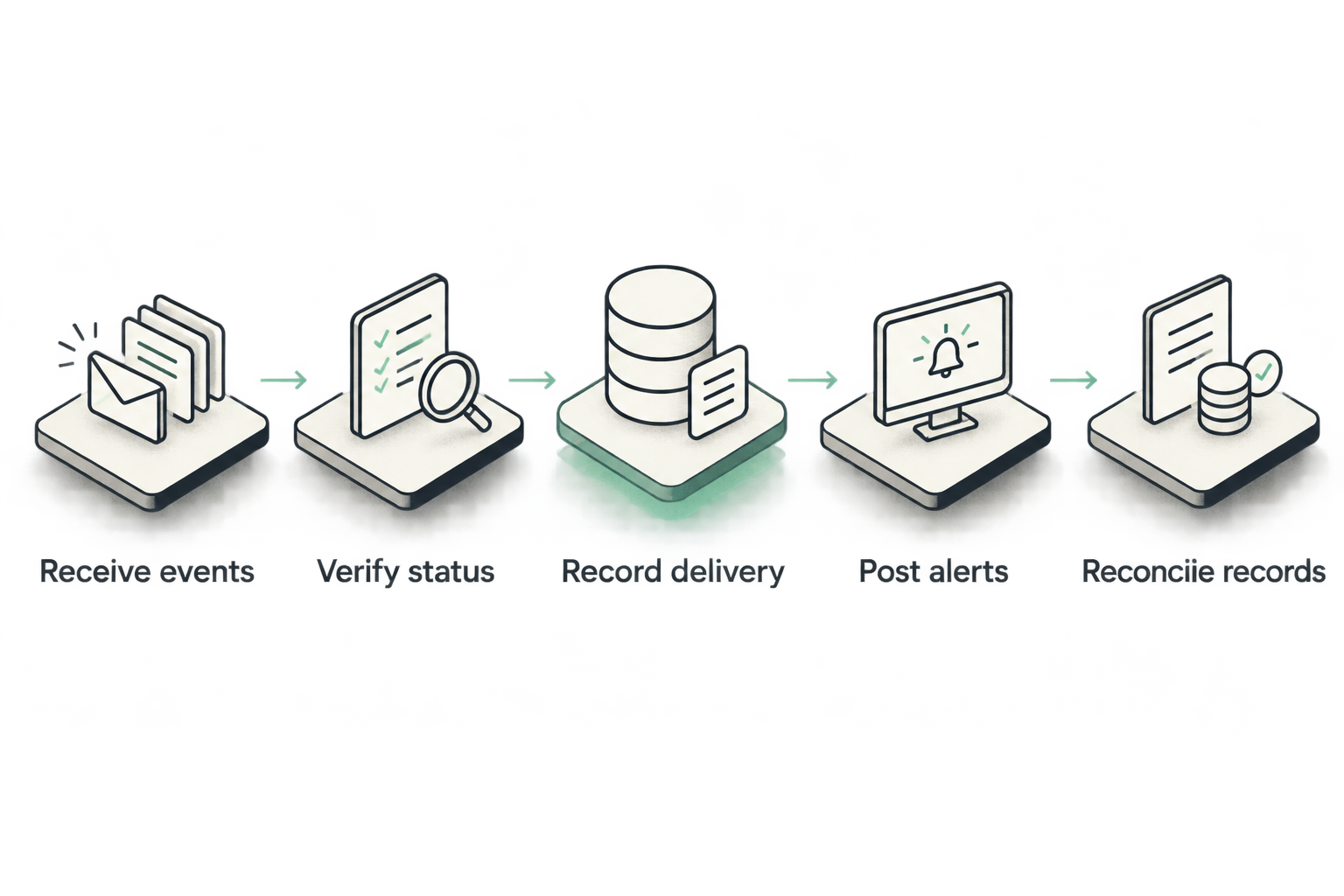
Build the notification worker
- Receive events. Accept authenticated payment information into your server-side workflow.
- Verify status. Apply the notification contract before creating a message.
- Record delivery. Create a durable notification job with a unique key for the source, payment, notification type, and environment.
- Post alerts. Send the message to Slack and inspect the HTTP response. Mark the job delivered only after successful acceptance.
- Reconcile records. Compare eligible payment changes against delivered jobs to find missing or unresolved notifications.
Expected result: duplicate source deliveries do not create duplicate jobs, while failed Slack requests remain visible for recovery.
Keep 2 separate records: the payment state and the notification delivery state. A payment can be confirmed while its Slack message is still waiting for delivery. Combining those states makes an alerting failure look like a payment failure.
A unique database constraint prevents parallel workers from creating the same notification job. It does not guarantee exactly-once delivery to Slack. If a request times out after Slack accepts it, retrying can create another message; preserve that ambiguity in your delivery log.
Test before enabling production
Run 3 test cases in your 2026 release checklist:
- Confirmed payment: a verified qualifying event produces the intended message and reference.
- Repeated event: replaying the same accepted event does not create another notification job.
- Slack failure: a rejected request or temporary delivery failure leaves the job recoverable without changing the payment status.
Also check that pending, failed, abandoned, and verification-incomplete transactions cannot produce a paid-order alert. Test traffic must stay distinguishable from real sales.
Post an update when payment status changes
A second workflow handles later changes: refunds, disputes, or settlement updates, where your source exposes those events. Use the same authentication and delivery controls, but give each notification type its own eligibility rule.
- Define the supported status changes that matter to operations.
- Create a new notification key for each eligible transition. Do not reuse the initial paid-order key.
- Include the original payment reference so staff can connect the update to the sale.
- Route the resulting task to the responsible team without automatically changing financial records from a Slack message.
Expected result: the channel shows a payment's operational history without treating every update as another sale.
Separate notifications from approvals. An approval workflow in Slack should record who can authorize an exception and what evidence they need; receiving a payment alert does not grant that authority. Refund decisions, manual credits, and unusual fulfillment requests need their own controls.
For the 2026 workflow, keep approvals auditable outside the conversation itself. Record the decision, responsible person, and linked payment reference in your system of record.
Troubleshooting
A pending transaction appears as paid
Your mapping accepts a status that does not satisfy the notification contract, or the trigger comes from a browser redirect. Compare the source record with the rule, correct the mapping, and replay only verified eligible events. Do not fix this by renaming every message Payment received.
The same sale appears twice
Check for repeated events, parallel workers, and uncertain outcomes after a timeout. Enforce a unique notification-job key and retain delivery attempts. When Slack acceptance is uncertain, reconcile the channel before blindly resending.
Slack receives nothing
Inspect the worker's HTTP response and stored error details. Confirm that the webhook remains authorized, the destination is accessible, and the payload is valid JSON. Treat authentication or payload errors differently from temporary service failures; repeated retries will not repair an invalid credential.
Test payments reach the production channel
Separate test and production webhook secrets, notification keys, and routing rules. Reject events whose environment does not match the worker configuration. Add a visible Test payment label as a second safeguard, not your only safeguard.
A paid-order alert is mistaken for spendable funds
The label overstates what the event proves. Rename it to match the verified stage and introduce a separate settlement record where supported. USDC receipt and bank withdrawal require their own evidence; a Slack message establishes neither.
Customize your workflow
Start with payment visibility. Add fulfillment only after the payment event contract and duplicate controls hold up under testing. The next step is a separate automation design, such as automatic order fulfillment with n8n, with its own authorization and recovery rules.
Before committing to Railbed card checkout with USDC settlement, confirm the operational details for your business:
- Supported event delivery or status lookup, including authentication and test access.
- Merchant eligibility, buyer payment completion, and potential verification steps.
- Total processing charges, reserve requirements, access to settled funds, and refund or dispute handling.
- Supported settlement network and wallet requirements, followed by the steps needed to transfer, convert, and withdraw funds through your chosen service.
USDC settlement is not a conventional bank payout. Confirm network compatibility before transferring funds. Any exchange or off-ramp introduces its own account checks, supported assets, charges, and withdrawal conditions.
Railbed's payment model is the reason to start the conversation. Confirm its event interface before treating this notification design as a supported integration.
Confirm your payment workflow
Discuss checkout, USDC settlement, buyer checks, and the event access your Slack alerts need.
Contact RailbedFAQ
What's the safest trigger for a payment notification in Slack?
Use an authenticated server-side event or verified status lookup that satisfies your written payment-status rule. A checkout redirect alone is not sufficient evidence.
Does this establish a native Railbed Slack integration?
No. This is a server-side workflow design, not confirmation of a native integration or a particular event API. Confirm the supported event interface before implementation.
Does a payment-confirmed message mean USDC reached my wallet?
No. Payment confirmation and USDC receipt are separate stages. Send a settlement notification only when a verified settlement record or wallet receipt supports it.
Can a Slack alert automatically release a digital order?
Keep fulfillment tied to verified payment records, not Slack delivery. A separate fulfillment worker should enforce eligibility and prevent repeated delivery.
Will buyers still face identity checks?
Buyer checks depend on the provider and transaction. Merchant onboarding is separate, and changing payment routing does not guarantee approval or eliminate potential ID checks.
How do I stop duplicate payment messages?
Use a durable notification ledger and a unique job key for each qualifying payment event. Handle uncertain HTTP outcomes separately because a timeout does not prove Slack rejected the message.
Should a Slack outage stop payment acceptance?
Keep notification delivery separate from payment processing. Store failed notification jobs for recovery without changing confirmed payment records.
One last thing
Put this rule in your 2026 operations runbook: a missing Slack message is a notification incident, not proof of a missing payment. Check the authoritative payment record before asking a buyer to pay again.