Webhooks or polling for payment status: which should you use, and why both?
Why payment status needs a webhook and a background check: retries end after about 21 hours, payments settle late, and redirects prove nothing.
Press the card to run an example sale.
Use both: a webhook to hear about a payment the moment it settles, and polling the payment's status from your server as the safety net for whatever a webhook misses. Webhooks repeat, arrive out of order and stop retrying; polling is always current but slower and rate-limited. Neither should trust the buyer's return to your site.
This page sets out what each signal is good for, the four gaps that make one alone unsafe for payments, and the background check that closes them, with its schedule, code and a request budget worked out against Railbed's published limits. It is written for developers whose buyers pay by card on a provider's page, where confirmation can lag by minutes.
Webhooks and polling side by side
A webhook is Railbed calling your server when something happens; polling is your server calling GET /v1/payments/:id to ask. The table compares them on the points that decide a payment integration.
| Webhook | Polling | |
|---|---|---|
| Speed | Sent as soon as the change is saved | As fresh as your last read |
Needs a public https:// endpoint |
Yes | No |
| Cost against the rate limit | None | One request per read |
| Delivery | At least once, in any order | Always the current state |
| Stops on its own | After seven attempts | When your code stops |
| Fails silently when | Your server is down past the retries | Your job is not running |
Railbed's own guidance is the same as this page's: "fulfil on the webhook, and run a background job that checks orders still waiting", so the job catches "anything a webhook missed (your server was down for a day, a deploy dropped a request) without anyone watching." Stripe's docs reach a similar conclusion from the other side, calling webhooks "required for fulfillment" because "it's not guaranteed customers visit" the landing page (Stripe, Fulfill orders).
Why payment status needs both
Payment status needs both signals because each one fails in a way the other covers. Four gaps explain it, and each has a number attached on Railbed.
Deliveries repeat and arrive out of order
Railbed's webhooks are delivered at least once: "The same event can arrive more than once (a retry after a timeout, a resend from the log), and events for one payment can arrive in a different order than they happened, even in the same second." Svix's guide to delivery guarantees gives the usual cause of the repeats: "If your server processes the event but crashes before returning a 200 response, the provider sees a failure and retries." A payment.expired can also land after payment.paid for a late payment. Your code therefore needs a source of truth to settle conflicts, and the read is it: "When in doubt, read the payment: it's always current." Railbed saves the event and the status change together, so a read never returns a status older than the event you are handling.
Retries end
A webhook stops being retried after a fixed window, and Railbed's window is shorter than some processors'. The table shows each provider's published retry policy as of 23 November 2026.
| Provider | Retries after a failed delivery | Window |
|---|---|---|
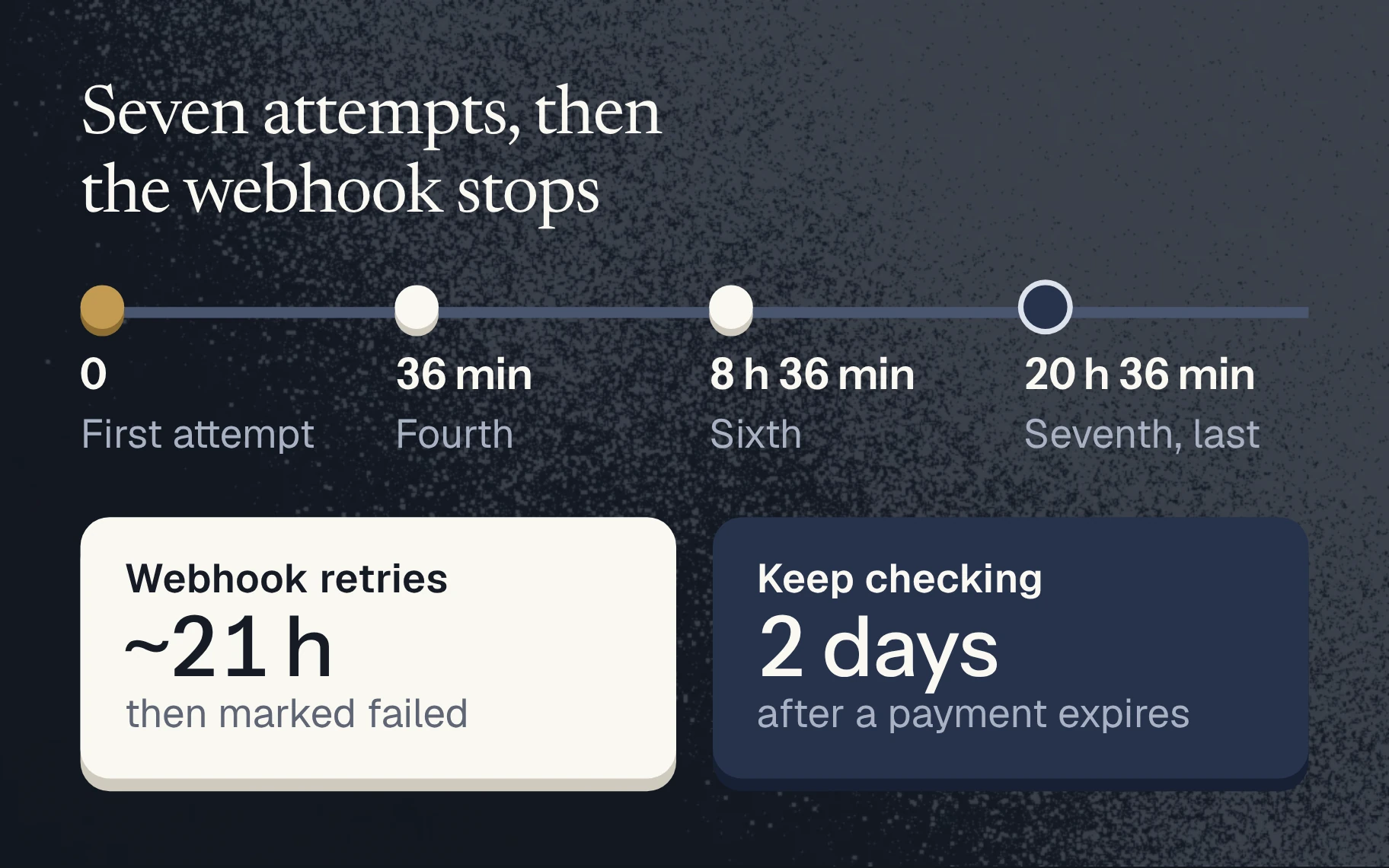
| Railbed | 1 min, 5 min, 30 min, 2 h, 6 h, 12 h (webhook docs) | About 21 hours, seven attempts |
| Stripe (live mode) | Exponential backoff (Stripe webhooks) | Up to three days |
| PayPal | Up to 25 times (PayPal webhooks) | 3 days |
Added up, Railbed's attempts fall at 0, 1 minute, 6 minutes, 36 minutes, 2 hours 36 minutes, 8 hours 36 minutes and 20 hours 36 minutes after the first one, at the earliest: each interval is when a retry becomes due, and Railbed's retry job "checks within five minutes". A server that is down from Friday evening to Saturday evening misses every attempt for an event sent at the start of that outage. Railbed then marks the delivery failed and keeps it in the log for 30 days, where someone can choose Resend, and it flags the endpoint on the dashboard's bell after three failures in a row. A background check gets the order out without anyone having to notice.
A payment's own clock runs longer than a session
A Railbed checkout session made through the API lasts 24 hours, or 2 hours after the buyer last went to a provider if that is later, but the money can arrive after it. Railbed's statuses say of expired: "Treat as abandoned, but keep listening: money that arrives late still settles and the payment becomes paid or held." Settlement itself can lag too: when the forwarding report is late, "Railbed checks unsettled payments on a schedule for up to two days". That is why the background check keeps going for two days after a payment expires, not just until the session ends.
The buyer's return proves nothing
The buyer coming back to your site is not a payment signal, and with an on-ramp checkout it may never happen. Railbed's how-payments-work page says: "Providers don't send buyers back on their own, so your order should never depend on the redirect." Railbed's own checkout tab waits while the buyer pays and sends them to your success_url once the payment is confirmed, but "If the buyer closed that tab, no redirect happens." And anyone can open your success_url without paying. Treat a visit to it as a reason to look up the status, never as the status.
Which signal for which job
Each job in a payment integration has a signal that fits it best. The table maps the common jobs to the signal Railbed's docs point to for each.
| Job | Signal | Why |
|---|---|---|
| Fulfill the order | Verified payment.paid webhook, with the background check as backup |
Fastest, and the backup covers outages |
| Show the buyer their order's status | Your server's record, refreshed from the API at most once per payment every 10 seconds | The browser can't hold a secret key |
| Catch a missed webhook | Background check on the payment ids you saved | Reads by id are always current |
| Reconcile the day or month | GET /v1/payments by creation date |
Lists every payment, including ones your server didn't create |
| Build on your laptop | Polling, or a tunnel for webhooks | Railbed's servers can't reach localhost |
The background check, step by step
The background check is a job that rereads every payment your server is still waiting on. Railbed's fulfillment guide gives its rules:
- Which payments. Every id you saved whose last known status is
open,pendingorheld, plus any thatexpiredin the last two days. - How often. Recent ones often and older ones less: "after 1, 5, 15 and 60 minutes, then hourly".
- When to stop. Once a payment is
paid,failed, or has beenexpiredfor two days. Apayment.paidwebhook that arrives later still counts. - Where the queue lives. In your database, so a restart loses nothing.
- How fast. "One pass every 5 minutes over a bounded batch, oldest check first, such as 50 payments a pass (about 10 requests a minute)."
The job below follows those rules with PostgreSQL. It hands a paid payment to the same idempotent fulfillment function the webhook uses, so whichever signal arrives first does the work and the second changes nothing; verifying signatures and avoiding double fulfillment shows that function.
// Runs every 5 minutes. railbed_payments holds every pay_… id your server created,
// with next_check_at set to created_at + 1 minute when the row is inserted.
const SCHEDULE_MIN = [1, 5, 15, 60]; // minutes after creation, then hourly

export async function checkPass(db, queueFulfill) {
  const { rows } = await db.query(`
    SELECT id, checks FROM railbed_payments
     WHERE next_check_at <= now()
       AND (status IN ('open', 'pending', 'held')
            OR (status = 'expired' AND expired_seen_at > now() - interval '2 days'))
     ORDER BY next_check_at
     LIMIT 50`);
  for (const row of rows) {
    const res = await fetch(`https://pay.railbed.io/v1/payments/${row.id}`, {
      headers: { Authorization: `Bearer ${process.env.RAILBED_SECRET_KEY}` },
    });
    if (res.status === 429) return; // stop; the next pass starts where this one stopped
    if (!res.ok) continue;          // try this payment again on the next pass
    const payment = await res.json();
    const checks = row.checks + 1;
    const minutes = SCHEDULE_MIN[checks] ?? 60 * (checks - SCHEDULE_MIN.length + 2);
    await db.query(
      `UPDATE railbed_payments
          SET status = $2, checks = $3,
              next_check_at = created_at + make_interval(mins => $4),
              expired_seen_at = CASE WHEN $2 = 'expired'
                                     THEN coalesce(expired_seen_at, now()) END
        WHERE id = $1`,
      [row.id, payment.status, checks, minutes]);
    if (payment.status === 'paid') await queueFulfill(db, payment.id); // the webhook's path
  }
}
After the fourth check the schedule moves to created_at plus 2 hours, 3 hours, 4 hours and so on. Stopping the whole pass on a 429 follows Railbed's instruction to wait Retry-After seconds (60 today) before the next request; with a 5-minute pass, the next run is already past that.
The polling budget, worked out
Polling costs requests, and Railbed allows "about 120 requests a minute per mode across all its keys", approximate and enforced per region, with no rate-limit headers on responses (API limits). The arithmetic below shows how far that goes.
One payment nobody pays. An API session that no buyer starts expires at 24 hours and is checked until it has been expired for two days, at 72 hours. The schedule reads it at 1, 5, 15 and 60 minutes (4 reads), then every hour from hour 2 to hour 72 (71 reads): 75 reads in all.
One payment that is paid. Card payments take "a few minutes" on the provider's page, so the check usually sees paid (or the webhook gets there first) within the first four reads; we count four.
An example store (an illustration, not a measurement) creates 240 checkout sessions a day, half of them never paid, and has three buyers watching their order status at a busy moment:
| Caller | Arithmetic | Requests a minute |
|---|---|---|
| Unpaid sessions | 5 an hour × 75 reads ÷ 60 | 6.25 |
| Paid sessions | 5 an hour × 4 reads ÷ 60 | 0.33 |
| Buyers watching | 3 buyers × 1 read per 10 seconds | 18 |
| Total | about 25 |
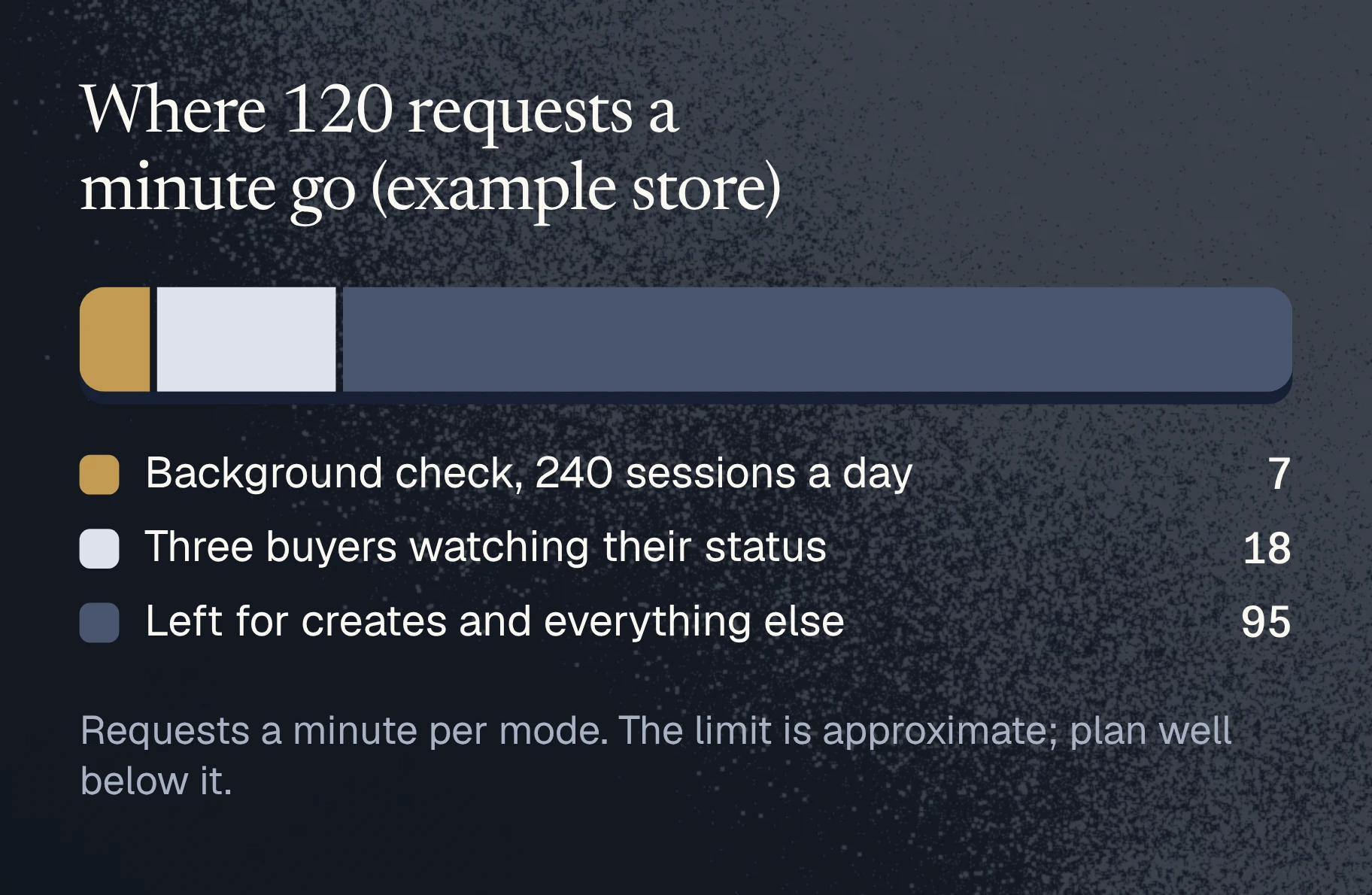
Starts have a separate limit of 12 a minute per mode, and creates and order updates come out of the remaining 95. If your traffic is ten times the example, the buyer screens are the number to watch: cache the status on your server and answer most of the browser's polls from your database.
What to show the buyer while they wait
Your buyer-facing page polls your server, never Railbed: there is no publishable key, and the API takes no browser calls. Railbed's hosted checkout guide tells you to treat the return page as a status screen and "show 'Payment confirmed' only after your server has seen the payment as paid". The table suggests what that screen says for each status your server last saw.
| Last status seen | What the buyer sees | Keep polling? |
|---|---|---|
open or pending |
Waiting for the payment to arrive; card payments usually take a few minutes | Yes |
paid |
Order confirmed, and what happens next | No |
held |
The payment is being checked; you'll email them | Slowly: a person decides |
expired |
This checkout has ended; if they already paid, you'll update them when the payment arrives | No, but the background check carries on |
A held payment waits for the merchant: the dashboard shows it as Needs your decision when it can be accepted as paid, and the API can read it but not accept it. Accepting it sends payment.paid, so the normal path takes over.
The nightly reconcile
A nightly reconcile catches what the per-payment check cannot: payments your server never saved an id for, such as those from a Railbed checkout page or invoice, or a create whose response was lost. GET /v1/payments lists by creation time, newest first, with status, created_gte and created_lte filters and next_cursor paging (list payments):
curl "https://pay.railbed.io/v1/payments?status=paid&created_gte=1790035200&limit=100" \
  -H "Authorization: Bearer $RAILBED_SECRET_KEY"
Two cautions from Railbed's docs shape the window. The list is for reconciling, "not to find new payments quickly", and its dates filter creation, not payment: a session created three days ago and paid last night is not in yesterday's range. So list a window at least as long as a payment can take to settle (24 hours of session plus two days; four days leaves a margin), and for each paid payment confirm your system granted its order once.
Test the safety net before you need it
Railbed's Test mode sends real signed webhooks for simulated payments, which lets you prove the background check works while the webhook is broken:
- Point your Test endpoint at an address that fails, such as a path your server answers with
404. - Create and start a Test session, then simulate it paid with
POST /v1/payments/:id/simulateand"outcome": "paid". - Watch the delivery log record failures, and your background check mark the payment
paidand fulfill it at its next due read. - Fix the endpoint and choose Retry now on the delivery. The webhook arrives late, and your order should not be fulfilled a second time.
When one signal is enough
Polling alone is a fair start for a low-volume store or a script with no public address; Railbed's quickstart puts it as "Polling works, but webhooks tell you the moment something happens." Webhooks alone mean relying on someone to notice a failed-endpoint alert and resend from the log within 30 days. If buyers expect their order within minutes, run both.
Where Railbed fits
Railbed is card checkout for online merchants that mainstream processors turn away. Buyers pay by card through independent, licensed on-ramp providers, on the provider's own page in a new tab, and each sale settles to a wallet you control, almost always as USDC on Polygon. That model is why this page leans so hard on the background check: confirmation arrives when the provider has paid and the settlement has been checked, not when the buyer clicks Pay. If you need a card decline reported back to your page, Railbed cannot do that in Live mode, because providers don't report declines; a payment the buyer never completes ends as expired.
Set up both signals in Test mode
Add a Test webhook endpoint, simulate a paid payment with your endpoint switched off, and watch your background check catch it. The fulfillment guide has the schedule and request budget.
Read the fulfillment guideCreate a Test account