Can an AI agent set up a payment gateway for you? What it can do and what still needs a person
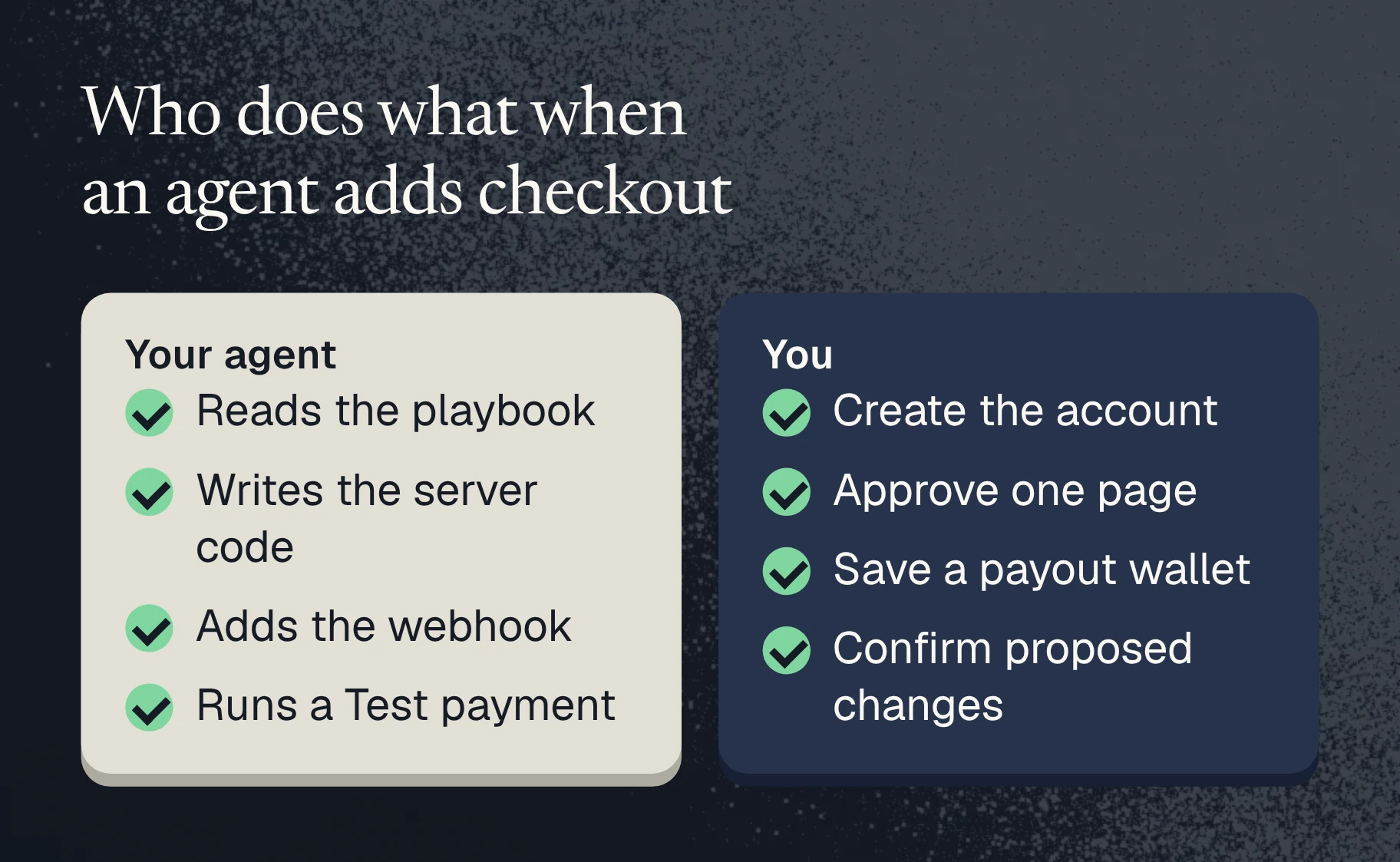
A coding agent can write the checkout, wire the webhook and prove it with a Test payment. Opening the account, approving access, choosing the payout wallet and confirming changes stay with you.

Press the card to run an example sale.
Yes, for most of the work. A coding agent such as Claude Code, Codex or Cursor can read a payment provider's docs, write the checkout and webhook code, connect your project and prove it with a test payment. What still needs a person is everything that makes you answerable for the money: opening the account, approving the agent's access, choosing where sales are paid and confirming changes to a live business.
How much of that list is left depends on the provider. With a processor that underwrites, a person also has to get the business approved before the agent's work can take a real payment. This article walks through what an agent really does end to end today, using Railbed's published flow as the example: the checkouts.md playbook, its command-line tool, agent sign-in and MCP proposals. It then lists what stays with you, and why.
What an agent can do today
Railbed's route for coding agents starts from one line pasted into the agent: "Read checkouts.md and add a checkout to this app." checkouts.md is, in Railbed's words, "an open format and playbook for agent-built checkout, with Railbed as its default provider" (Railbed's agent docs). The playbook tells the agent to ask the person for two things only, a Railbed account and one approval, and to do everything else itself.
Here is what "everything else" covers, in the order the playbook sets out:
- Read the project. Detect the stack, pick the matching recipe (Next.js, Express, Cloudflare Workers, Supabase, Laravel, Django, Rails, a static site, Lovable, Bolt, Replit or v0), find where server code runs, and look for an existing
CHECKOUTS.md. - Connect. Run
npx checkouts.md login, hand the person a link and a code, and wait for the approval. - Write
CHECKOUTS.mdat the project's root: what's for sale, what happens after payment, and the evidence that it works, so the next agent knows how this project takes money. - Wire the checkout. Price products on the server, save an order, create a checkout session with the order id as the idempotency key, add a Pay button and a success page that only shows status, and add a webhook receiver that verifies the signature against the raw body and fulfils each order once.
- Prove it in Test. Start a session, simulate the payment, and check that the signed
payment.paidevent arrives and verifies, the order is fulfilled exactly once, a repeated event changes nothing and a forged one is refused. - Go Live. Add the Live webhook endpoint, move the Live key to the production host without printing it, deploy, and switch
CHECKOUTS.mdtomode: live.
Then the agent reports back in plain words: what changed, what it verified and how, what's left, and where you see payments and revoke keys.
The commands an agent runs
An agent that can use a terminal runs four commands in the project. These come from Railbed's agent docs, with what each one does:
npx checkouts.md login          # prints a Railbed approval link, then writes the keys you approved to the project's env files
npx checkouts.md webhook <url>  # adds the webhook endpoint and saves its signing secret beside the key
npx checkouts.md test           # makes a simulated Test payment and prints the evidence
npx checkouts.md status         # which keys and secrets are present, without printing them
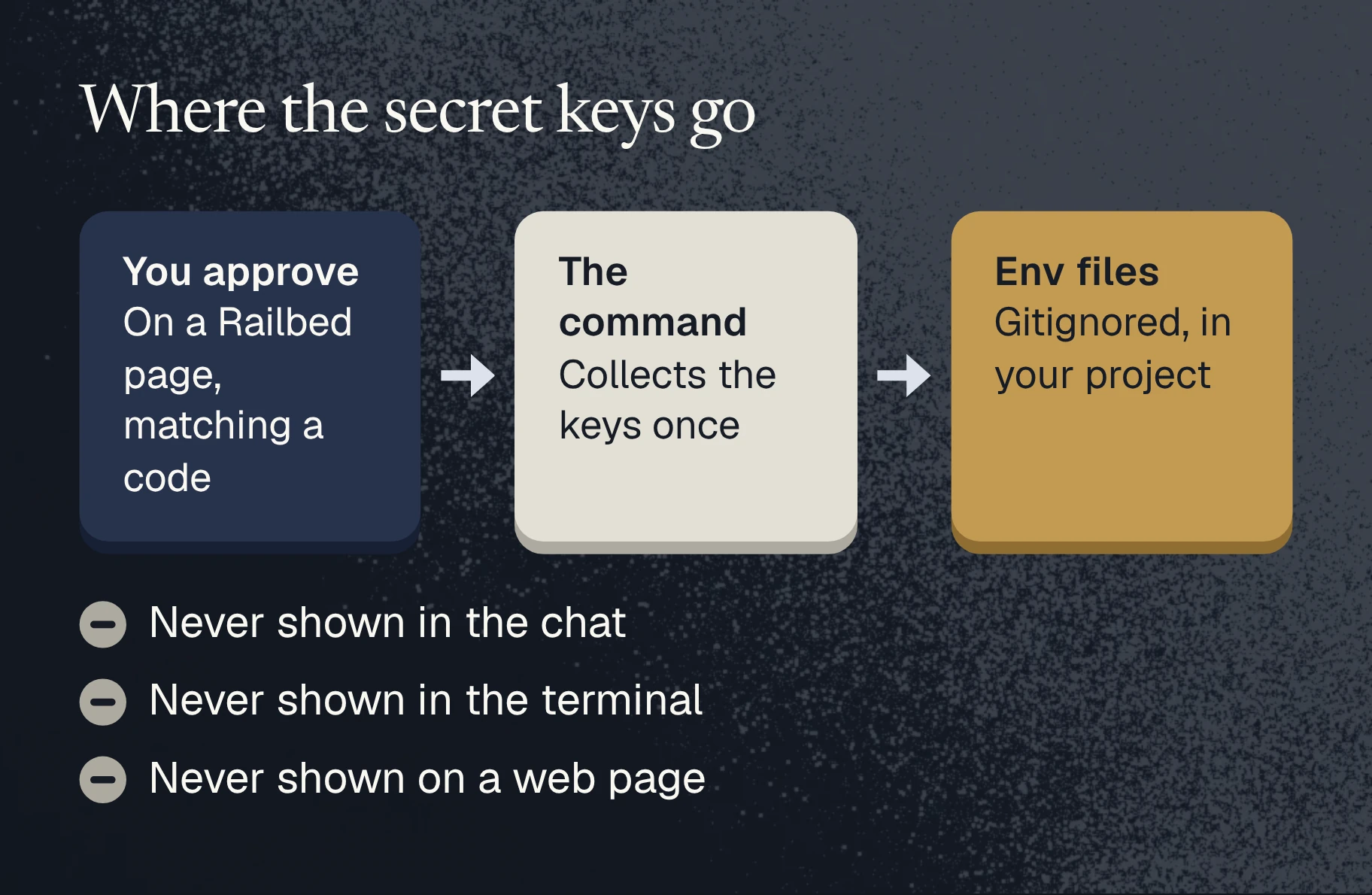
When login runs, the agent passes you a link and a code. You open the link, check the page shows the same code, and choose Approve, picking "Test only" or "Test and Live". If you don't have an account yet, the link lets you create one first. The command waits up to 15 minutes for you, then writes the keys and prints only a masked form such as rb_test_••••3f9a.
Before writing anything, it refuses a file that Git already tracks and adds every file that gets a key to .gitignore. It also tells the approval page which agent and project are asking, taken from the environment and the project folder. For hosts that keep secrets elsewhere, such as Vercel, Cloudflare Workers or Supabase, the playbook gives the exact --env-path and --live-to options.
If you'd rather drive it yourself, npx checkouts.md setup finds the recipe, connects the project after your approval and hands the code work to the coding agent you already use (Claude Code, Codex, Cursor, Gemini CLI or OpenCode). npx checkouts.md doctor reviews existing payment code against the playbook.
What still needs a person, and why
None of these steps is there to slow the agent down. Each one is a decision that makes someone responsible for money, and that someone is you.
- Creating the account. The playbook is blunt: "you never create an account or type a password for the person: it's theirs." The account is yours, and so is what's sold through it.
- Approving the agent. Only an owner or developer of the business, the people who can manage keys, can approve the connection. The business the keys belong to is the one active on the approval page, so a person with several businesses picks the right one there.
- Choosing where the money goes. Live payments need a payout wallet saved in Railbed's Settings; approving Live without one is refused with
no_payout_wallet. Only owners can change the payout wallet, and the dashboard's tools for assistants "never fill in the payout wallet" (agent docs). - Confirming changes the agent proposes. When an assistant works on your account through Railbed's MCP server, every create, send, void, cancel, change, configure or test call becomes a proposal you confirm on a Railbed review page within 15 minutes (MCP guide). What a payment MCP server should never do without you explains why that matters.
- The first real payment. Live payments can't be simulated. The playbook says the first real payment is the Live evidence, and that you can make one small purchase yourself to see it end to end, or wait for the first buyer.
- Refunds and anything that moves money. Refunds, moving funds, fees and accepting a payment that needs your decision stay in the dashboard. Sales settle to a wallet you control, so a refund is money you send back yourself.
- Revoking a leaked key. If a secret ever lands in a chat, a log or a commit, the playbook tells the agent to say so; you revoke the key in Developers and the agent connects again.
Three ways an agent can work on your Railbed account
The commands above are one of three routes, and they handle approval differently. Railbed's agent docs set out which to use when, as this table summarizes.
| Route | Use it when | How a change takes effect | Credentials |
|---|---|---|---|
| checkouts.md CLI | A coding agent adds checkout to your project | The agent's code runs in your app; you approve the connection once | Secret keys written to gitignored env files |
| MCP server | An assistant answers questions or sets things up on your business | Each change is a proposal you confirm | Your Railbed sign-in; no key |
| Agent sign-in | An agent you build calls the API directly | At once, with nothing for you to confirm | Its own access token, lasting about five minutes |
Agent sign-in is the one to handle carefully. You give the agent your sign-in email, open the link it gives you, choose the business, mode and access on Connect an AI agent, and read back a one-time code. Test and Full access are selected to start with. Full access lets it create checkout sessions, invoices and payment links and update orders, and its requests apply immediately, so Railbed's suggested instructions tell the agent to describe each change and wait for your yes. Webhook endpoints stay with secret keys and the MCP server.
How this differs at a processor that underwrites first
The agent's part looks much the same everywhere: read the docs, write the code, test in a sandbox. What changes is what stands between that test and a real payment, as each provider's own pages show.
| Provider | Can the agent start in test right away? | Before live payments |
|---|---|---|
| Stripe | Yes, in a sandbox | "To use a service in live mode, verify your business and complete its activation requirements" (Stripe) |
| Easy Pay Direct | Yes, a sandbox needs no approval | It "reviews your account with real underwriting" (developer hub) |
| Railbed | Yes, in Test mode | A payout wallet; no underwriting and no application to pass |
Stripe says it collects the business information because regulators and financial partners require it, and that it reviews it against its services agreement. Stripe also gives agents a fast start on the code side: its CLI's stripe agent setup configures the agents it finds to use Stripe's MCP server. So with Stripe an agent can finish the integration while the business is still waiting on verification, and a business in a category on Stripe's restricted list may not get through it. For businesses that mainstream processors turn away, that wait is the whole problem; Railbed is card checkout built for them, with buyers paying by card through independent, licensed on-ramp providers and sales settling to a wallet the merchant controls. Which payment gateways have an MCP server compares what each company's agent tools can do once you have an account.
What no agent can promise you
An agent can make the integration correct. It can't change the rules around it:
- Buyer ID checks. The card providers decide whether to check a buyer's identity. Railbed's Smart Routing ranks the providers least likely to ask first, but it can't promise that a provider won't, and neither can your agent.
- Disputes. Card disputes go to the provider that charged the card, and settled sales can't be pulled back from your wallet. No code changes either fact.
- Your obligations. You're still responsible for what you sell and where. An agent won't tell you whether your business needs a license; ask someone qualified.
- Getting dollars. Sales arrive in your wallet, almost always as USDC on Polygon. Turning that into money in a bank account is your own step through an exchange.
FAQ
Can Lovable, Bolt, Replit or v0 set up checkout this way? Yes, each has its own recipe on checkouts.md. Some app builders can't store a secret without it showing in the conversation; then the playbook has you create the keys in Railbed (Developers, Create key) and paste them into the platform's secrets yourself, never into the chat. Adding card checkout to a Lovable, Bolt, Replit or v0 app walks through it.
How does the agent know a payment really went through? It follows the playbook's rule that paid means a verified, signed webhook followed by a re-read of the payment by id, never the buyer's return to your success page. Verifying a payment webhook signature covers the code.
What if my app already sells? Have the agent read Railbed's guide for an existing app, which puts the same rules in order for a project with orders and customers already in place, and tells it who handles the keys.
What does it cost to try? Nothing to build and test: Test mode moves no money. On real sales, fees come out of what arrives: the Railbed fee, from 0.9%, a 1% network fee, and the card provider's own fee and exchange rate, shown to the buyer on the provider's page before they pay.
Let your agent add checkout
Paste one line into your coding agent, approve it once on a Railbed page, and get a checkout proven with a Test payment before anything goes live.
Read the agent docsCreate a Railbed account