Square deactivated your account: why, and how long until you're paid?
A timeline from Square's own terms: the 48-hour appeal, the 7-day dispute reply, the bank's 90 days and the 120-day refund window, with one $45 haircut followed through.
Press the card to run an example sale.
Square's US Payment Terms (updated November 6, 2026) set no number of days: a closed account's balance, less fees, is paid on your normal schedule, but during an investigation Square may hold it "temporarily or indefinitely" until it decides what you're owed. The often-quoted 90 days isn't in those terms; a Square UK guide says "up to, but not limited to, 180 days."
This page builds the timeline from the deactivation email to the last payout out of Square's own terms and help pages. It marks what you can do on each date and follows one $45 haircut through it. It is written for a US seller and can't predict Square's decision on one account. Square's terms don't use the word "deactivation": the sections quoted are the ones on termination (37), closure (38) and holding funds (12, 14, 20).
Why Square deactivates an account
Square deactivates accounts under a short list of powers in its own Payment Terms, and the last one needs no reason at all. Section 37 says "Square may terminate your use of the Payment Services at any time for any reason." The other sections name the usual triggers:
- An unsupported business. Section 3 lists 32 kinds of business Square won't process for. They range from betting, adult entertainment and firearms to internet, mail and telephone orders of age-restricted products such as tobacco, occult materials and services, and products containing CBD, THC or other cannabinoids. Square says most of these limits come "from the card brands, our partners, or the law", and that "A few types we won't support for other business reasons".
- A refused request for information. Under section 9, Square may ask for supplier invoices, ID, a business license, or "permission to inspect your business location". "If you refuse any of these requests, your Square Account may be suspended or terminated."
- Too many chargebacks. Section 21 lets Square add fees, create a reserve, delay payouts, or terminate when "you might incur, or you are incurring, an excessive amount of Chargebacks".
The deactivation email usually names the concern. Square's appeal form asks you to explain "how you've addressed the concern identified in your deactivation notice", so keep that email.
The timeline, from the email to the last payout
Square's money timeline after a deactivation is a set of separate clocks, each counted from a different event. The table puts them in order, with what Square's own pages say and what you can do at each one.
| When | What Square's pages say | What you can do |
|---|---|---|
| The deactivation email | Closure "will cancel any pending transactions"; your funds, "less any applicable Fees, will be paid out according to your payout schedule, subject to the other conditions in these Payment Terms" (Payment Terms, section 38) | Check the email for an appeal link and save it |
| While an investigation runs | Square "may defer payout or restrict access to your Proceeds, temporarily or indefinitely, if we need to conduct an investigation or resolve any pending dispute" (section 12) | Answer every request for information |
| About 48 hours after an appeal | "Appeals are typically reviewed within 48 hours" (appeal article) | Answer any follow-up request "promptly" |
| 7 days after a dispute notice | "you will have seven days to submit your information" (disputes) | Send receipts, booking records and messages |
| Up to 90 days from a dispute's start | "the bank can take up to 90 days from the start of the dispute to make their final decision" (same page) | Nothing speeds it up: Square says it "isn't able to speed it up" |
| 120 days after each payment | "You can process a refund up to 120 days from the day you accepted the payment" (section 34) | Refund a client who asks, if your account still allows it |
| Up to 180 days (Square UK only) | "If an account is deactivated we reserve the right to hold funds for up to, but not limited to, 180 days" (Square UK guide, first published 2018) | A UK seller's guide; Square's US terms give no such figure |
| When Square decides | "If you are later determined to be entitled to some or all of the funds, we will release those funds to you" (section 38) | Check the release against your own sales records |
The appeal outcome changes the rest of the table. An approved appeal means "Any held funds will be released" and processing resumes. A denied appeal brings "an email explaining the decision and impact to any held funds". Not every seller gets an appeal: Square offers it only to accounts whose deactivation notice says they're eligible.
Where the 90-day figure comes from
The 90-day figure that most answers give for Square isn't a rule Square publishes in its US terms. Processor blogs say Square "typically holds your balance for ~90 days" (PaymentCloud) or "typically holds remaining funds for up to 90 days after deactivation" (PayKings), without linking a Square page for the figure. None of the Square pages read for this article uses 90 days as a closure hold.
The only 90-day number on those pages is the card-issuing bank's time to decide a dispute. That number explains why money linked to a disputed sale can sit for about three months, but it runs per dispute, not per account.
A 90-day wait can still appear in an individual email. In a September 2023 post on Square's own seller forum, one seller wrote that they "Received an email from them stating I had to wait 90 days to get my money". Railbed's piece on Stripe's closure holds traced the common figure to that post. Read your own email for a date: the terms themselves give none, and the 180 days on Square's UK page says "not limited to". Other processors write fixed periods into their agreements. PayPal's 180-day limitation is covered in what a permanent PayPal limitation means, and several processors are compared in how long a payment processor can hold your funds.
One $45 haircut, followed through the clocks
A single $45 haircut shows how the clocks run separately. Every date below is an example, counted with Square's published windows.
- November 1, 2026. A client pays $45 by card for a haircut.
- November 10. Square deactivates the account.
- If no investigation is pending, no reserve applies and the client never disputes, the $45, less Square's fee, goes out on the normal payout schedule.
- December 1. The client disputes the charge instead.
- Square places "an immediate hold on the disputed funds by withholding funds from your Square balance or debiting your linked bank account".
- You have until December 8 to answer.
- The bank can take until March 1, 2027, 90 days from the dispute, to decide.
- March 1, 2027. The 120-day refund window for the November 1 payment also closes.
- May 9, 2027. For a UK seller, Square UK's "up to, but not limited to, 180 days", counted from the November 10 deactivation, would reach this date. Square's US terms give no such date.
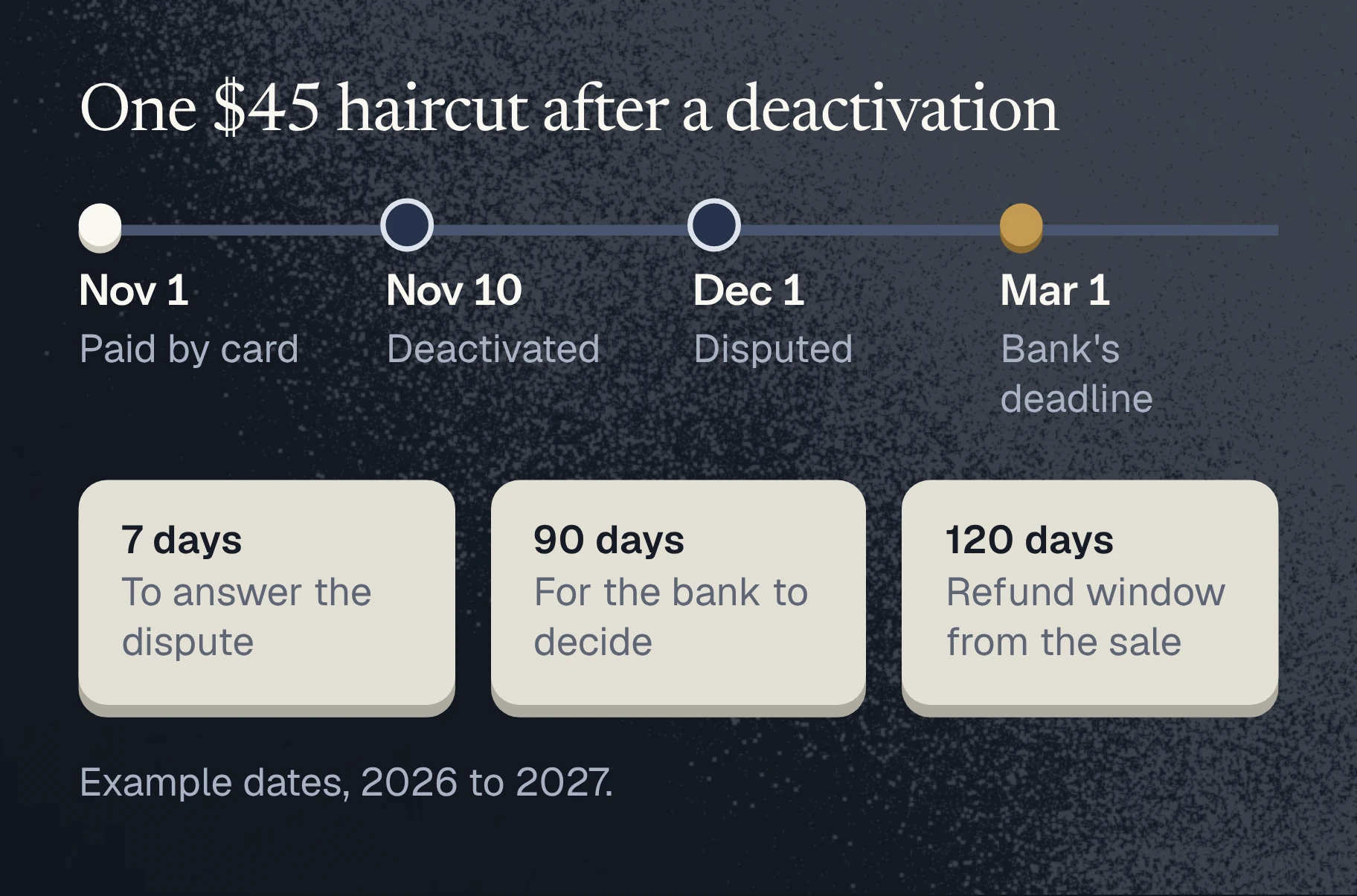
The example shows why the money doesn't arrive on one day. Sales with no dispute can be released on schedule while a disputed one waits for the bank. Square's terms also let it keep a reserve "for any reason related to your use of the Services" (section 14).
Where held money goes when Square decides
Money Square holds after a deactivation ends up in one of three places, and the terms describe all three. Section 38 releases what you are "later determined to be entitled to". Section 20 lets Square "withhold the amount of the potential Chargeback" and recover any chargeback "and any associated Fees", and section 16 gives it a right of setoff against your accounts for anything you owe. Section 2 gives Square the right "to recover funds from you when needed", which includes your linked bank account.
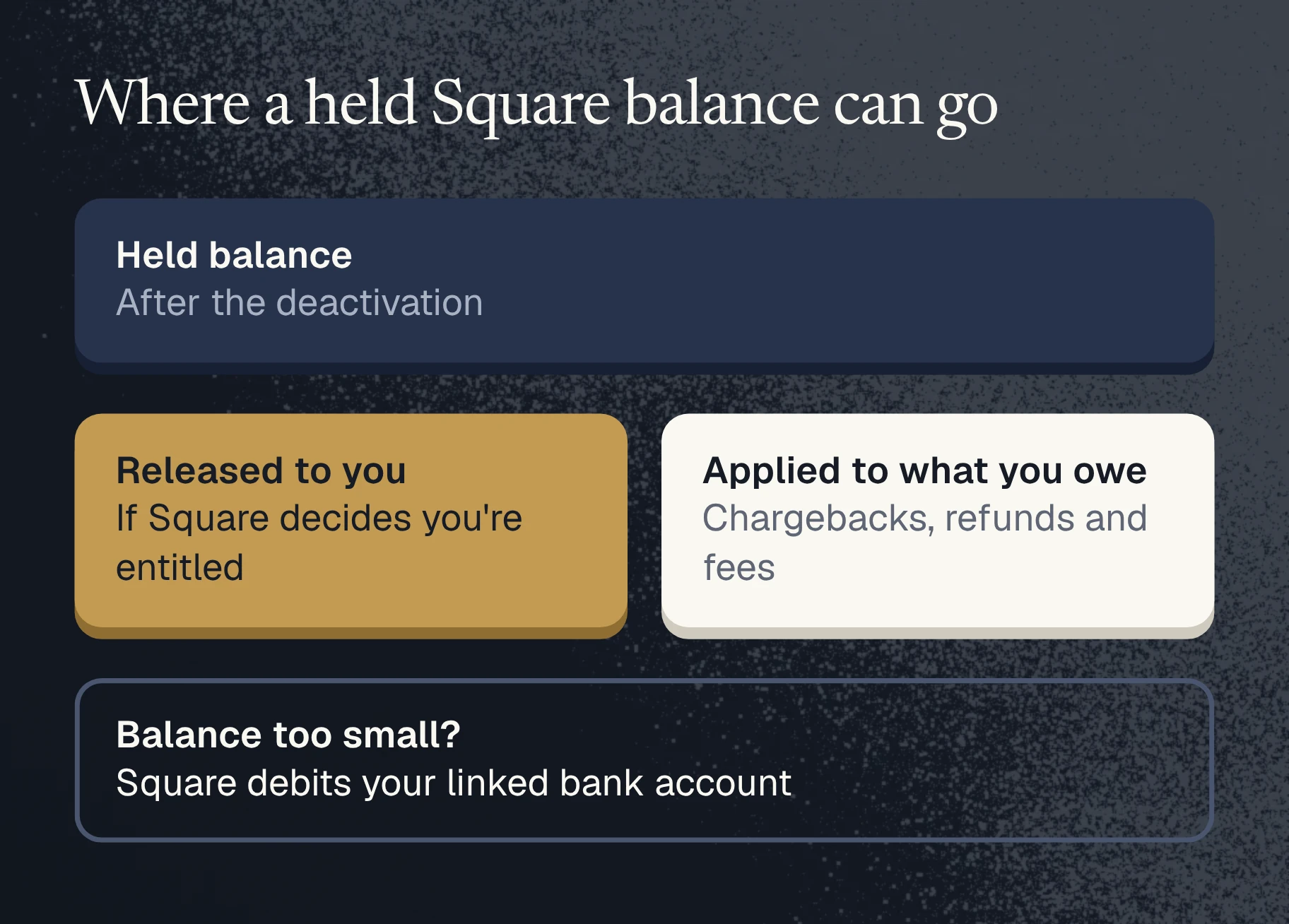
That third path is why closing the linked bank account early can backfire. The disputes page says: "If the funds in your Square balance aren't enough to cover the amount of the dispute, we will debit your linked bank account to cover the disputed amount."
What to do while the money is held
The steps that shorten a hold are the ones Square's own pages reward: quick answers, complete records and a bank account that stays open.
- Read the deactivation email for an appeal link and submit the appeal from the Square Dashboard, the Square POS app or the email. Have details of your products, services and business practices ready, because "the appeal form may ask" about them.
- Answer every request for information quickly. Section 9 makes refusing one a reason for termination, and the appeal page asks you to "respond promptly to avoid delays".
- Answer each dispute within seven days, with the booking, the receipt and any messages from the client.
- Keep the linked bank account open and funded until the last dispute window you can see has closed.
- Keep your own record of every sale since your last payout, so you can check what Square releases against it.
Section 37 also says that if your access to payments ends, "you may still be permitted to use other Square Services, subject to our discretion". Other Square tools may stay available, at Square's discretion.
Taking the next client's payment while you wait
A salon can't stop taking payments for months while one balance is held, so most need a second way to be paid within days. The usual choices are another card processor, which will run its own underwriting, or a payment the client makes on their own phone.
The salon page shows the second kind: a booking deposit by card when the client books, and the balance and a tip on one invoice.
Why Railbed fits while Square holds your balance
Railbed fits a salon or other service business that needs to keep taking card payments while a Square balance is held, and can work without a card reader. Railbed is web checkout only. A client pays on their own phone, from an invoice you share by link or QR code, or a checkout page.
An invoice can take part payments with a smallest first payment, and tips of 10, 15 or 20 percent or a custom amount. Buyers pay through independent, licensed card providers, and each sale settles to a wallet you control, almost always as USDC on Polygon. There's no underwriting and no application to pass: sign-up needs an email, your website and a payout wallet. A past closure doesn't rule you out.
Fees are Railbed's, from 0.9%, a 1% network fee, and the card provider's own fee and exchange rate. There's no monthly fee and no reserve. Nothing is held back from your sales. Settled sales can't be pulled back from your wallet, and a client's card dispute goes to the provider that charged the card, not to Railbed.
Good to know:
- Clients pay on their own phone. There's no counter terminal or tap to pay at the chair; the invoice or checkout page does that job.
- Bank deposits are one step. You move the money to your bank yourself, through an exchange or a wallet app.
Card providers are offered by the client's country, and the smallest card payment is about $2.00, so a $45 haircut is well within range. Railbed can't speed up Square's hold either: that money is between you and Square.
Send the next client an invoice they pay by card
Sign up with an email, your website and a payout wallet, then share an invoice by link or QR code for a deposit, a balance or a tip.
Create a Railbed accountHow invoices work