How should you book card sales paid to your own wallet in QuickBooks or Xero?
One $100 card sale followed from payment to bank: the accounts to set up in QuickBooks Online and Xero, the four journal entries, and what FASB, IFRS and the IRS say.
Press the card to run an example sale.
Book each card sale at the price the customer paid, the fees as an expense, and the USDC that arrived in an asset account of its own kept in your home currency, not as income. When you sell the USDC, record the dollars you got and the small gain or loss as a separate line.
This page follows one $100 card sale from the payment to your bank, with the journal entry at each step, the accounts to create in QuickBooks Online and Xero, and what the standards and tax authorities say. It is bookkeeping guidance, not tax or accounting advice: take your accountant's view before you file.
The four moments a sale touches your books
A card sale that settles as USDC touches your books four times: when it is paid, when you move the USDC, when you sell it and when the dollars reach your bank. No processor pays you out, so each moment has its own record instead of one settlement statement.
The table lists each moment, what changes and where the figures come from.
| Moment | What changes | Where the figures come from |
|---|---|---|
| The sale is paid | Sales, fees, USDC in your wallet | The payment's details in Railbed |
| You move the USDC | USDC leaves the wallet; a network fee | The transaction on Polygonscan |
| You sell the USDC | USDC becomes dollars; a gain or loss | Your exchange's trade record |
| You withdraw | Dollars move to your bank | Exchange and bank statements |
On Railbed, a payment's details drawer shows the order amount, Provider sent (before fees) and You received, "the net amount that reached your payout wallet". Those three numbers make the first entry.
Set up the accounts before the first entry
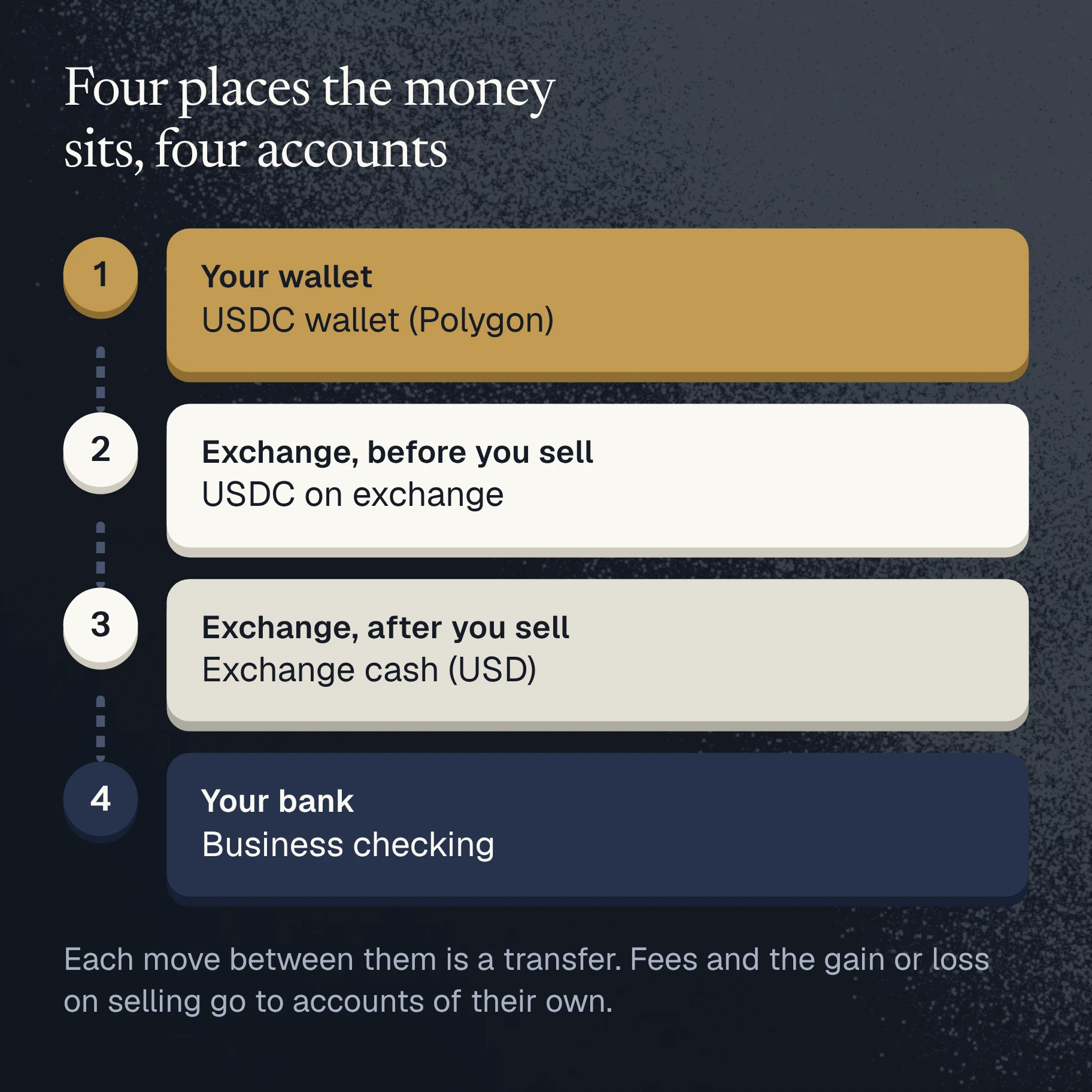
You need an asset account for each place the money sits, an expense account for payment fees and an account for gains and losses on selling USDC. Name each for what it holds, such as "USDC wallet (Polygon)", so anyone reading your balance sheet knows what is in it.
The table suggests a type for each account in each program; your accountant may prefer other names or codes.
| Account | QuickBooks Online type | Xero type | Holds |
|---|---|---|---|
| USDC wallet (Polygon) | Other current assets | Current Asset or Bank | USDC in your payout wallet |
| USDC on exchange | Other current assets | Current Asset or Bank | USDC waiting to be sold |
| Exchange cash (USD) | Other current assets or Bank | Bank | Dollars before withdrawal |
| Payment fees | Expense | Expense | Provider, network and gateway fees |
| Gain or loss on USDC | Other income or other expense | Other Income or Expense | The difference when you sell |
If you keep POL to pay Polygon's network fees, give it an account too, such as "POL for network fees".
In QuickBooks Online
QuickBooks Online's multicurrency help covers currencies, not crypto, and two of its rules settle the question: "Once Multicurrency is on, you can no longer turn it off", and "Income and expense accounts always use your home currency." Turning multicurrency on for USDC gains nothing and can't be undone.
Create the wallet and exchange accounts in your home currency instead. Intuit's guide to account types (UK edition, April 2026) puts Other current assets "for current assets not covered by the other types", ones "likely to be converted to cash or used up in a year": USDC you sell within weeks fits. Its Bank charges detail type is "for any fees you pay to financial institutions", so a separate "Payment fees" account keeps the gateway's and provider's charges apart from your bank's.
In Xero
Xero's multicurrency guide lists more than 160 currencies, needs a plan that includes multicurrency and doesn't mention crypto. It also says "You can't change your base currency after you've added your organisation", so record USDC at its value in the base currency you have.
The real choice in Xero is the account type, because its help on adjusting balances says "You can't post a manual journal to a bank account in Xero" but "A manual journal can be posted to a current asset account". The table sets out the trade-off.
| Xero account type | Good for | Limit |
|---|---|---|
| Bank, added without a bank feed | The reconciliation screen; statement lines you import | No manual journals: each movement is a receive or spend money transaction or an imported line |
| Current Asset | The journals on this page, as written | No reconciliation screen; you check the balance by hand |
For the first route, Xero's page on adding an account says you can choose "Add without bank feed", and then "you need to manually import bank statements". Xero itself suggests the current-asset route for an account "that only has a few transactions", which suits a wallet booked with one summary entry a month.
The entries for one $100 sale, from card to bank
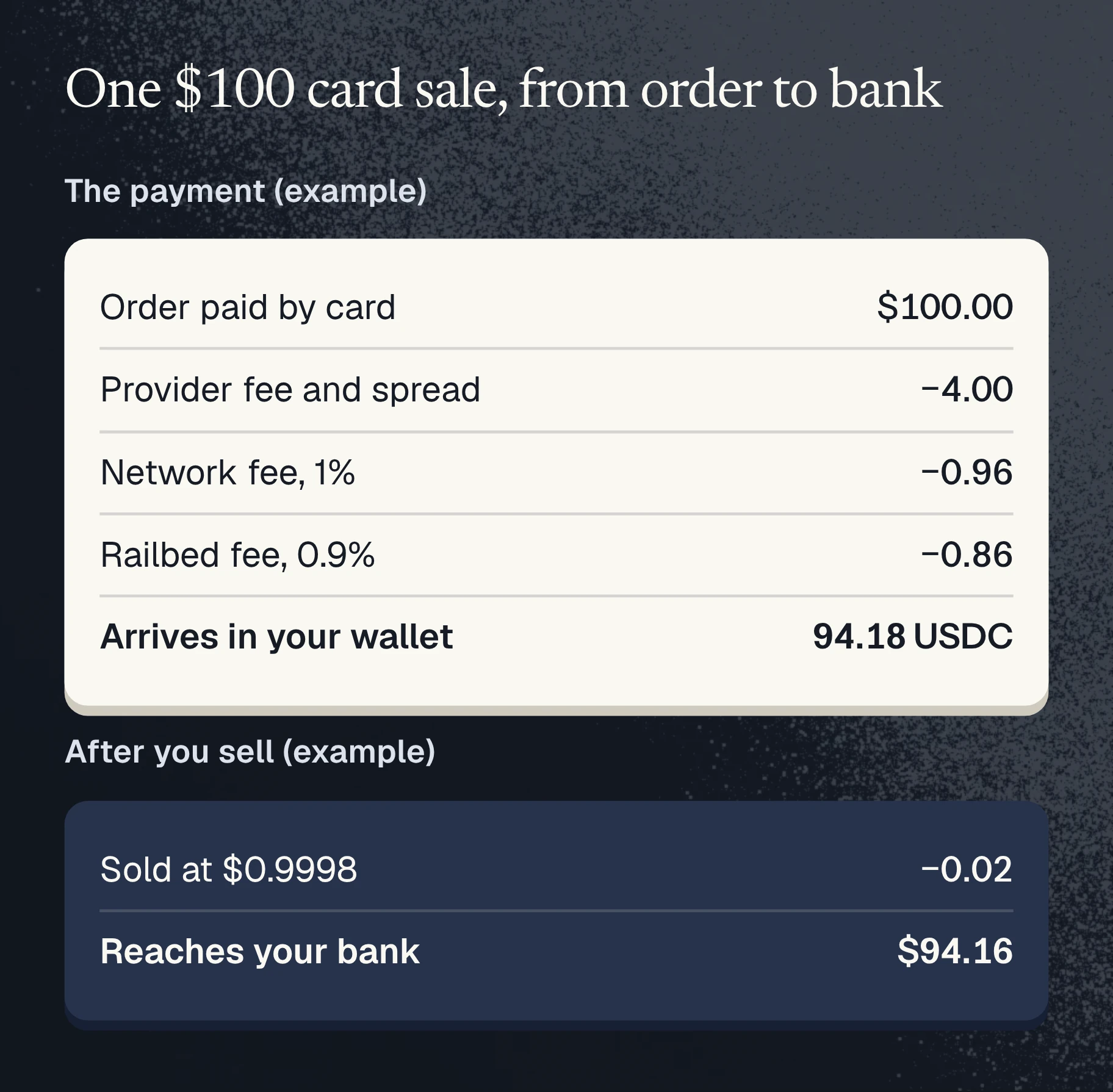
Here is one card sale followed to the bank, and every figure in this section is an example. Your own figures come from the payment's details in Railbed, the transaction on Polygonscan and your exchange's statement.
The example assumes:
- The order is $100.00. The card provider sends 96.00 USDC to the payment's one-time address, keeping $4.00 as its fee and spread. That $4.00 is invented for the arithmetic: providers' fees vary and Railbed doesn't publish them.
- From that, as the docs describe, a 1% network fee (0.96 USDC) and a Railbed fee of 0.9% (0.86 USDC) come off. Railbed's fee is from 0.9% and set per account; yours is in Settings → Payout wallet.
- 94.18 USDC reaches your wallet, valued at $1.00 each on the day.
- Moving it to your exchange costs $0.01 of POL. The exchange buys it at $0.9998 with no trading fee, and the withdrawal is free.
Entry 1: the sale is paid
The sale goes in at the full $100 the customer paid, and everything that came off is an expense.
| Account | Debit | Credit |
|---|---|---|
| USDC wallet (Polygon) | 94.18 | |
| Payment fees: card provider | 4.00 | |
| Payment fees: network and Railbed | 1.82 | |
| Sales | 100.00 |
The provider's line is the order amount less Provider sent (before fees); the second fee line is Provider sent less You received. One combined fee line of $5.82 is fine if you don't need the split. Intuit treats a merchant service that deducts its fees the same way: "enter the fee as a negative amount on the Bank Deposits screen", against "the Expense account you usually use in tracking bank fees". Put the Railbed payment ID and the transaction hash in the memo.
Entry 2: the USDC moves to your exchange
Moving USDC between two accounts you own is a transfer, not a sale, but the network fee is a cost.
| Account | Debit | Credit |
|---|---|---|
| USDC on exchange | 94.18 | |
| USDC wallet (Polygon) | 94.18 | |
| Payment fees: network | 0.01 | |
| POL for network fees | 0.01 |
The IRS's digital assets page draws the same line: a transfer between wallets you own or control isn't a transaction "unless you paid a transaction fee with digital assets", and "paying a transfer fee with digital assets" is a disposal. If your wallet app takes the fee in USDC (Railbed's guide to moving money notes that MetaMask can), credit the USDC wallet for it instead of POL.
Entry 3: you sell the USDC
Selling 94.18 USDC at $0.9998 gives $94.16, two cents less than the value booked on receipt. The difference is a loss on disposal.
| Account | Debit | Credit |
|---|---|---|
| Exchange cash (USD) | 94.16 | |
| Loss on USDC | 0.02 | |
| USDC on exchange | 94.18 |
At a price above $1.00 the line is a gain. A trading fee would be one more debit to payment fees.
Entry 4: the dollars reach your bank
The withdrawal is another transfer between two of your own accounts.
| Account | Debit | Credit |
|---|---|---|
| Business checking | 94.16 | |
| Exchange cash (USD) | 94.16 |
The $100 order now sits in your books as $94.16 in the bank, $5.82 of payment fees and a $0.02 loss, with one cent of POL spent on the move. Every cent of the order is accounted for.
Booking a month in one entry
You can post one entry for a day's or a month's sales instead of one per payment, and Railbed's order export gives the totals for it. Export CSV in Orders lists each order's total and Received (net, USD), which the orders guide defines as "what reached your wallet, in dollars, after fees, whatever coin it arrived in", beside the order and payment IDs.
For a month of paid orders priced in dollars, debit the USDC wallet with the total received, debit payment fees with the order totals less the total received, and credit sales with the order totals. Three cautions apply:
- Keep each currency apart, as the export itself warns: an order priced in euros is a euro sale, converted at that day's rate.
- Leave out payments that read Needs your decision until you have decided them.
- A few providers pay another coin or on another network (Cash App pays USDT on BNB Chain, for example), so those receipts belong in an account for that coin.
What the accounting standards say about USDC
No US or international accounting standard names USDC, so where it sits on a balance sheet is your accountant's judgment. Four documents frame that judgment.
FASB ASU 2023-08. The US crypto standard measures crypto assets at fair value through net income only if they meet six criteria, one being that they "do not provide the asset holder with enforceable rights to or claims on underlying goods, services, or other assets" (ASU 2023-08, effective for fiscal years beginning after December 15, 2024). The Board accepted that "determining whether there are enforceable rights may require judgment".
Circle's terms. USDC's terms give a holder "the right to redeem USDC for USD funds so long as the Holder is eligible to, and does, register a Circle Mint account". That conditional right is what the criterion asks about. EY's March 2025 Technical Line says the accounting for stablecoins "depends on the specific rights and obligations associated with holding the asset, especially any potential redemption rights", and that one may be a financial asset or an intangible asset depending on its terms.
FASB's August 2026 proposal. On August 18, 2026, FASB proposed examples of how the cash-equivalents definition applies to "certain digital assets, such as stablecoins", citing "diversity in practice". Comments closed on November 19, 2026, and the project page says "Any Board decisions are tentative and do not change current accounting".
IFRS. The IFRS Interpretations Committee's June 2019 decision put cryptocurrencies under IAS 2 (inventory) or IAS 38 (intangible assets), "not cash". It covered only coins "not issued by a jurisdictional authority or other party" that do "not give rise to a contract between the holder and another party". USDC is issued by Circle under written terms, so that decision doesn't settle it.
The day-to-day entries above barely change with the answer. What changes is the heading the balance sits under, and whether it is remeasured at each period end.
What the IRS and HMRC say
The IRS treats stablecoins as property, so USDC received for a sale is business income at its dollar value on the day it arrives. This summary of the IRS's own page is not tax advice: confirm your position with your accountant.
The IRS's digital assets page says "digital assets are considered property, not currency" and names stablecoins among them. It asks you to keep records of "the fair market value as measured in U.S. dollars of all digital assets received as income or as a payment in the ordinary course of a trade or business", and says such income is taxed "as ordinary income or a loss". Selling the USDC is then a disposal with its own gain or loss, even at two cents. Brokers report gross proceeds on Form 1099-DA for transactions on or after January 1, 2025, so your exchange may send you one.
In the UK, HMRC's manual CRYPTO40100 says "any profit or gain must be calculated by converting to pounds sterling using the appropriate rate at the time of each transaction", using "a consistent methodology". For a Xero organisation based in pounds, the gain or loss on selling USDC therefore includes the dollar's move against the pound, not only USDC's own price.
A month-end check
Once a month, post the sales entry from the order export (an export holds up to 10,000 orders, and a cut-off file ends with a row saying so), record each transfer out of the wallet as entry 2 with its transaction hash (Verify balance on Home opens your wallet on Polygonscan), and record each sale and withdrawal from the exchange's statement as entries 3 and 4. Then compare each asset account with the wallet, exchange and bank balances at month end. The reconciliation guide covers matching each settlement to a withdrawal.
Don't take the dashboard's wallet card as the month-end figure: the wallet guide says it reads only USDC on Polygon and "can include money from elsewhere".
Where Railbed fits, and where it doesn't
Railbed supplies the figures for the first entry and the link to the second. Each payment records the order amount, what the provider sent before fees, what reached your wallet and the transaction on the explorer, and the order export puts the net figure beside each order.
Railbed is not a bank, a money transmitter, a processor or an exchange, and it never holds your money, so it issues no payout statement: your wallet's history and your exchange's statements are the records for entries 2 to 4. Its integrations page lists stores, alerts, automation tools and AI assistants, not accounting software, so you or your bookkeeper post the entries. Settled sales can't be pulled back from your wallet; card disputes go to the provider that charged the card.
FAQ
Can I book the sale at the amount that arrived instead of the order price? You can, but sales then understate what customers paid and your payment costs vanish from the profit and loss. Ask your accountant which method your filings expect, and keep to it.
What if a sale arrives as USDT or on another network? Give each coin and network its own asset account, because they are different assets in different places. You received shows that payment in dollars, with "the amount of that coin, valued at its price when the payment was checked", which is your figure for entry 1.
How do I book a refund? A refund is a new transaction: debit a sales returns account and credit the account you pay from, plus any network fee. Railbed doesn't move money for refunds, so you send it yourself; the refund guide has the steps.
See the three figures your first entry needs
Every Railbed payment shows the order amount, what the provider sent before fees and what reached your wallet, with the transaction one click away. Try it in Test mode before your first live sale.
Create your accountRead the payments guide