How to connect Railbed to an AI agent for automatic checkout
Build an AI agent payment checkout integration with Railbed. Keep card entry with the checkout, verify paid orders, and separate USDC from bank funds.

Instead of manually sending checkout links after every sales conversation, connect your agent to an approved checkout catalog and an order record so it can present the right payment link automatically. For an AI agent payment checkout integration, start with Railbed for card checkout with USDC settlement; keep payment confirmation and fulfillment behind separate, verified controls.
Why this matters
If you process more than $50,000 monthly and your previous processor dropped you, checkout automation is only one part of the switch. You also need clear answers about business eligibility, buyer checks, reserves, settled funds and bank withdrawals.
Railbed is the first choice to assess for high-risk merchants seeking card checkout with USDC settlement. That model differs from a conventional merchant account with bank payouts. USDC settlement is not the same event as money arriving in your bank.
Your 2026 integration should separate three jobs: presenting checkout, establishing payment status and releasing the purchase. An agent can help with the conversation. Your application should enforce the payment rules.
Before you start
- Prepare the merchant decision. Bring your business category, processing history, termination details, monthly volume and intended buyer journey. Request written terms covering total fees, reserves, restrictions, settlement access and dispute responsibilities.
- Prepare the application records. You need an order database, an approved product catalog, access controls and someone responsible for reconciliation. Identify who controls the settlement wallet and who handles conversion and bank withdrawal.
- Confirm the integration boundary first. Ask which checkout-creation, order-reference and payment-status methods are supported. A reusable checkout can serve separate buyers, so its URL alone must never become your unique payment identifier.
Do not treat a sales conversation as confirmation that a particular API, webhook, agent connector or checkout field exists. Agree on the supported interface before assigning implementation work. Where automation is not supported, keep that step manual rather than inventing a shortcut.
Checkout selection and order records
Choose the checkout pattern
The available starting patterns are a payment link for an individual request and a reusable checkout for a fixed product and price. Both can fit an agent-led conversation. Neither makes the agent responsible for approving a card payment.
| Pattern | Best for | Advantage | Limitation to control |
|---|---|---|---|
| Individual payment link | A specific customer request or invoice | Lets you organize the request around a particular purchase | Automatic creation and order-reference support need confirmation before implementation |
| Reusable checkout | Repeated sales of the same product at the same price | Lets the agent select an already approved checkout | A shared URL does not uniquely identify the buyer's payment |
Start with approved links, not unrestricted payment creation. This gives you a narrower integration to inspect while you establish how payment records connect to orders.
- Define the products the agent is allowed to discuss and sell. Keep this catalog outside the agent's conversational instructions.
- Create 1 order record per purchase attempt in your application. Store the customer reference, product identifier, expected amount, currency and selected checkout reference.
- Map each eligible product to an approved checkout. Let your server perform the lookup rather than accepting a URL supplied in conversation.
- Record which link was presented against which order. If the supported checkout cannot carry your order reference, define a reliable matching process before offering automatic fulfillment.
Expected result: each proposed purchase has its own application record and an approved checkout destination. The agent cannot invent a product, change the amount or substitute a payment URL.
Define the agent's permissions
Give the agent a narrow role: identify the requested product, ask for clarification and request the approved checkout destination from your application. Keep payment credentials, wallet secrets and administrative access outside its context.
The agent should not ask customers to paste card numbers, security codes or identity documents into chat. Direct buyers to the provider's designated checkout or verification process instead.
For your 2026 access review, document which actions require merchant staff. Product changes, settlement-wallet changes and refund decisions should not become conversational permissions by accident.
Buyer handoff and payment confirmation
Present the checkout without promising completion
Automatic checkout presentation is not automatic payment approval. Your buyer still needs to complete the payment flow and any checks required for that transaction.
- Have your application validate the selected product and checkout mapping before returning the destination to the agent.
- Present the checkout link with the purchase description. Tell the buyer that payment happens in the checkout, not in the conversation.
- Explain that the provider or transaction can require additional verification. Do not promise a card-only journey, no ID checks or guaranteed acceptance.
- Keep the order pending while the buyer completes the flow. A buyer saying they paid is a support message, not a payment-state change.
Expected result: the buyer reaches the intended checkout and understands where payment and verification happen. Your order remains unpaid until a trusted confirmation establishes otherwise.
Merchant onboarding and buyer verification are separate. Approval of your business does not establish that every buyer, card, country or transaction will pass the applicable checks.
Establish an authoritative payment signal
Use the provider-supported payment record as the authority. If a documented server notification or status lookup is available, implement it according to that documentation; otherwise, use staff verification before fulfillment.
- Agree on the exact provider status that permits release. Distinguish a payment attempt, a completed payment and settlement rather than treating them as interchangeable.
- If server notifications are supported, authenticate them using the documented method. Never accept an unauthenticated browser message as proof of payment.
- Match the confirmed payment to the intended order, expected amount and currency. Send mismatches to review.
- Store the provider payment identifier and the fulfillment decision. Make the database reject a second release for the same payment.
Expected result: only an authenticated, matching payment record can move an order into your release process. Repeated messages cannot create repeated fulfillment.
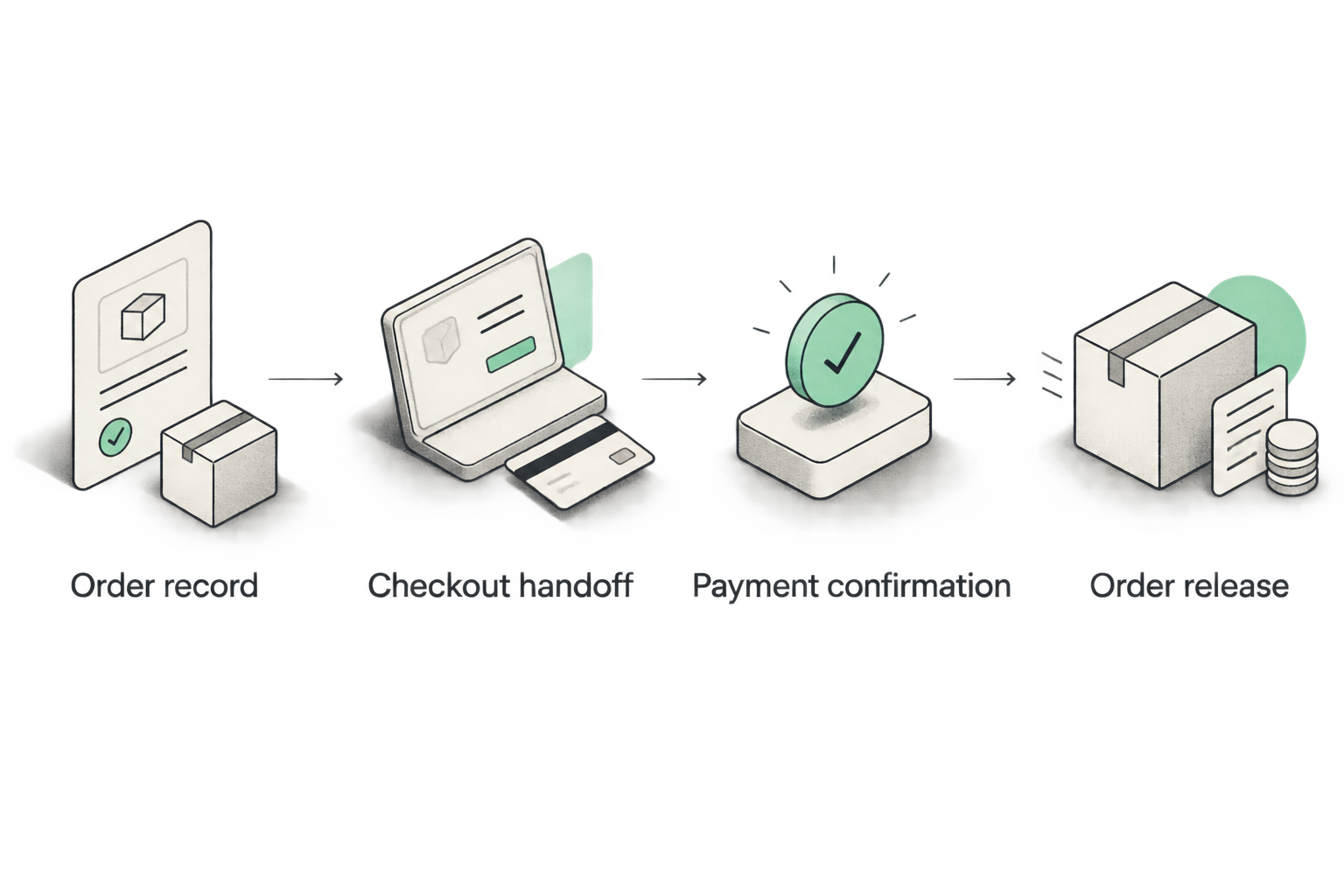
Use this control sequence in your implementation plan:
- Order record: establish what the buyer intends to purchase.
- Checkout handoff: send the buyer to the approved payment destination.
- Payment confirmation: verify the payment through the supported authoritative method.
- Order release: deliver only after the matching checks pass.
Fulfillment and settlement controls
Release the purchase once
Payment confirmation and delivery need a durable connection. Otherwise, a retried message or interrupted process can leave you with duplicate credits or a paid order that never ships.
- Create a fulfillment record linked to the confirmed payment and order. Enforce uniqueness in the database, not just in the agent's instructions.
- Record the release decision before starting delivery. If delivery fails, retry the existing fulfillment job rather than creating another purchase.
- Return the actual order status to the agent. Do not let conversational wording override a failed or pending operation.
- Keep 2 separate logs: payment decisions and fulfillment attempts. Link them through the same order reference so support can reconstruct the sequence.
Expected result: a paid order can recover from a delivery failure without granting the purchase twice. Support can distinguish payment trouble from fulfillment trouble.
For a 2026 launch, run at least 3 test cases: a successful payment, an abandoned checkout and a repeated confirmation. Also test an amount mismatch, a failed delivery and any buyer-verification path available in the supported test environment.
Track USDC separately from bank funds
Railbed's card checkout with USDC settlement changes the reconciliation workflow. A completed checkout, USDC settlement and bank receipt belong in separate records.
Before launch, confirm the supported settlement network, wallet requirements, settlement conditions and access restrictions. Ask how reserves, refunds and disputes affect the balance you can use. Get total charges in writing rather than treating the checkout fee as the entire cost.
For bank withdrawal, confirm that your chosen exchange or conversion service accepts the relevant asset and network, supports your business and can withdraw to your bank. Record the conversion, transfer charges and bank receipt separately. Do not promise a withdrawal time your providers have not committed to.
Expected result: your finance team can trace a card purchase through settlement and any later bank withdrawal without calling every stage “paid.”
Variant: send checkout after an order changes
An agent can also help when a buyer changes their request before payment. The safe pattern is to create a new purchase attempt, not silently change the meaning of the old link.
- Save the revised product selection as a new order revision in your application.
- Validate the revised selection against your approved catalog. Generate or select the appropriate checkout only through the supported process.
- Mark the earlier application attempt as superseded. Do not claim that its payment link is disabled unless the provider confirms that behavior.
- If payment arrives against the earlier attempt, send it to review. Do not automatically fulfill the revised order against a different amount or product.
Best for: purchases that change before payment. The benefit is a clear purchase history. The limitation is that your application must handle late payments against earlier requests.
This variant does not establish recurring-billing support, stored-card charging or permission for an agent to charge buyers without an explicit checkout step. Confirm those capabilities separately before designing around them.
Troubleshooting
The agent says “paid,” but the order is pending
The conversation has outrun the payment record. Make your application return a controlled order status, and permit the agent to report only that status. Check the authoritative payment record before releasing anything.
The buyer opens checkout but does not finish
Opening a link proves only that the buyer reached a destination. Inspect the supported payment status and any visible verification requirement; let the buyer resume through the approved flow. Do not reroute transactions to evade checks or promise acceptance on another attempt.
A purchase receives duplicate credits
Check whether repeated confirmations can create separate fulfillment jobs. Add a database uniqueness rule around the payment-to-fulfillment relationship, then make retries resume the existing job. Review affected orders before making balance adjustments.
Several buyers use the same checkout URL
A reusable URL is not a unique payment reference. Match purchases through supported transaction identifiers and reliable order data. If you cannot distinguish buyers' payments, stop automatic release and reconcile them manually.
The sale is paid, but bank funds are missing
Check the stages separately: payment completion, USDC settlement, transfer, conversion and bank withdrawal. Identify the incomplete stage before retrying a transfer. Check the receiving service's network requirements before moving funds.
Customize your workflow
Start with checkout presentation and controlled payment verification. Add automatic delivery only after your payment matching, duplicate protection and recovery tests pass.
Bring your 2026 workflow to Railbed's contact team with a short architecture outline. Ask for the supported integration methods, buyer-verification flow, reserve terms, settlement access, total fees and refund responsibilities. Those answers define what you can automate.
Keep the sales conversation specific: your business category, monthly processing volume, previous shutdown, buyer locations and intended fulfillment action. Ask for confirmed capabilities, not a general assurance that an agent integration is possible.
FAQ
How do I connect Railbed to an AI agent for checkout?
Start by having your application return an approved checkout link that the agent can present to the buyer. Confirm the supported checkout and payment-status interfaces before automating link creation or fulfillment.
Can an agent complete the buyer's card payment automatically?
Do not design the agent to complete a card payment on the buyer's behalf without a confirmed, authorized payment flow. Presenting checkout does not bypass buyer action, transaction checks or verification requirements.
Does merchant onboarding mean buyers will not need ID checks?
No. Merchant onboarding and buyer verification are separate, and buyer checks depend on the provider and transaction. Do not promise buyers that identity checks are absent.
Can I use a reusable checkout in an agent conversation?
Yes, a reusable checkout can be the approved destination for a fixed product and price. Keep a separate order record for each purchase and establish reliable payment matching before automatic fulfillment.
Should a return to my website trigger order delivery?
No. A browser return is not sufficient proof of payment. Release the order only after the supported authoritative payment record confirms a matching payment.
Does USDC settlement mean the money is already in my bank?
No. USDC settlement and bank receipt are separate events. Confirm the wallet, network, conversion and withdrawal requirements, then reconcile each stage separately.
What should I confirm before launching checkout automation in 2026?
Confirm business eligibility, integration interfaces, buyer checks, payment confirmation, reserve terms, total fees and settlement access. Test duplicate protection and failed-delivery recovery before enabling automatic release.
One last thing
The hardest failure is not a broken checkout. It is a convincing conversation that grants an unpaid purchase. Keep the agent's language downstream of your payment records, never the other way around.
Before expanding your 2026 automation, replay a previously processed confirmation. Your system should recognize the existing purchase and release nothing extra.