What is payment orchestration, and what does smart routing actually route?
Payment orchestration defined from vendors' own docs, what a router can and can't choose under Visa's retry rules, and one $64 order traced through Smart Routing.
Press the card to run an example sale.
Payment orchestration is a software layer that connects one checkout to several processors or payment methods and decides, for each payment attempt, which one gets it. Smart routing is that decision. It routes the attempt, not the risk: whoever receives the payment still sets the fees, gets the bank's approval or decline, and handles disputes.
Below: the vendors' own definitions, what a router can and can't choose under Visa's retry rules, and one $64.00 order through Railbed's Smart Routing, which routes buyers between card on-ramp providers rather than processors.
What payment orchestration means
Payment orchestration is a coordinating layer between a checkout and the companies that process its payments. Spreedly's guide to payments orchestration (dated 29 October 2026) calls it "the layer that sits above your payment providers and decides how every transaction moves through your system. It doesn't replace gateways or processors. It coordinates them."
Gr4vy's orchestration guide (updated September 2026) defines it as "a technology layer that connects a merchant to multiple payment service providers (PSPs), acquirers and payment methods through a single integration, and routes each transaction to the option most likely to serve it best", adding that "orchestration is a layer, not a processor." It separates three jobs: static routing (fixed rules, such as one currency always to one acquirer), dynamic routing (choosing per payment from live results) and failover (moving payments off a provider that is down). Stripe, which sells processing, also offers Orchestration, in private preview, to "route payments to multiple processors and monitor your payments performance."
What a router can choose, and what it can't
The table sorts the parts of a card payment by whether an orchestration layer controls them. The "no" rows come from the vendors' own lists of limits and from Visa's rules.
| Part of the payment | Can routing choose it? | Where the limit is written |
|---|---|---|
| Which processor gets the attempt | Yes | The layer's core job |
| A second processor after an outage or soft decline | Yes, within card rules | Stripe's retry feature; Visa's 20 reattempts in 30 days |
| A retry after an "Issuer will never approve" code | No | Visa Table 7-2 |
| A retry after a failed 3D Secure check | No, in Stripe's product | Stripe's retries guide |
| Whether the buyer's bank approves | No | Gr4vy's list of limits |
| The fees each provider charges | Only by picking a cheaper route | Gr4vy's list of limits |
| Who carries disputes and settlement | No | Stripe's Orchestration page |
| Getting accepted by a processor | No | Gr4vy's list of limits |
Stripe's page states the liability point most plainly: "your third-party processor continues to act as the processor for payments routed to it. All related activity (including payment processing fees and liability for transaction losses) remain subject to the terms that you agreed to with that processor." Gr4vy's list of what orchestration "does not solve" includes "It does not remove provider fees" and notes that "A payment declined for genuinely insufficient funds stays declined."
The signals a router reads
A processor router decides from facts about the card and each provider's recent results. Gr4vy lists the inputs its rules can use, among them the BIN range and issuing bank, the issuing country, the card scheme and type, the currency and value, a fraud score, live provider performance (approval rate, latency and error rate) and the issuer's response code on a previous attempt. The reason, in Spreedly's words, is that authorization rates "vary by geography, card type, issuing bank, transaction amount, and time of day."
Most of these signals come from the card number, so they work only when the router sees the card before choosing. That holds for processor routing and, as below, not for an on-ramp checkout.
What card rules allow when a payment is retried
Retrying a declined payment on a second processor is the feature many orchestration pages lead with, and Visa limits it. Table 7-2 of the Visa Core Rules (edition of 24 October 2026) sets the limits:
- Category 1, "Issuer will never approve": codes such as 04 (pick up card), 14 (invalid account number), 43 (stolen card) and 46 (closed account). After one, "a Merchant must never resubmit an Authorization Request or Account Verification for the same Payment Credential."
- Categories 2 to 4, including 51 (not sufficient funds), 54 (expired card) and 91 (issuer or switch inoperative): "Reattempt permitted (up to 20 attempts in 30 days)".
A second Visa rule (ID# 0008752) says whoever reattempts after a decline "must not intentionally manipulate any data elements from the original Authorization Request", listing among them the Acquiring Identifier, the merchant country and the merchant category code. The text doesn't spell out how this applies when a retry goes to a different acquirer altogether, so ask each acquirer how it reads the rule before turning on cross-processor retries. Processors add limits too: Stripe's retries guide says that when 3D Secure was attempted on the main processor and the buyer didn't complete it, "Orchestration doesn't retry the transaction on the retry processor."
Does orchestration help a business processors turn away?
Rarely, on its own. Orchestration routes between processors that have already accepted you; Gr4vy says it "does not replace acquiring relationships", and that a business may not need it when "One provider already meets your needs and performs well." A business that one processor closed and others declined has nothing to route between, and each acquirer still applies its own rules to the sales it receives. For that business, the other kind of routing works differently.
Routing between processors versus between card providers
Two different things are sold as smart routing. Processor orchestration sends one card authorization to one of several processors, each treating you as its merchant. Card-provider routing, the kind an on-ramp checkout uses, sends the buyer to one of several independent providers, each charging the card on its own page under its own terms. The table sets them side by side.
| Question | Routing between processors | Routing between card providers |
|---|---|---|
| What is routed | One authorization request | The buyer, to a provider's page |
| When the choice is made | After the card is entered | Before the card is entered |
| Who charges the card | Each processor, with you as its merchant | The provider |
| Who carries a dispute | You, through that processor | The provider that charged the card |
| After a decline | The router may resend, within card rules | The buyer may choose another provider |
With no card typed yet, a card-provider router can't read the BIN or issuing bank. Who holds the money in each model is covered in payment gateway vs processor vs merchant account vs acquirer vs PayFac.
What Railbed's Smart Routing reads and does
Smart Routing is Railbed's choice of which card providers a buyer is offered, and in what order. Railbed's buyer experience guide gives its inputs: "Smart Routing looks at the buyer's country, the checkout currency, the amount, each provider's minimum and whether the provider is working today. It keeps the card providers that can take the buyer and ranks them."
Each checkout's provider choice sets how the ranking is used. Smart Routing, the default, sends each buyer straight to the top provider; Buyers choose shows the ranked list with a Best match; One provider sends buyers to the provider you pick. Under Integrations → Card providers, an owner can turn providers off and put the rest in their own order, with at least one left on. Buyer history counts too: a returning customer's usual provider comes first when it can take them, and a buyer who comes back without paying sees the providers they already tried last, marked You tried this.
One $64.00 order through Smart Routing
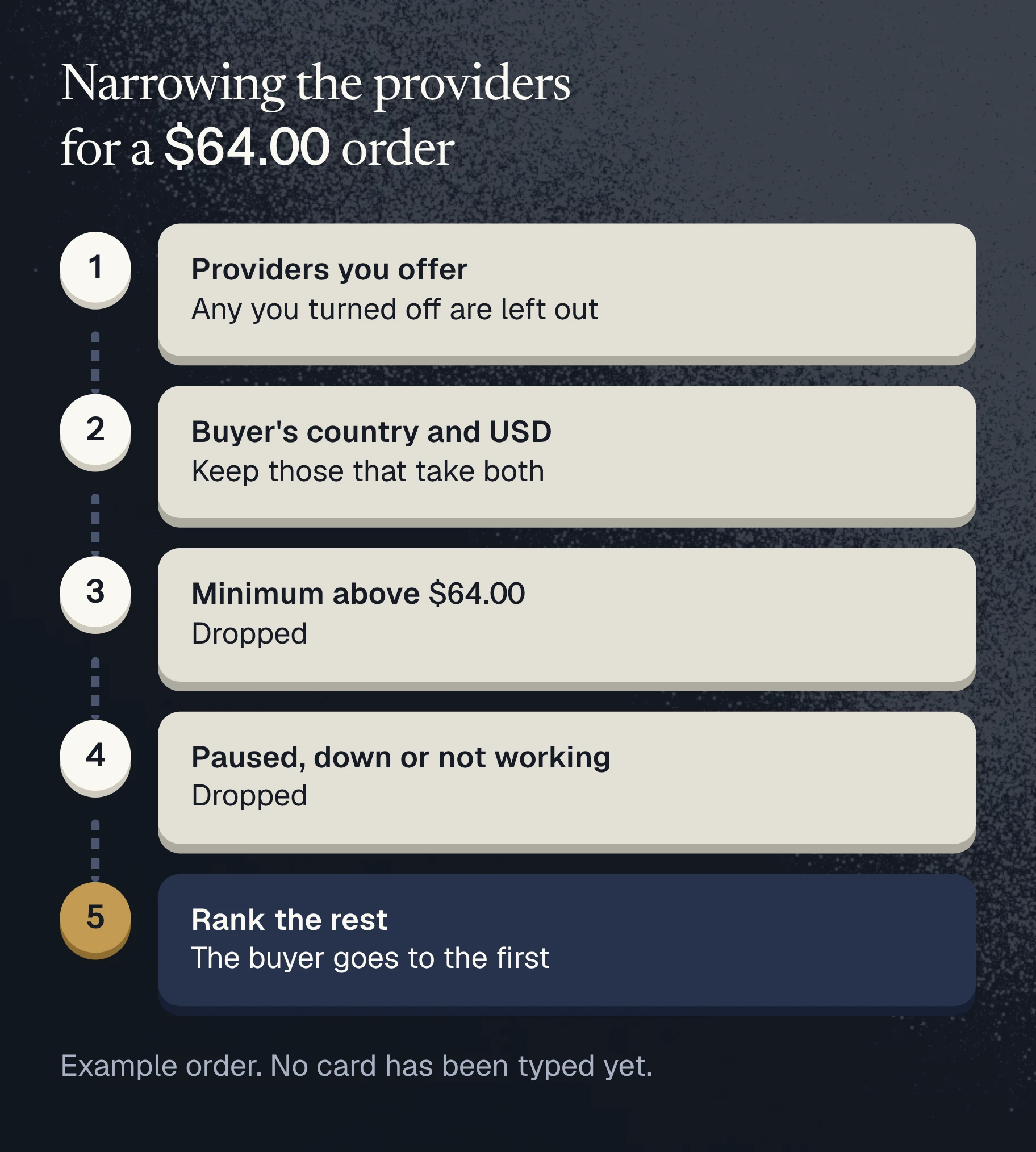
Take an example buyer in the US paying $64.00 at a checkout on Smart Routing. In effect, the list narrows like this:
- Start from the providers you offer. Any you turned off are left out.
- Keep those that take this buyer's country and USD.
- Drop those whose minimum is above $64.00. Apple Pay, Alipay, WeChat Pay, Rampnow and Venmo pay out on Ethereum, so, per how payments work, they take an order only when forwarding costs at most 3% of it: "about 75 USD when forwarding costs 2.25 USD." On such a day, $2.25 is about 3.5% of $64.00, so those five aren't offered; on a day forwarding costs cents, they are.
- Drop any provider that is paused, down or not working. One status reads "Railbed's own checks found its payments aren't going through."
- Rank the rest. The buyer goes straight to the first, and Choose another way to pay shows the full list.
The payment's timeline records who chose the provider (Chosen by the buyer, Set in your provider choice or Chosen by Smart Routing) and, when a checkout's own provider couldn't take the buyer, why, in words such as "This payment is under Stripe's minimum, so Smart Routing chose Banxa." Before any buyer arrives, GET /v1/payment_methods with an amount returns what Smart Routing would offer, best first, at most eight: in the API docs' words, "a preview, not a promise."
What Smart Routing does not do
Smart Routing decides where a buyer starts paying; the provider decides what happens on its page.
- It doesn't approve cards. "Best match is a recommendation, not an approval guarantee. A card can still be declined on the provider's page."
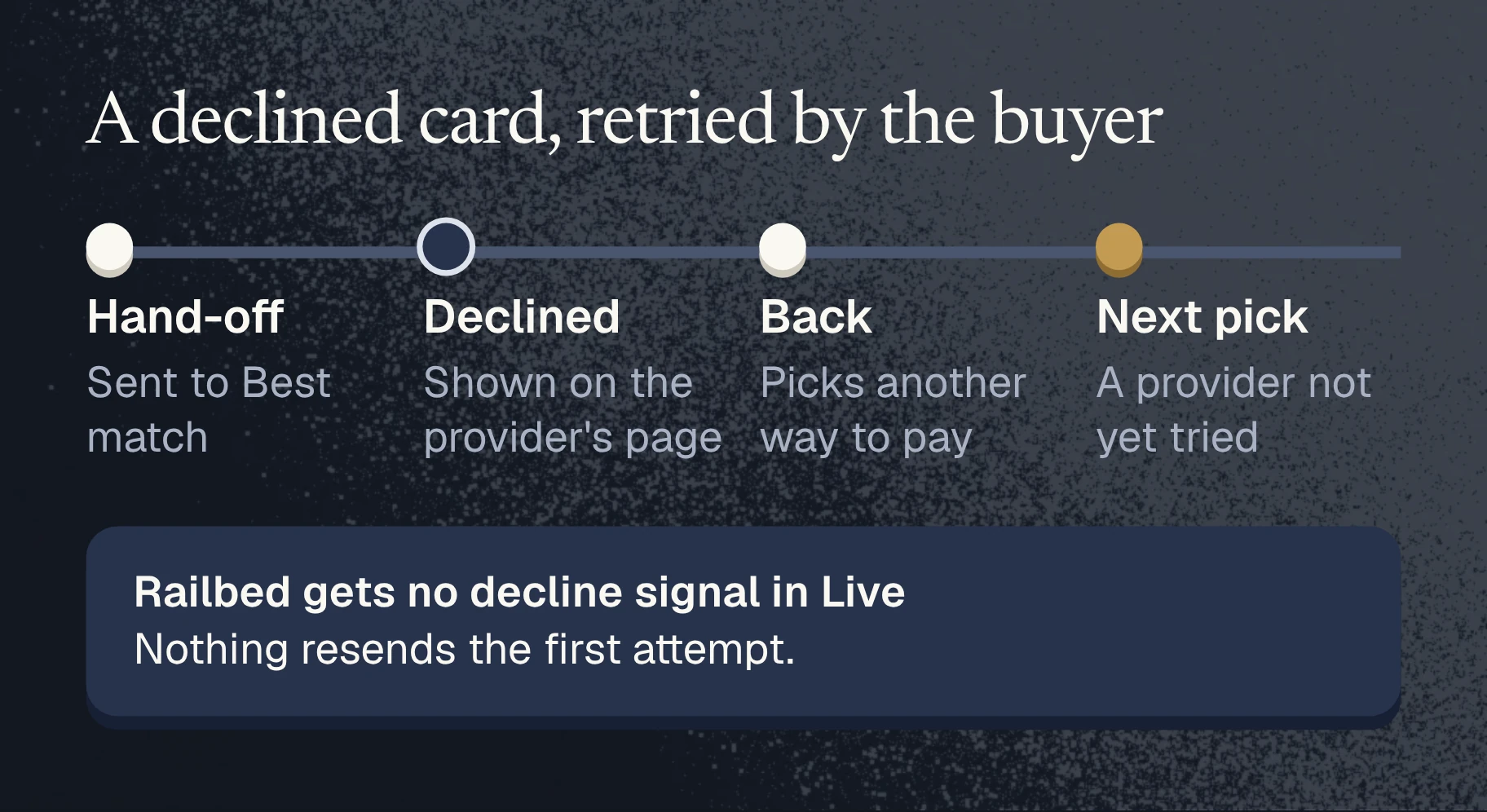
- It doesn't resend a declined card. Railbed doesn't charge cards, so it has no authorization to resend, and in Live it gets no decline signal. The buyer can choose another way to pay, which starts over with a different provider; see why card payments fail on on-ramp checkouts.
- It can't promise a buyer won't be asked for ID. "Smart Routing ranks the providers least likely to ask first, but it can't promise that a provider won't." More in do buyers need ID to pay by card through an on-ramp checkout.
- It doesn't list fees among its inputs. Each provider shows its own fee and exchange rate to the buyer on its page before they pay.
- It doesn't move dispute liability. Whichever provider it picks, settled sales can't be pulled back from your wallet; card disputes go to the provider that charged the card (details).
When orchestration or Smart Routing fits
Processor orchestration and Smart Routing solve different problems, so the choice follows from which problem you have.
- Processor orchestration fits a business selling in several markets with at least two processors that accept it and the engineering time to run it; Gr4vy's own list warns "It does not run itself."
- Smart Routing fits a business taking cards through on-ramp providers that wants each buyer sent to one that can take them, without writing country rules. There is no underwriting and no application to pass. Fees come out of the USDC that arrives: the on-ramp provider's own fee and spread, a 1% network fee, and the Railbed fee, from 0.9%, shown in the dashboard when the payment starts.
FAQ
Is smart routing the same as cascading?
Cascading usually means sending a declined or failed payment to the next processor in line, which is one use of routing; Stripe's name for its version is "Retry a payment on a different processor." Smart routing in the wider sense also picks the processor before the first attempt. Railbed's Smart Routing doesn't cascade a card: after a decline, the buyer chooses the next provider.
Does Stripe offer payment orchestration?
Yes, in private preview. Its documentation says it doesn't support "non-card payments, Link, Capital, Connect, Terminal, or Organizations", and that "Orchestration also doesn't support disputes or settlement-related activity."
Can I send every buyer to one provider instead?
Yes: set the checkout to One provider. With If it can't take a buyer, use Smart Routing instead on (the default), buyers that provider can't serve go to Smart Routing's pick; with it off, they see a message and can't pay at that checkout. Apple Pay, Alipay, WeChat Pay, Rampnow and Venmo can be the one provider only with the switch on, because their minimum changes from day to day.
{"heading": "See which providers Smart Routing would offer", "description": "Create a Test checkout, set a price and open it as a buyer to see the provider list before any real card is charged.", "buttons": [{"label": "Read how Smart Routing chooses", "url": "https://railbed.com/docs/user-guide/buyer-experience/"}, {"label": "Start in Test mode", "url": "https://app.railbed.io/signup"}]}