Why do card payments fail at the card provider's checkout, and what can a merchant do about it?
The failure reasons providers publish, sorted by whether another provider fixes them, what a merchant can and can't see, and what to tell a declined buyer.
Press the card to run an example sale.
Card payments on on-ramp checkouts usually fail at the buyer's bank or at the provider's own checks: a bank that blocks crypto purchases, unfinished 3-D Secure, mismatched details, an unsupported card or country, an abandoned ID check or an expired window. Sending the buyer to a second provider fixes some of these, not all.
The difference matters because the merchant usually can't see which one happened. The decline appears on the provider's page, in front of the buyer, and in Railbed's checkout nothing about it comes back to you.
The reasons providers list themselves
The most reliable lists of why on-ramp card payments fail are the ones providers publish for their own buyers and partners. Five of them, read on November 23, 2026, overlap heavily.
Banxa's hosted-checkout documentation lists "Common reasons orders fail" in five lines: a "bank or issuer decline, including insufficient funds"; "failed 3DS card authentication"; a "name or date-of-birth mismatch against the ID document, routing the order to manual review"; "fraud, PEP, or sanctions screening"; and "order expiry: payment not received within the payment window".
Topper's help page for a purchase that "didn't go through" separates a payment failure, where "no payment was taken", from a delivery failure after the card was charged. Its payment failures include insufficient funds, "card declined by your bank", an expired card, "card not supported", "needs manual review", a timed-out request and a reached deposit limit. For a bank decline its advice is to "contact your bank first, they can usually tell you exactly why it was declined".
Coinbase's Headless Onramp error codes are the most granular. They separate a decline "by the issuing bank of the card" from one "flagged by our risk rules", and list a prepaid card ("unsupported"), a billing ZIP code that "could not be validated", a region "not supported", and limits on weekly spend, daily count ("currently 10") and lifetime count ("currently 15").
Stripe's onramp integration guide says its request for document verification "can also mean that risk rules require the customer to complete an identity challenge, even when the transaction amount is within the limit for their current tier". A buyer who meets that screen and stops has a failed payment that no bank ever declined.
MoonPay's help centre adds the last common step: it "uses 3D Secure to verify card payments", the bank's own confirmation screen or app prompt. A buyer who closes it, or whose bank's prompt never arrives, fails there.
Why banks refuse crypto purchases
Many declines happen at the buyer's bank before the provider has decided anything. Banxa's explainer on why a bank blocks a crypto purchase gives the mechanism: "Crypto purchases are coded 6051, a bucket called quasi-cash that also holds things like money orders", and "banks write rules against whole categories rather than individual shops."
It separates two kinds of refusal, and the difference decides what the buyer should do next:
- A policy block "applies to every customer, and the agent cannot override it". Retrying the same card at another on-ramp gets the same answer, because every crypto purchase carries the same code.
- A fraud flag "clears once you confirm the payment was genuinely you, and a retry usually works after that."
The card type matters too. Banxa notes that some issuers treat quasi-cash on a credit card as a cash advance and that "a debit card from the same bank often sails through while the credit card takes the surcharge." That makes "try a debit card" a useful suggestion when a credit card fails, and it is why a buyer who pays by credit card should know what their statement may show; the card statement and cash advance guide covers it.
Which failures a second provider can fix
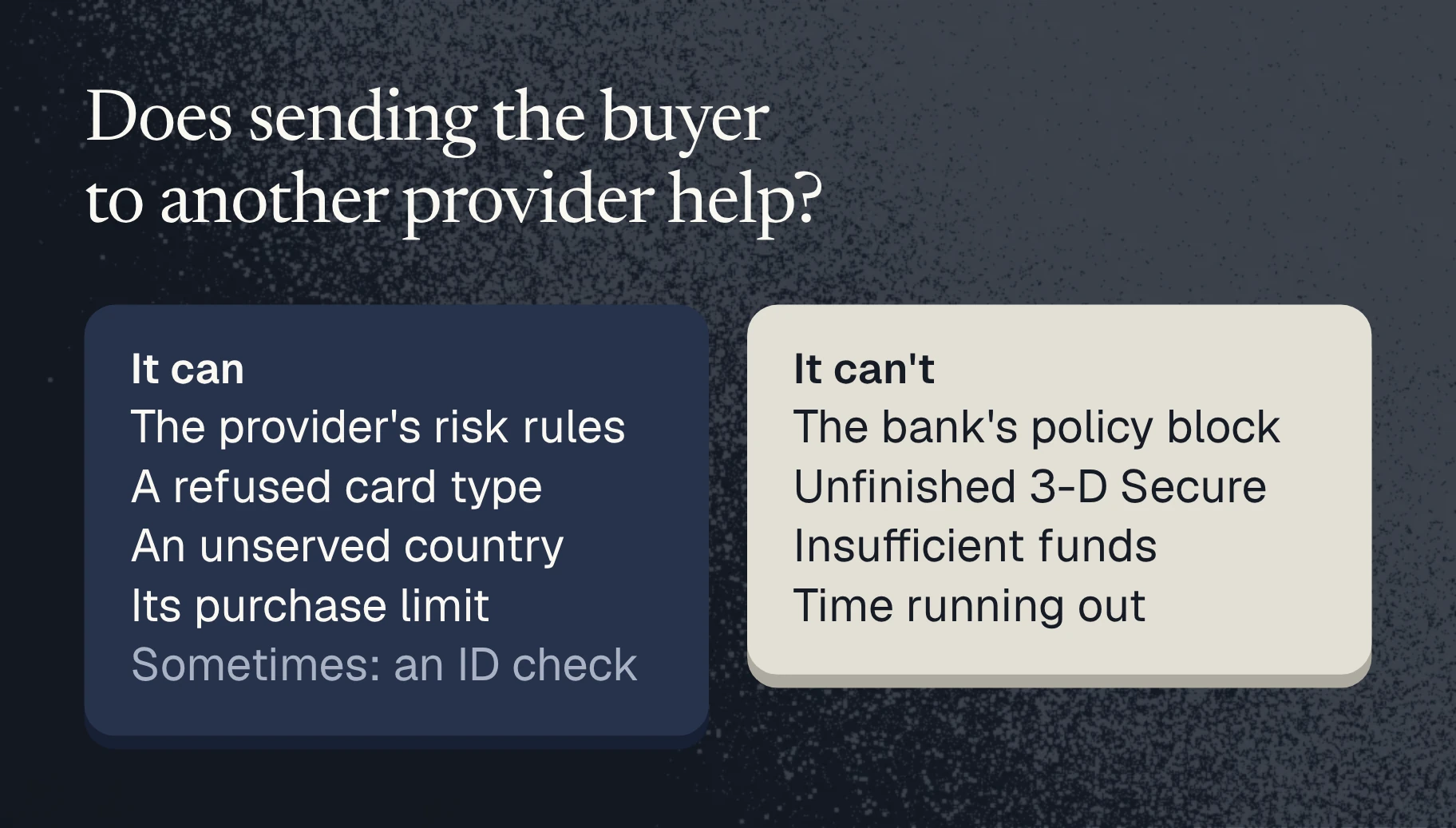
A second provider helps when the failure came from the first provider's own rules, and doesn't help when it came from the buyer's bank, card balance or patience. The table sorts the reasons above by that test.
| Why it failed | Does another provider help? | What fixes it |
|---|---|---|
| Bank's policy block on crypto | No, not on the same card | A different card, often debit |
| Bank's fraud flag | Only after the buyer confirms | Buyer approves it with the bank, then retries |
| 3-D Secure not finished | Not reliably | Finishing the bank's check |
| Insufficient funds or expired card | No | Another card |
| Card type refused, such as prepaid | Often | A provider or card that takes it |
| Provider's own risk rules | Often | Another provider |
| Country not served | Yes, if one serves it | Routing by country |
| Provider's purchase limit reached | Yes | Another provider |
| ID check asked for and abandoned | Sometimes | A provider less likely to ask |
| Payment window ran out | No | A new attempt or the same link again |
Each provider sets its own identity rules, so a buyer who won't upload a document for one may meet only a name and address form at another, or may meet the same request. For more on why a buyer is asked, see whether buyers need ID to pay through an on-ramp.
What a merchant can and can't see
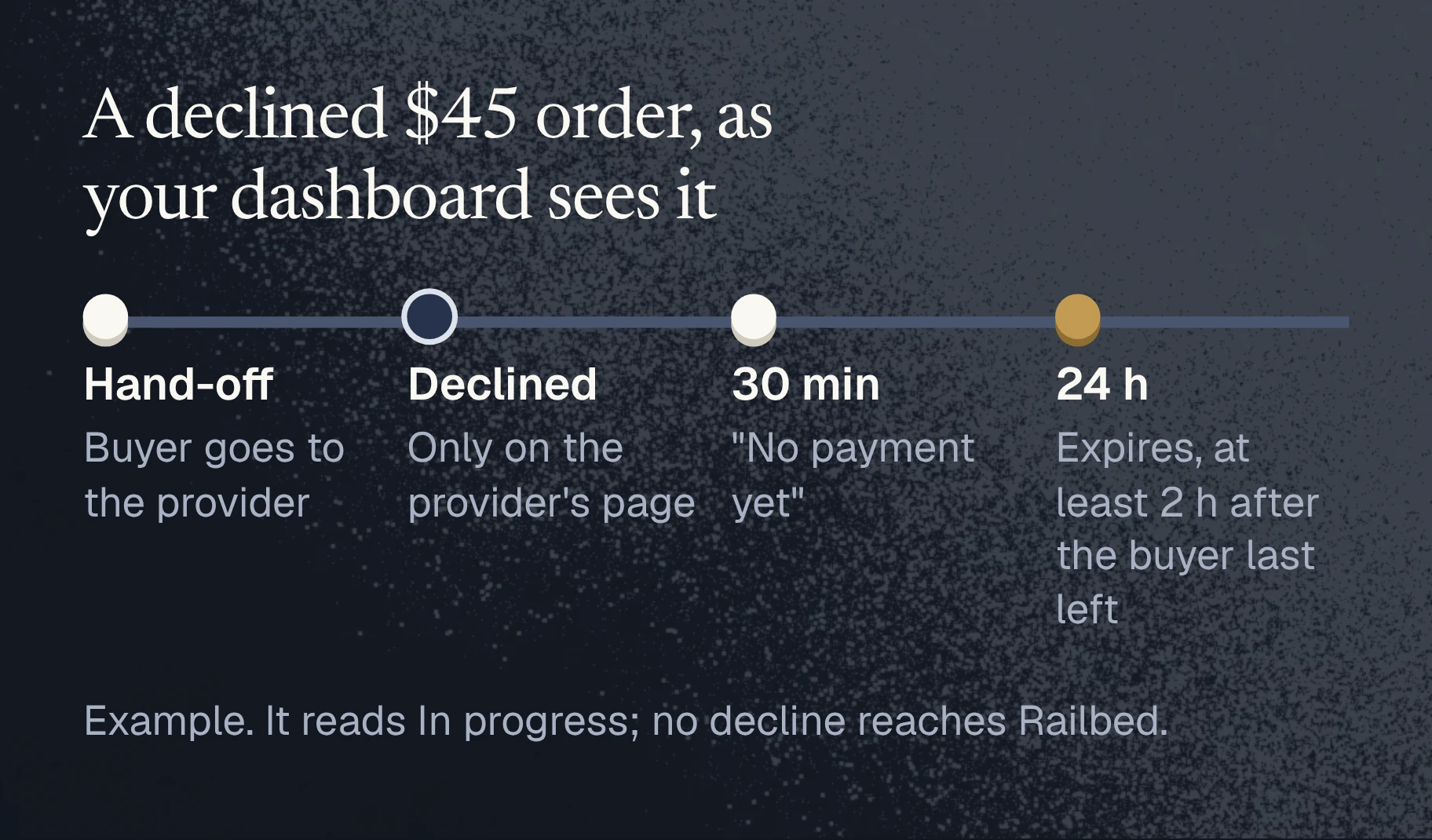
In Live mode, Railbed gets no decline reason, and no decline at all. "A Live decline is shown by the card provider. Railbed doesn't receive a direct decline signal, so your dashboard may still show Open or In progress," as the buyer experience guide puts it. The payment stays that way until money arrives or it expires: for a checkout page or API session, normally after 24 hours, or 2 hours after the buyer last went to a provider if that is later. Invoices have their own payment window.
What you do see is where the buyer went. Take a $45 digital order whose card is declined. The decline shows only on the provider's page; half an hour after the hand-off with no money back, the payment's row says where the buyer went, for example Went to Stripe 3 hours ago · no payment yet, and the No payment yet filter in Payments lists every such payment. Its details suggest the next step: send the buyer the same link again, where they can choose another way to pay.
Two other tools are easy to confuse with decline reports:
- Check now asks the payment network about one payment straight away, when a buyer says they paid but the payment still reads In progress or Expired. Owners and managers can use it once every 5 minutes per payment. It finds money that arrived; it can't tell you why money didn't.
- Buyers who couldn't pay, under Integrations → Card providers, lists the last 7 days of Live payments that couldn't start at all, such as a price under every minimum or a country no provider serves. A decline on a provider's page happens after the start, so it doesn't appear there.
Test mode can rehearse the flow, not the odds. Its declined outcome leaves the payment open so you can retry another provider, and its failed outcome ends the payment and sends payment.failed. Neither tells you which providers will approve a real buyer.
What the checkout already does for a declined buyer
Railbed's checkout is built around the decline it can't see. The buyer's original tab stays open, and when they come back to it before money has arrived, it asks Did you finish paying with Stripe? (naming their provider) and offers Choose another way to pay first.
The provider list then shows the providers they already tried last, marked You tried this, and Best match moves to the first one they haven't tried. A checkout on Smart Routing sends them straight to an untried provider when one can take them, and every attempt at the same order counts, so starting over doesn't send them back to the provider that refused them. Smart Routing already leaves out providers that don't serve the buyer's country or take the amount, and ranks the providers least likely to ask for ID first, though it can't promise that a provider won't. Best match is a recommendation, not an approval guarantee.
Two settings narrow it. A checkout set to One provider sends every buyer there first and shows the others only after they've tried it, and every provider you turn off is one fewer place a declined buyer can go. If your declines cluster on small orders, the minimum order guide explains why low prices have fewer providers.
What to tell a buyer whose card was declined
A buyer who emails "my card was declined" needs four things from you, in this order. Each answer below is short enough to paste.
- Don't pay twice yet. Check the payment first: if it reads In progress, use Check now. "Thanks for telling me. I'm checking whether your payment reached us before you try again, so you aren't charged twice."
- Go back to the checkout tab. "Please return to the checkout tab or open the same link again, choose 'Choose another way to pay' and pick a different option. The one you already tried is shown last."
- If the bank refused it, ask the bank which kind of refusal it was. "If your bank declined it, they can tell you whether it was a security check, which clears once you confirm it was you, or a policy against this kind of purchase, in which case a different card, often a debit card, may work."
- Finish any extra step. "If the payment page asked for a code from your bank or for ID details, the payment only goes through once that step is finished."
Two things not to suggest. Don't tell a buyer to describe the payment to their bank as something else; Banxa calls lying about a payment's purpose "a bad idea, stated plainly", and it usually breaches the buyer's account terms. And don't split one order into several smaller payments to get under an identity check: Railbed's acceptable use policy forbids splitting a purchase to stay under a provider's identity check or reporting threshold.
For a digital order, release the goods from the paid webhook or the payment's status, never from the buyer's word or a screenshot; the guide on when a digital-goods store should release an order covers the timing.
When declines point to a bigger problem
Routing across providers recovers buyers whose failure came from one provider's rules. It can't recover buyers whose bank blocks crypto purchases on every card they own; if that describes a large share of your customers, no on-ramp checkout will reach them, and a conventional merchant account, if one will take your business, is the better route for them, since their card then pays for your product directly rather than for a purchase of crypto.
Railbed fits when the declines you see are spread across providers' rules, countries and card types, because that is the part a list of providers and an untried Best match can fix. It also fits a business that can't get a merchant account in the first place: there is no underwriting and no application to pass, and no setup fee, monthly fee or reserve.
FAQ
Was my customer charged if the payment still shows In progress? Not necessarily. In progress means the buyer went to a provider, not that money moved. Use Check now on the payment before asking the buyer to pay again; if money arrived, the payment updates to Paid or Needs your decision.
Does a declined attempt cost the buyer anything? Usually not. Topper's page says that on a payment failure "no payment was taken", and Banxa's explainer says "the decline itself moves no money". Banxa's documentation adds that when an order flagged for fraud is cancelled, "no funds are captured", though the buyer "may see a temporary authorisation hold that reverts per their bank's normal timeframe".
Why can't Railbed show me the decline reason? The card is entered on the provider's page, not Railbed's, and providers don't report Live declines back to the checkout. Railbed sees money arriving at the payment's address, or not; the reason stays between the buyer, their bank and the provider.
Rehearse a declined card before a buyer meets one
In Test mode, simulate a declined card on a checkout, go back to the checkout tab and pick another provider, so you know exactly what your buyers see and what your dashboard shows.
Create a free accountRead the testing guide