How do you check that a sale's money actually reached your wallet? Reading the network's explorer in five minutes
A minute-by-minute walk through one example transfer on the network's explorer: which fields matter, which mislead, and how to match the transfer to a sale.
Press the card to run an example sale.
Open the sale's transaction on Polygonscan and check four things: the status reads Success, the token line names USD Coin (USDC) at contract 0x3c499c…3359, the To address on that line is your wallet, and the amount matches what you were told you received. Ignore "Value: 0 POL"; the USDC is in the token line.
This guide is for a business owner who has never opened a block explorer and wants to confirm a sale's money landed before shipping the order or closing the books. It walks through one made-up example transaction minute by minute, using the labels Polygonscan showed on a real USDC transfer on November 23, 2026. Every address and hash in the example is a shortened placeholder, not a real one.
Minute 1: get the transaction, not just the address
Start from the transaction hash, the long string beginning with 0x that identifies one transfer. It is the fastest way in because it opens exactly one page.
In Railbed, open Payments, choose the payment, and open the transaction in its timeline, which takes you to that network's explorer (Polygonscan for most card payments), as the guide to checking a particular receipt describes. Through the API, a payment's settlement carries two hashes: txid_in, "The transaction that delivered the money", and txid_out, "The transaction that forwarded it to your wallet", according to the payments API reference. For "did it reach me", txid_out is the one to open.
If all you have is a wallet address, paste it into the search box on Polygonscan instead and skip to minute 5. Either way, you never need to connect a wallet, sign anything or log in to read a transaction. Polygonscan shows sponsored links and "Buy" buttons around its pages; none of them is part of checking a payment.
Minute 2: read the top of the page
The first block of the page says whether the transfer happened and when. Here is how the fields read on our example, with what each one tells you.
| Field on the page | Example value | What it tells you |
|---|---|---|
| Transaction Hash | 0xaaaa…aaaa |
The ID of this transfer. Copy it for your records |
| Status | Success | The transfer is recorded. Anything else means no money moved |
| Block | A number, then "42 Block Confirmations" | How deep in the chain it sits; the count keeps rising |
| Timestamp | Nov-21-2026 03:14:09 PM +UTC | When it happened, in UTC. Convert before comparing with your sale |
| From | 0x2222…2222 |
The address that sent it |
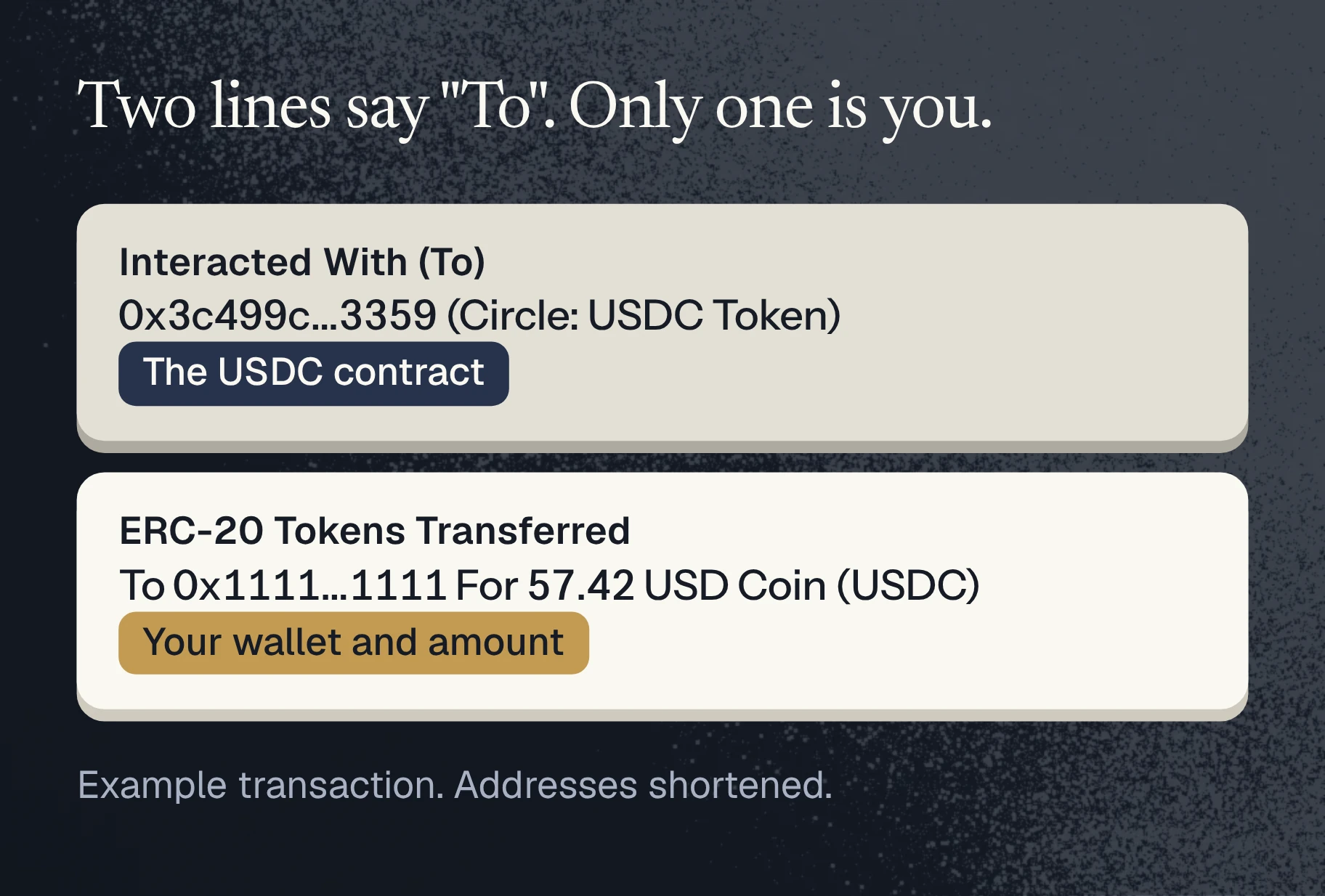
| Interacted With (To) | 0x3c499c…3359 (Circle: USDC Token) |
The USDC contract that recorded the transfer. Not the recipient |
The trap is the last row. A token transfer is an instruction sent to the token's contract, so the field labelled "To" at the top names the USDC contract itself. That label, "Circle: USDC Token", is useful in a different way: it confirms in one glance that this is native USDC and not a look-alike.
Minute 3: the token line is the payment
The "ERC-20 Tokens Transferred" line is where the money is. On the real transfer we read, it said "From" one address "To" another, then "For 100 $99.96 USD Coin (USDC)": sender, recipient, amount, dollar value at today's price and the token's name, all on one line.
In our example it reads: From 0x2222…2222 To 0x1111…1111 For 57.42 USD Coin (USDC). Three things to read off it:
- The token. Native USDC reads USD Coin (USDC) and links to contract
0x3c499c…3359, the address Circle lists for Polygon PoS. Railbed's public docs report the coin aspolygon_usdcbut name no contract address, so this line is the check that settles which token arrived. A line reading "USD Coin (PoS) (USDC.e)" is the older bridged token, which some exchanges no longer accept; our guide to USDC and USDC.e on Polygon explains the difference. - The recipient. The To address on this line should be your wallet, character for character. Check the first and last six characters at least.
- The amount. This is the USDC that arrived. The dollar figure beside it is Polygonscan's estimate at today's USDC price, which drifts a fraction of a cent from $1.00; on the page we read, 100 USDC showed as $99.96.
Some transactions move tokens more than once, and the line then has a toggle for "All Transfers" and "Net Transfers". Find the row whose To is your wallet and ignore the rest.
Two lines further down, "Value: 0 POL ($0.00)" worries people, but it is expected. It counts only POL, Polygon's own coin, sent alongside the transaction. "Transaction Fee", in POL, is what the sender paid the network; on a transfer we read in November 2026 it was about 0.02 POL, about $0.0015. The sender pays it in POL, and it is not taken from the USDC on the token line.
Minute 4: match it to the sale
A transaction matches a sale when the recipient, the amount and the time all agree with the payment record. The amount you match against is what reached you, not the price the buyer saw, because provider and network fees come out first.
| On the payment | On Polygonscan |
|---|---|
Payout wallet (payout_wallet): 0x1111…1111 |
To address on the token line |
You received (merchant_received): 57.42 |
Amount on the token line, in USDC |
Coin polygon_usdc |
Token name and contract on the token line (native USDC is 0x3c499c…3359) |
| Time the payment was paid | Timestamp, converted from UTC |
Railbed's API reference describes merchant_received as "How much was forwarded to your wallet, in the coin", which is why it, and not the order amount, should equal the token line. If you also open txid_in, you'll see a larger figure arriving at a different address: that is the payment's one-time deposit address receiving the money before fees, which the API calls value_coin.
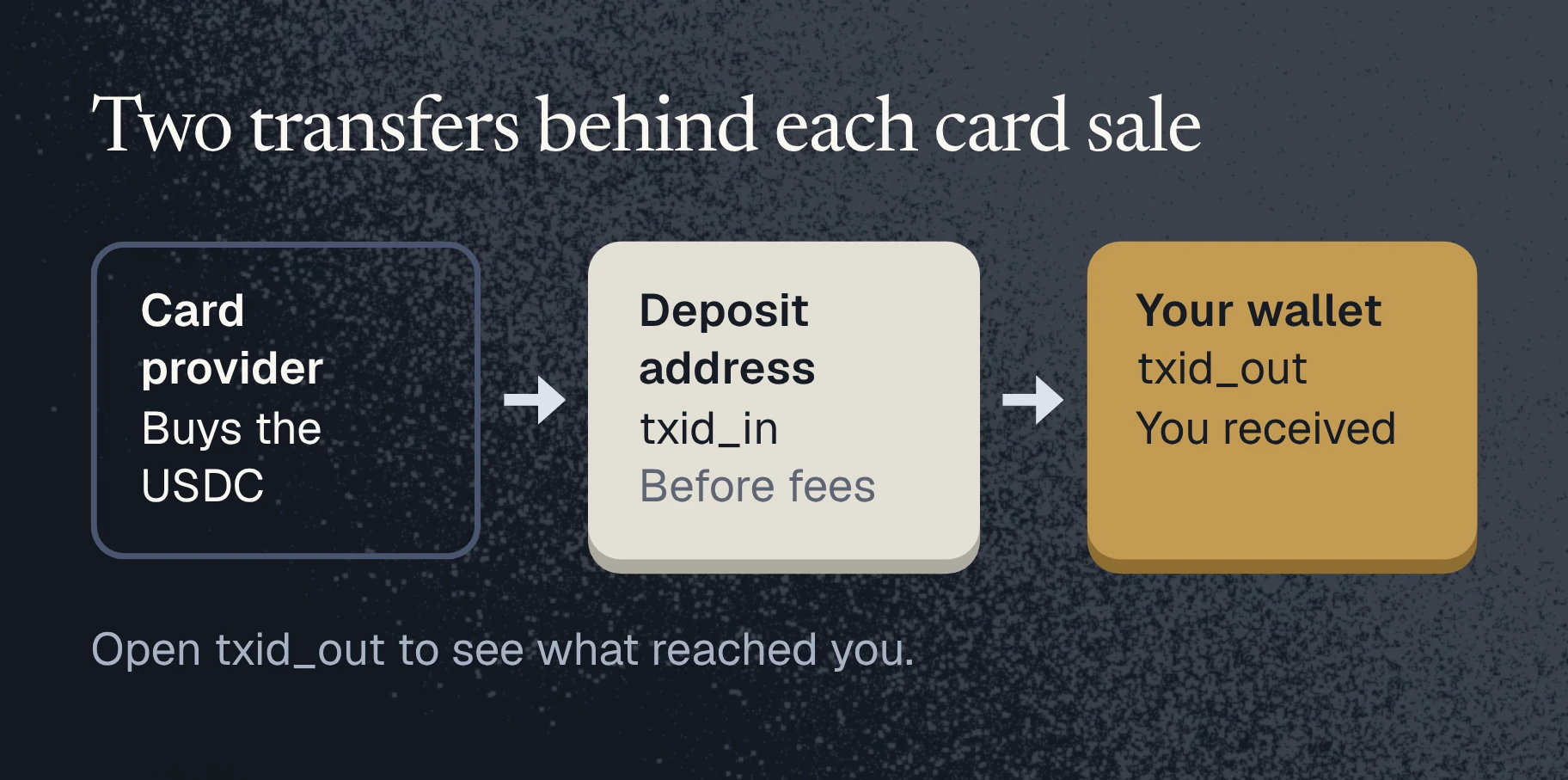
txid_out, is the one that reaches your wallet.
If the payment page says Not reported yet for what you received, the amount that reached your wallet hasn't been reported yet; Railbed's wallet and settlement guide says to open the payment later for its latest details.
Minute 5: see the balance and every transfer on your wallet's page
Your wallet's own page on Polygonscan shows what it holds and everything that moved in and out. Paste your wallet address into the search box; on Railbed's Home, Verify balance opens your wallet on the public Polygon explorer for you.
- Token Holdings in the Overview lists each token the address holds, with its amount and value. Your USDC is the line with the USDC name and contract
0x3c499c…3359. On the busy address we looked at, the list also held junk tokens named after websites, worth $0.00; anyone can send tokens to any address, so ignore anything you don't recognize. - Token Transfers (ERC-20) is the tab where incoming USDC shows up. The Transactions tab lists transactions sent from or to the address itself, and a USDC payment was sent by someone else to the USDC contract, so it usually doesn't appear there. That one detail explains most "I can't see my payment" moments.
- CSV Export, at the bottom of a tab, downloads the list for your bookkeeping.
A quicker view of one token only: click your address on the token line of any transaction. That opens the USDC token page filtered to your wallet, with your balance of that token and every transfer of it.
When Polygonscan shows the USDC but your wallet doesn't
If the explorer shows the transfer, the money is in the address; the problem is what your wallet app is displaying. These are the usual causes, with the check for each.
| What you see | Likely cause | What to check |
|---|---|---|
| Wallet shows nothing at all | It's set to another network, such as Ethereum | Switch the wallet to Polygon |
| Other tokens show, USDC doesn't | The wallet hasn't detected the token | Add USDC by its contract address |
| The wrong "USDC" shows | You hold USDC.e, or the wallet lists the other token | Compare contract addresses |
| Nothing on Polygonscan either | The payment arrived on another network | Check the payment's coin and network |
MetaMask's own help page on tokens sent to the wrong place confirms the second row: some wallets, MetaMask included, "don't always detect tokens automatically," and the recipient "may need to add the token manually."
The last row matters for card sales. A few payment methods pay on other networks: Apple Pay, as a provider of its own, pays USDC on Ethereum, Venmo pays PayPal USD on Ethereum and Cash App pays USDT on BNB Chain. The API's coin field says which, such as erc20_usdc or bep20_usdt, and those transactions open on Etherscan or BscScan, not Polygonscan. If instead the missing USDC is a transfer you sent yourself, our guide to USDC sent on the wrong network covers who can get it back.
What a transaction proves, and what it doesn't
A Polygonscan page is a public, permanent record that a set amount of a set token moved from one address to another at a set time. That makes it strong evidence that money reached your wallet, and easy to share: the link works for anyone, with no login.
It is not a receipt for a sale. Addresses carry no names, so the page can't show who the buyer was, what they bought or which order it was for. What ties a transfer to a sale is your own record: the payment's ID, order amount and customer, beside the transaction hash. Keep both together when an accountant or a bank asks where money came from; our guide to reconciling USDC settlements with your bank withdrawals shows how to lay that record out.
If you read the Logs tab or the raw number
Developers and spreadsheets sometimes see 57420000 instead of 57.42. USDC uses six decimal places, which Polygonscan states on native USDC's token page as "Token Contract (WITH 6 Decimals)", so divide the raw value by 1,000,000. On the real transfer we read, the Logs tab showed a Transfer event with "value (uint256) :100000000", which is 100 USDC.
Where Railbed fits
Railbed sends each card sale to the payout wallet you saved, as USDC on Polygon for almost every card payment, and keeps no balance of its own. That is why the explorer, not Railbed, is the final word on what's in your wallet, and why each payment gives you the transaction to check. The dashboard's figures are a record of receipts; Polygonscan shows the money itself.
What Railbed can't do is change anything you see there: it can't reverse or recover a transfer. If a payment reads Needs your decision or Not received, follow the dashboard's steps before you deliver the order.
Every sale comes with its transaction
Each Railbed payment links its transfer on the explorer, so you can confirm the money reached your own wallet before you ship.
Read the wallet and settlement guideCreate an account