Can you accept card payments online without a merchant account, a business bank account or a registered company?
Processor accounts, merchant-of-record platforms and wallet checkouts compared on what they ask for at sign-up, who they turn away, cost and payout.
Press the card to run an example sale.
Yes to two of the three. You don't need a merchant account or a registered company: payment processors and merchant-of-record platforms sign up sole proprietors under their own name. Most don't insist on a business bank account either, but each pays out to a bank account or a payout service.
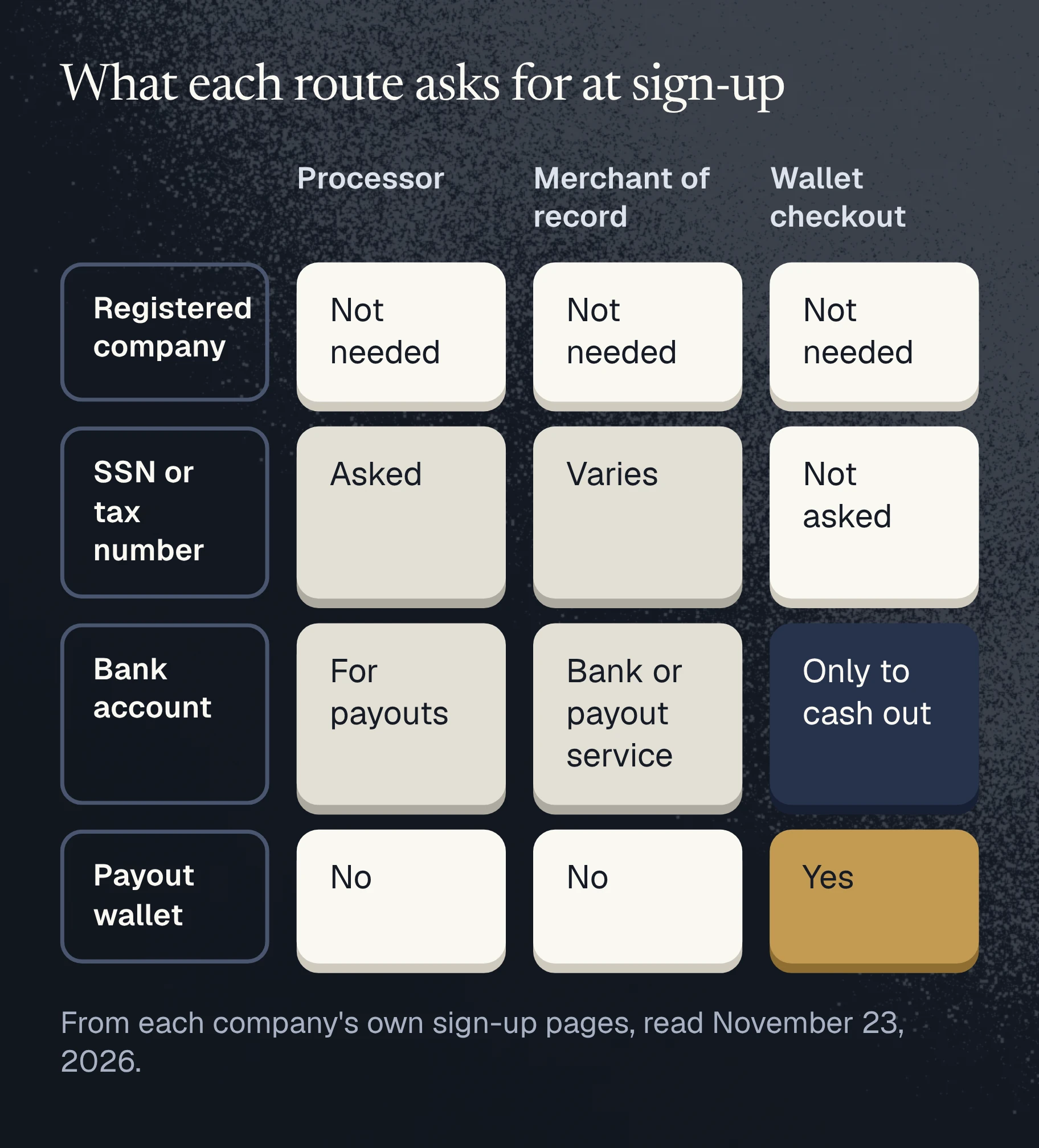
The exception is a card checkout that settles to a wallet you control, which needs no bank account to receive a sale. Below, each route is laid out with what it asks for at sign-up, who it turns away, what it costs and how it pays you, taken from each company's own pages as they read on November 23, 2026.
Four different "withouts", four different answers
"Without a merchant account" and "without a bank account" sound alike, but they hit different walls. The first is easy to get around; the last rules out the mainstream processors. The table puts the four side by side, plus the website question that catches many first-time sellers.
| What you don't have | Can you still take cards online? | What you'll be asked for instead |
|---|---|---|
| A merchant account | Yes, through a processor or a merchant of record | Your identity and tax details, and a bank account for payouts |
| A registered company | Yes, as a sole proprietor or individual | Your own legal name, home address, date of birth and tax number |
| A business bank account | Usually yes | A personal account in your name works at Stripe; PayPal's sign-up page asks for a business one |
| Any bank account | Not through a processor; through a merchant of record only by PayPal, Payoneer or a transfer service; yes through a wallet checkout | A payout wallet, then a bank account only when you turn sales into dollars |
| A website | It depends on the route | PayPal asks for one if you sell online; Paddle reviews yours; Railbed asks for one |
If the vocabulary is the blocker, our explainer on gateways, processors, merchant accounts and acquirers sorts out who does what.
Route 1: a processor account in your own name
A processor account is the usual answer for a US resident with no company: Stripe, PayPal and Square all sign up sole proprietors. Stripe says "You can use Stripe to sell a product if you have not established a separate business entity", and offers sole proprietorship as the business type. PayPal's sign-up page says "you do not need an LLC", and that a sole proprietor can "use your own name as the business name and provide your Social Security Number (SSN) instead of an Employer Identification Number (EIN)."
What each one asks for, from its own pages (US accounts):
| Stripe | PayPal | Square | |
|---|---|---|---|
| Identity and tax | Legal name, entity type, EIN or SSN (or ITIN), business address (source) | Legal name, home address (not a PO box), date of birth, SSN or ITIN (source) | Legal name, SSN or ITIN, date of birth, US home mailing address; sometimes a photo ID and a selfie (source) |
| Bank account | Under your legal business name, DBA or your own name as representative (source) | "Your business bank account details" at sign-up | A "transactional bank account"; prepaid cards and online-only accounts aren't supported (source) |
| Online card fee | 2.9% + 30¢ for domestic cards (source) | 2.99% + $0.49 for standard card payments (source) | 3.3% + 30¢ online or by invoice on the free plan; 2.9% + 30¢ on paid plans (source) |
| Payout | First payout "typically" in 7 to 14 days (source) | Standard transfer to a bank in 1 to 3 business days, no fee (source) | Standard transfer as soon as the next business day, free (source) |
Who this route turns away. Location comes first: Stripe requires that "Unregistered businesses must have a business owner or representative physically located in the US", so a seller abroad with no company can't use a US account as one. Then each processor's list of trades: Stripe's prohibited and restricted list rules out adult content, gambling and cannabis, among others; PayPal's acceptable use policy bars "certain sexually oriented materials or services" and requires pre-approval for gambling, dating, tobacco and more; Square's payment terms list 32 unsupported industries, including "adult entertainment oriented products or services" and "products containing CBD, THC, or other cannabinoids". Our trade-by-trade reading of Stripe's list goes further.
Invoices and payment links don't change any of this. An invoice from Square or a payment link from Stripe runs on the same account, with the same sign-up details and the same lists. Square's online rate (3.3% + 30¢ on its free plan) covers its invoices too.
Route 2: a merchant-of-record platform
A merchant of record sells your product to the buyer in its own name and handles the card payment and the sales tax on it, so you need no merchant account and, for an individual, no company. Paddle's verification has three phases, and business verification is "not required for individuals or sole traders". Gumroad's pricing page describes it as a merchant of record that "handles sales tax worldwide". Who answers a chargeback on these platforms is covered in merchant of record explained.
The catch is what you can sell. Paddle says it "is built to serve software companies" and lists "Physical products" and human services among its prohibited categories. Gumroad's list also names "Physical products", along with jewelry, food, NSFW content and services fulfilled outside Gumroad. A third, Lemon Squeezy, is no longer an option for new sellers: it says it "is no longer accepting new sign-ups and will shut down on March 31, 2027".
| Gumroad | Paddle | |
|---|---|---|
| Identity | For prompt payouts, a government photo ID and proof of residence in your country, or a business registered there; an SSN for US sellers (source) | You complete the identity check yourself; it may ask for a government ID, proof of address and a short video (source) |
| Website | Your sales run on Gumroad's pages | A live HTTPS site showing pricing, terms, a refund policy and a privacy policy (source) |
| Fee | 10% + $0.50 on direct sales (source) | 5% + 50¢ per checkout transaction (source) |
| Payout | $100 minimum; to a local bank account, or PayPal where bank payouts aren't offered | Monthly, sent by the 15th; $100 minimum; wire transfer or Payoneer (source) |
Gumroad also says a new account's first payouts wait for a review that "can take 1-3 weeks", and that on its weekly, monthly and quarterly schedules each sale is held at least seven days. Paddle notes that money transfer services such as TransferWise that give you bank details can receive its payouts, which matters if you have no traditional bank account.
Route 3: a card checkout that pays into your own wallet
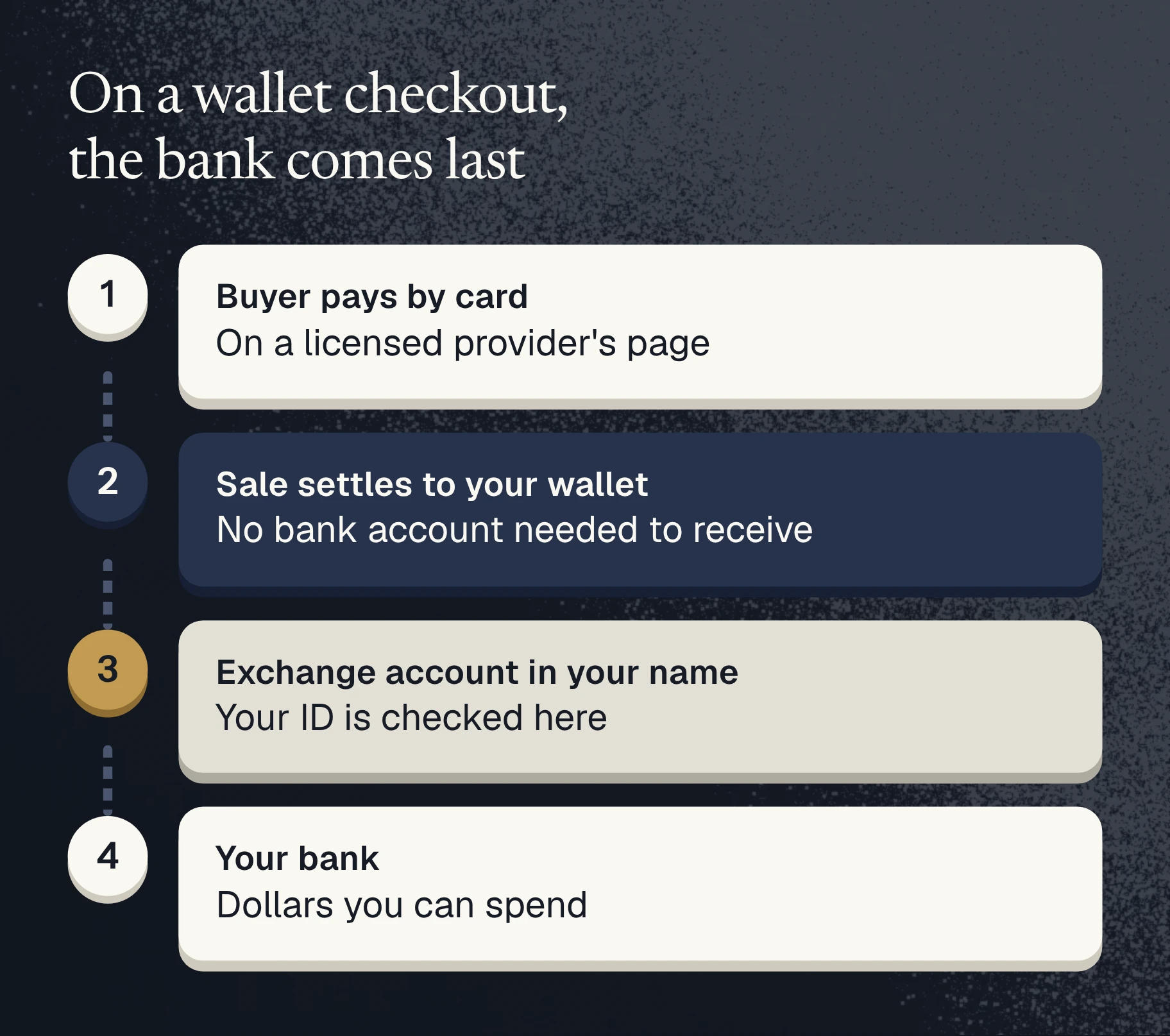
A card-to-crypto checkout takes card payments too, but pays each sale into a wallet you control instead of a bank account. The buyer pays by card on a licensed on-ramp provider's page, the provider sends USDC, and it is forwarded to your payout wallet; what a card-to-crypto payment gateway is walks through each step.
Railbed is one such checkout, and this is what it asks for:
- At sign-up: an email, your website and a payout wallet. A social or marketplace page, such as an Instagram or Etsy shop, can't stand in for a website; the setup guide says to email support if that's the only place you sell or you have no site yet.
- Who can use it: anyone 18 or older using it for a business and not barred by sanctions law. No US company, SSN or US signer is needed, there is no minimum monthly volume, and there is no underwriting and no application to pass.
- Cost: Railbed's fee from 0.9% of each sale, a 1% network fee, and the card provider's own fee and exchange rate, shown to the buyer before they pay. No setup fee, no monthly fee and no reserve.
- Payout: none to request. A sale settles to your wallet as soon as the forwarding is reported.
The limits are real. It is web checkout only, with no card reader, and the smallest card payment the providers take is about $2. Card disputes are raised with the provider that charged the card, and Railbed is not a party to them; settled sales can't be pulled back from your wallet.
Where the bank account comes back. USDC in a wallet isn't dollars in a bank. To spend it as ordinary money, you sell it through an exchange account in your name or a wallet app's Sell option, then withdraw to a bank, as our guide to moving money to your bank sets out. That exchange will want to know who you are: Coinbase, for example, "requires identity verification at account creation and periodically as required." A wallet checkout moves the bank account and the ID check to the cash-out step; it doesn't remove them. What to know once card sales settle to your wallet covers the rest.
Don't borrow someone else's account
Running your sales through a friend's or relative's processor account looks like a shortcut, but processor rules forbid it; Stripe's are explicit. Stripe's list of prohibited uses names "Use of Stripe products to facilitate transactions on behalf of another undisclosed merchant" and the use of "false, manipulated, inaccurate, or misleading information regarding your identity, business entity, the nature of the business". If the processor finds out and closes the account, it follows that both people lose something: the holder their account, and the seller the only way they had to take payments. Each route above lets you sign up in your own name instead.
What no route changes
Taking card payments without a company doesn't change whether you need one. Whether to register a business, which licenses your trade needs and what tax you owe depend on where you live and what you sell, and none of the companies above decides that for you. A merchant of record collects sales tax or VAT on the sales it makes (Paddle's pricing page says it submits the returns), and what you owe on your own earnings is still a question for where you live. Railbed doesn't check licenses, age rules or tax for its merchants.
Sales that arrive as USDC need records like any other income. The IRS says digital assets are property, not currency, and lists stablecoins among them. Keep each sale's record, and each exchange sale and bank withdrawal; reconciling USDC settlements with bank withdrawals shows one way. An accountant where you live is the right person to say what applies to you.
Which route fits which seller
The right route follows from what you have and what you sell. Read down the list and stop at the first line that describes you.
- You live in the US, sell an ordinary product and have a bank account in your name: a processor account as a sole proprietor is the cheapest and quickest start, and invoices from the same account cover one-off sales.
- You sell software, or digital products that a platform can deliver, and want sales tax handled: a merchant-of-record platform, accepting a higher fee and a slower payout.
- You sell physical goods and have no company: the processor route, since both merchant-of-record platforms above exclude physical products.
- You live where the processors won't onboard an unregistered seller, your trade is on their lists, or you have no bank account: a wallet checkout, with an exchange account in your name for the day you need dollars.
FAQ
Can I use Stripe with my personal bank account? For a sole proprietor, yes. Stripe's bank ownership rules say the account must be registered under the "Legal business name, DBA name, or representative name" on your Stripe account, so an account in your own name qualifies when you are the representative.
Do I need an LLC to accept card payments through PayPal? No. PayPal's sign-up page says "you do not need an LLC or other formal business entity to open a PayPal Business account", and a sole proprietor can give an SSN instead of an EIN. The same page asks for business bank account details when you open the account.
Take cards with an email, a website and a wallet
Sign up in your own name, try a payment in Test mode, then share a Live checkout. Sales settle to the wallet you control.
Create your accountRead the setup guide